1. Binding Variable Parameter Description
The following instructions add binding variables to the position variable types:
P $ INT: When a local integer variable (INT) is assigned a value, the local position P represents the position indicated by that value.
Usage Example:I001 = 2 P$I001is equivalent toP0002。P $ GINT: When a global integer variable (GINT) is assigned a value, the local position P represents the position indicated by that value.
Usage Example:GI001 =3 P$GI001is equivalent toP0003。GP $ INT: When a local integer variable (INT) is assigned a value, the global position GP represents the position indicated by that value.
Usage Example:I001 = 4 GP$I001is equivalent toGP004。GP $ GINT: When a global integer variable (GINT) is assigned a value, the global position GP represents the position indicated by that value.
Usage Example:GI001 = 5 GP$GI001is equivalent toGP0005。E $ INT: When a local integer variable (INT) is assigned a value, the local position E represents the position indicated by that value.
Usage Example:I001 = 6 E$I001is equivalent toE0006。E $ GINT: When a global integer variable (GINT) is assigned a value, the local position E represents the position indicated by that value.
Usage Example:I001 = 7 E$GI001is equivalent toE0007。GE $ INT: When a local integer variable (INT) is assigned a value, the global position GE represents the position indicated by that value.
Usage Example:I001 = 8 GE$I001is equivalent toGE0008。GE $ GINT: When a global integer variable (GINT) is assigned a value, the global position GE represents the position indicated by that value.
Usage Example:GI001 = 9 GE$GI001is equivalent toGE0009。
2. Motion Control Instructions
> 2.1 MOVJ - Point to Point
Function: Moves to the target point using joint interpolation. Used in sections where trajectory constraints do not apply when the robot moves to the target point. The robot operates at maximum speed in space.
Parameter Description:
| Parameter | Description |
|---|---|
| P/GP | Use local position variable (P) or global position variable (GP). When the value is "New", inserting this instruction creates a new P variable and records the robot's current position to that P variable. |
| VJ | Joint interpolation speed, range 1-100, unit is percentage. Actual motion speed is the maximum axis speed in robot joint parameters multiplied by this percentage. |
| PL | Smooth transition level, range 0-5. |
| ACC | Acceleration ratio, range 1-100, unit is percentage. Recommended to set equal to VJ value. |
| DEC | Deceleration ratio, range 1-100, unit is percentage. Recommended to set equal to VJ value. |
| TIME | Time, range is non-negative integer, unit is ms. Executes the next instruction ahead of time. |
Note: When modifying the speed of a point-to-point instruction, acceleration and deceleration will automatically display at a 1:1 ratio with the speed. To modify acceleration or deceleration, do so manually.
Usage Examples:
MOVJ P0001 VJ = 10 % PL = 1 ACC = 10 DEC = 10 0
MOVJ GP0002 VJ = 10 % PL = 0 ACC = 7 DEC = 11 0
> 2.2 MOVL - Linear
Function: Moves to the target point using linear interpolation. During the robot's movement to the target point, the trajectory of the robot end-effector is a straight line.
Parameter Description:
| Parameter | Description |
|---|---|
| P/GP | Use local position variable (P) or global position variable (GP). When the value is "New", inserting this instruction creates a new P variable and records the robot's current position to that P variable. |
| V | Motion speed, range 1-1000 (default Cartesian parameter maximum speed is 1000, range varies based on actual Cartesian parameters), unit is mm/s. |
| PL | Smooth transition level, range 0-5. |
| ACC | Acceleration ratio, range 1-100, unit is percentage. Recommended to set to V*10%. |
| DEC | Deceleration ratio, range 1-100, unit is percentage. Recommended to set to V*10%. |
| TIME | Time, range is non-negative integer, unit is ms. Executes the next instruction ahead of time. |
Note: When modifying the speed of a linear instruction, acceleration and deceleration will automatically display at a 1:10 ratio with the speed. To modify acceleration or deceleration, do so manually.
Usage Examples:
MOVL P0003 V = 200 mm/s PL = 2 ACC = 20 DEC = 20 0
> 2.3 MOVC - Arc
Note: Motion instructions containing arcs and full circles cannot be used independently. Their speed, PL, and other parameters are all affected by the first arc/full circle instruction.
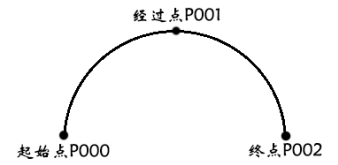
Function: The robot draws a circle by moving through 3 taught points using arc interpolation. If robot axes are taught with arc interpolation, the motion command is MOVC(Note: a complete arc curve requires one MOVJ or MOVL instruction plus two MOVC instructions). The starting point of a single arc and the first arc of a continuous arc can only be MOVJ or MOVL.
Single Arc When there is only one arc, teach 3 points P0001-P0003 using arc interpolation. If P0001 before the arc is taught using joint or linear interpolation, the trajectory from P0001 to P0002 automatically becomes a straight line.
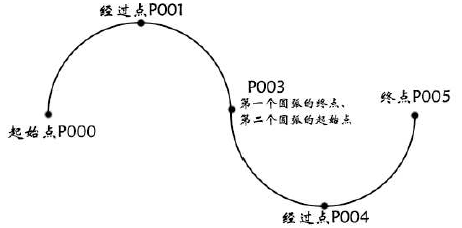
Continuous Arc When there are 2 or more consecutive arcs with changing curvature, the arcs will ultimately separate. Therefore, insert a joint or linear interpolation point at the connection point between arcs.
Parameter Description:
| Parameter | Description |
|---|---|
| P/GP | Use local position variable (P) or global position variable (GP). When the value is "New", inserting this instruction creates a new P variable and records the robot's current position to that P variable. |
| V | Motion speed, range 1-1000 (default Cartesian parameter maximum speed is 1000, range varies based on actual Cartesian parameters), unit is mm/s. |
| PL | Smooth transition level, range 0-5. |
| ACC | Acceleration ratio, range 1-100, unit is percentage. Recommended to set to V*10%. |
| DEC | Deceleration ratio, range 1-100, unit is percentage. Recommended to set to V*10%. |
| TIME | Time, range is non-negative integer, unit is ms. Executes the next instruction ahead of time. |
Note: When modifying the speed of an arc instruction, acceleration and deceleration will automatically display at a 1:10 ratio with the speed. To modify acceleration or deceleration, do so manually.
Usage Examples:
MOVJ P0001 VJ = 10 % PL = 0 ACC = 1 DEC = 1 0
MOVC P0002 V = 100 mm/s PL = 0 ACC = 10 DEC = 10 0
MOVC P0003 V = 100mm/s PL = 0 ACC = 5 DEC = 8 0
> 2.4 MOVCA - Full Circle
Function: By teaching the starting point of the circle (MOVJ or MOVL) and two passing points (MOVCA), the robot draws a complete circle.
Instruction insertion prerequisite: Click the "Tool" button in the upper status bar and select the previously calibrated tool hand.
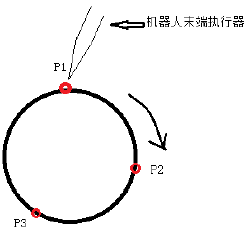
Insertion Steps - Four Instructions Total:
- Click Insert, click Coordinate Switch category, select SWITCHTOOL instruction, select the previously calibrated tool hand number.
- Move to any point on the desired circle as shown P1, click Insert, click Motion Control category, select MOVJ or MOVL.
- Move to another point on the desired circle as shown P2 (different from step 2), click "Coordinate System" button in upper status bar, select "Tool" coordinate system, click Insert, click Motion Control category, select MOVCA.
- Move to another point on the desired circle as shown P3 (different from steps 2 and 3), click "Coordinate System" button in upper status bar, select "Tool" coordinate system, click Insert, click Motion Control category, select MOVCA.
Parameter Description:
| Parameter | Description |
|---|---|
| P/GP | Use local position variable (P) or global position variable (G). When the value is "New", inserting this instruction creates a new P variable and records the robot's current position to that P variable. |
| V | Motion speed, range 1-1000 (default Cartesian parameter maximum speed is 1000, range varies based on actual Cartesian parameters), unit is mm/s. |
| PL | Smooth transition level, range 0-5. |
| ACC | Acceleration ratio, range 1-100, unit is percentage. Recommended to set to V*10%. |
| DEC | Deceleration ratio, range 1-100, unit is percentage. Recommended to set to V*10%. |
| TIME | Time, range is non-negative integer, unit is ms. Executes the next instruction ahead of time. |
| SPIN | Orientation unchanged: full circle runs with the same orientation as calibrated P001, completing the circle trajectory with this orientation. Six-axis fixed: full circle runs according to calibrated orientation, while six-axis remains stationary. Six-axis rotating: full circle runs according to calibrated state, while six-axis rotates 360 degrees during operation. |
Note: When modifying the speed of an arc instruction, acceleration and deceleration will automatically display at a 1:10 ratio with the speed. To modify acceleration or deceleration, do so manually.
Usage Examples:
MOVJ P0001 VJ = 10 % PL = 0 ACC = 10 DEC = 10 SPIN=1 0
MOVCA P0002 V = 100 mm/s PL = 0 ACC = 10 DEC = 10 SPIN=1 0
MOVCA P0003 V = 100mm/s PL = 0 ACC = 10 DEC = 10 SPIN=1 0
> 2.5 MOVS - Curve Interpolation
Function: In operations such as welding, cutting, fusion, and priming, using free curve interpolation makes it easier to teach irregular curve workpieces. The trajectory is a spline curve passing through 4 points. If robot axes are taught with free curve interpolation, the motion command is MOVS.
Single MOVS Teach 4 points P1-P4 to form a spline curve. P0 - Joint/Linear (first motion instruction in program cannot be MOVS). P1-P4 - Curve interpolation. P5 - Joint/Linear.
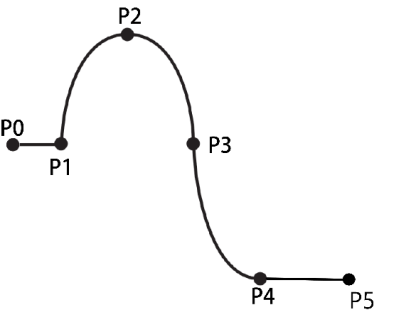
Continuous MOVS A spline curve composed of more than 4 points. P1-P5 form one spline curve. P0 - Joint/Linear. P1-P5 - Curve interpolation. P6 - Joint/Linear.
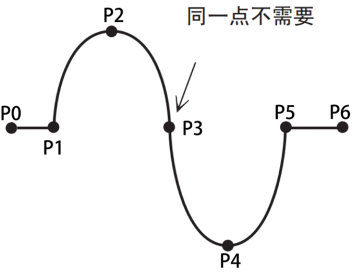
Note: A curve requires a minimum of four curve points.
Parameter Description:
| Parameter | Description |
|---|---|
| P/G | Use local position variable (P) or global position variable (G). When the value is "New", inserting this instruction creates a new P variable and records the robot's current position to that P variable. |
| V | Motion speed, range 1-1000 (default Cartesian parameter maximum speed is 1000, range varies based on actual Cartesian parameters), unit is mm/s. |
| PL | Smooth transition level, range 0-5. |
| ACC | Acceleration ratio, range 1-100, unit is percentage. Recommended to set to V*10%. |
| DEC | Deceleration ratio, range 1-100, unit is percentage. Recommended to set to V*10%. |
| TIME | Time, range is non-negative integer, unit is ms. Executes the next instruction ahead of time. |
Note: When modifying the speed of an arc instruction, acceleration and deceleration will automatically display at a 1:10 ratio with the speed. To modify acceleration or deceleration, do so manually.
Usage Examples:
MOVJ P0001 VJ = 10 % PL = 0 ACC = 10 DEC = 10 0
MOVS P0002 V = 100 mm/s PL = 0 ACC = 10 DEC = 10 0
MOVS P0003 V = 100mm/s PL = 0 ACC = 10 DEC = 10 0
MOVS P0004 V = 100 mm/s PL = 0 ACC = 10 DEC = 10 0
MOVS P0005 V = 100mm/s PL = 0 ACC = 10 DEC = 10 0
> 2.6 IMOV - Incremental
Function: Moves from the current position by the set incremental distance using joint or linear interpolation.
Parameter Description:
| Parameter | Description |
|---|---|
| RP | Incremental variable, can select from joint, Cartesian, tool, or user coordinate systems. Positive values for forward direction, negative for reverse. Fill 0 if no movement. |
| V/VJ | When RP is in joint coordinate system, this is VJ, Joint interpolation speed, range 1-100, unit is percentage. Actual motion speed is the maximum axis speed in robot joint parameters multiplied by this percentage.当RP为直角、工具、用户Coordinate system下的值when,该处为V,Motion speed, range 1-1000 (default Cartesian parameter maximum speed is 1000, range varies based on actual Cartesian parameters), unit is mm/s. |
| PL | Smooth transition level, range 0-5. |
| ACC | Acceleration ratio, range 1-100, unit is percentage. Recommended to set to V*10% or VJ. |
| DEC | Deceleration ratio, range 1-100, unit is percentage. Recommended to set to V*10% or VJ. |
| TIME | Time, range is non-negative integer, unit is ms. Executes the next instruction ahead of time. |
Note: When modifying the speed of an arc instruction, acceleration and deceleration will automatically display at a 1:10 ratio with the speed. To modify acceleration or deceleration, do so manually.
Usage Examples:
IMOV RP0001 V=10mm/s BF PL=0 ACC=0 DEC=0
> 2.7 MOVJEXT - External Axis Point to Point
Function: The robot moves to the taught position using joint interpolation, while the external axis moves using joint interpolation.
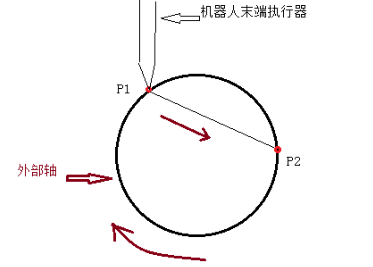
Parameter Description:
| Parameter | Description |
|---|---|
| E | Variable that simultaneously records robot and external axis position data. When the value is "New", inserting this instruction creates a new E variable and records the current positions of the robot and external axis to that E variable. |
| VJ | Joint interpolation speed, range 1-100, unit is percentage. Actual motion speed is the maximum axis speed in robot joint parameters multiplied by this percentage.External Axisspeed changes with robot speed。 |
| PL | Smooth transition level, range 0-5. |
| ACC | Acceleration ratio, range 1-100, unit is percentage. Recommended to set equal to VJ value. |
| DEC | Deceleration ratio, range 1-100, unit is percentage. Recommended to set equal to VJ value. |
| TIME | Time, range is non-negative integer, unit is ms. Executes the next instruction ahead of time. |
Note: When modifying the speed of an external axis point-to-point instruction, acceleration and deceleration will automatically display at a 1:1 ratio with the speed. To modify acceleration or deceleration, do so manually.
Usage Examples:
MOVJEXT E0001 VJ = 10 % PL = 0 ACC= 10 DEC = 10 0
> 2.8 MOVLEXT - External Axis Linear
Function: The robot moves to the taught position using linear interpolation, while the external axis moves using joint interpolation.
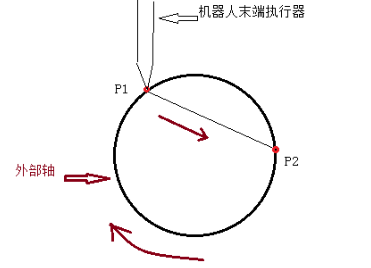
Parameter Description:
| Parameter | Description |
|---|---|
| E | Variable that simultaneously records robot and external axis position data. When the value is "New", inserting this instruction creates a new E variable and records the current positions of the robot and external axis to that E variable. |
| V | Robot motion speed, range 1-1000 (default Cartesian parameter maximum speed is 1000, range varies based on actual Cartesian parameters), unit is mm/s.External Axisspeed changes with robot speed。 |
| PL | Smooth transition level, range 0-5. |
| SYNC | Whether robot and external axis move synchronously. When Yes, robot and external axis cooperate for linear motion. When No, robot moves linearly in space while external axis moves independently. |
| ACC | Acceleration ratio, range 1-100, unit is percentage. Recommended to set to V*10%. |
| DEC | Deceleration ratio, range 1-100, unit is percentage. Recommended to set to V*10%. |
Note: When modifying the speed of an external axis linear instruction, acceleration and deceleration will automatically display at a 1:10 ratio with the speed. To modify acceleration or deceleration, do so manually.
Usage Examples:
MOVLEXT E0002 V = 10 mm/s PL = 0 ACC = 1 DEC = 1 SYNC = 0 0
> 2.9 MOVCEXT - External Axis Arc
Function: The robot moves to the taught position using arc interpolation, while the external axis moves using joint interpolation.
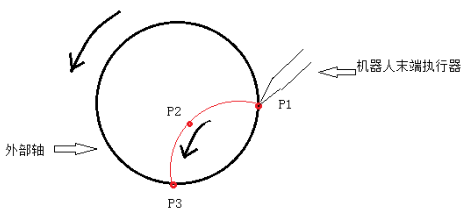
Parameter Description:
| Parameter | Description |
|---|---|
| E | Variable that simultaneously records robot and external axis position data. When the value is "New", inserting this instruction creates a new E variable and records the current positions of the robot and external axis to that E variable. |
| V | Robot motion speed, range 2-2000, unit is mm/s. External axis speed changes with robot speed. |
| PL | Smooth transition level, range 0-5. |
| SYNC | Whether robot and external axis move synchronously. When Yes, robot and external axis cooperate for arc motion. When No, robot moves in arc in space while external axis moves independently. |
| ACC | Acceleration ratio, range 1-100, unit is percentage. Recommended to set to V*10%. |
| DEC | Deceleration ratio, range 1-100, unit is percentage. Recommended to set to V*10%. |
| TIME | Time, range is non-negative integer, unit is ms. Executes the next instruction ahead of time. |
Note: When modifying the speed of an external axis arc instruction, acceleration and deceleration will automatically display at a 1:10 ratio with the speed. To modify acceleration or deceleration, do so manually.
Usage Examples:
MOVLEXT E0002 V = 10 mm/s PL = 0 ACC = 1 DEC = 1 SYNC = 1 0
MOVCEXT E0003 V = 10 mm/s PL = 0 ACC = 1 DEC = 1 SYNC = 1 0
MOVCEXT E0004 V = 10 mm/s PL = 0 ACC = 1 DEC = 1 SYNC = 1 0
> 2.10 SPEED - Global Speed
Function: The motion speed of all motion instructions below SPEED is: instruction speed * status bar speed * SPEED percentage.
Parameter Description: Global speed (%): speed percentage: 1-200.
Usage Examples:
SPEED = 9 %
> 2.11 SAMOV - Absolute Position Move
Function: The robot moves to a set absolute position using joint interpolation. If you do not want to move a certain axis, leave the coordinate blank (do not fill 0!).
Parameter Description:
| Parameter | Description |
|---|---|
| AP | Absolute position, can select from joint, Cartesian, tool, or user coordinate systems. If corresponding axis is not filled, that axis will not move. |
| V/VJ | When AP is in joint coordinate system, this is VJ, Joint interpolation speed, range 1-100, unit is percentage. Actual motion speed is the maximum axis speed in robot joint parameters multiplied by this percentage.当AP为直角、工具、用户Coordinate system下的值when,该处为V,Motion speed, range 1-1000 (default Cartesian parameter maximum speed is 1000, range varies based on actual Cartesian parameters), unit is mm/s. |
| PL | Smooth transition level, range 0-5. |
| ACC | Acceleration ratio, range 1-100, unit is percentage. Recommended to set to V*10% or equal to VJ. |
| DEC | Deceleration ratio, range 1-100, unit is percentage. Recommended to set to V*10% or equal to VJ. |
| TIME | Time, range is non-negative integer, unit is ms. Executes the next instruction ahead of time. |
Note: When modifying the speed of an absolute position move instruction, acceleration and deceleration will automatically display at a 1:10 ratio with the speed. To modify acceleration or deceleration, do so manually.
Usage Examples:
SAMOV AP0001 VJ= 10 % PL= 2 ACC= 10 DEC= 10
> 2.12 MOVJDOUBLE - Dual Robot Point to Point
Function: When configured for two robots, both robots simultaneously move to the target position using joint interpolation, starting and stopping together.
Parameter Description:
| Parameter | Description |
|---|---|
| E | Variable that simultaneously records position data of both robots. When the value is "New", inserting this instruction creates a new E variable and records the current positions of both robots to that E variable. |
| VJ | Joint interpolation speed, range 1-100, unit is percentage. Actual motion speed is the maximum axis speed in robot joint parameters multiplied by this percentage.Speed is synchronized between both robots |
| ACC | Acceleration ratio, range 1-100, unit is percentage. Recommended to set equal to VJ value. |
| DEC | Deceleration ratio, range 1-100, unit is percentage. Recommended to set equal to VJ value. |
| TIME | Time, range is non-negative integer, unit is ms. Executes the next instruction ahead of time. |
Note: When modifying the speed of a dual robot point-to-point instruction, acceleration and deceleration will automatically display at a 1:1 ratio with the speed. To modify acceleration or deceleration, do so manually.
Usage Examples:
MOVJDOUBLE E0001 VJ = 10 % PL = 0 ACC= 10 DEC = 10 0
> 2.13 MOVLDOUBLE - Dual Robot Linear
Function: When configured for two robots, both robots simultaneously move to the target position using linear interpolation. Starting and stopping together.
Parameter Description:
| Parameter | Description |
|---|---|
| E | Variable that simultaneously records position data of both robots. When the value is "New", inserting this instruction creates a new E variable and records the current positions of both robots to that E variable. |
| V | Robot motion speed, range 1-1000 (default Cartesian parameter maximum speed is 1000, range varies based on actual Cartesian parameters), unit is mm/s.Speed is synchronized between both robots。 |
| ACC | Acceleration ratio, range 1-100, unit is percentage. Recommended to set to V*10%. |
| DEC | Deceleration ratio, range 1-100, unit is percentage. Recommended to set to V*10%. |
| TIME | Time, range is non-negative integer, unit is ms. Executes the next instruction ahead of time. |
Note: When modifying the speed of a dual robot linear instruction, acceleration and deceleration will automatically display at a 1:10 ratio with the speed. To modify acceleration or deceleration, do so manually.
Usage Examples:
MOVLDOUBLE E0001 V = 100 mm/s PL = 0 ACC= 10 DEC = 10 0
> 2.14 MOVCDOUBLE - Dual Robot Arc
Function: When configured for two robots, both robots simultaneously move to the target position using arc interpolation. Starting and stopping together.
Parameter Description:
| Parameter | Description |
|---|---|
| E | Variable that simultaneously records position data of both robots. When the value is "New", inserting this instruction creates a new E variable and records the current positions of both robots to that E variable. |
| V | Robot motion speed, range 1-1000 (default Cartesian parameter maximum speed is 1000, range varies based on actual Cartesian parameters), unit is mm/s.Speed is synchronized between both robots。 |
| PL | Smooth transition level, range 0-5. |
| ACC | Acceleration ratio, range 1-100, unit is percentage. Recommended to set to V*10%. |
| DEC | Deceleration ratio, range 1-100, unit is percentage. Recommended to set to V*10%. |
| TIME | Time, range is non-negative integer, unit is ms. Executes the next instruction ahead of time. |
Note: When modifying the speed of a dual robot arc instruction, acceleration and deceleration will automatically display at a 1:10 ratio with the speed. To modify acceleration or deceleration, do so manually.
Usage Examples:
MOVLDOUBLE E0001 VJ = 10 % PL = 0 ACC= 10 DEC = 10 0
MOVCDOUBLE E0002 V = 100 mm/s PL = 0 ACC= 10 DEC = 10 0
MOVCDOUBLE E0003 V = 100mm/s PL = 0 ACC= 10 DEC = 10 0
> 2.15 MOVCADOUBLE - Dual Robot Full Circle
Function: When configured for two robots, both robots simultaneously move to the target position using full circle interpolation. Starting and stopping together.
Parameter Description:
| Parameter | Description |
|---|---|
| E | Variable that simultaneously records position data of both robots. When the value is "New", inserting this instruction creates a new E variable and records the current positions of both robots to that E variable. |
| V | Robot motion speed, range 1-1000 (default Cartesian parameter maximum speed is 1000, range varies based on actual Cartesian parameters), unit is mm/s.Speed is synchronized between both robots。 |
| PL | Smooth transition level, range 0-5. |
| ACC | Acceleration ratio, range 1-100, unit is percentage. Recommended to set to V*10%. |
| DEC | Deceleration ratio, range 1-100, unit is percentage. Recommended to set to V*10%. |
| TIME | Time, range is non-negative integer, unit is ms. Executes the next instruction ahead of time. |
Note: When modifying the speed of a dual robot full circle instruction, acceleration and deceleration will automatically display at a 1:10 ratio with the speed. To modify acceleration or deceleration, do so manually.
Usage Examples:
MOVLDOUBLE E0001 VJ = 10 % PL = 0 ACC= 10 DEC = 10 0
MOVCADOUBLE E0002 V = 100 mm/s PL = 0 ACC= 10 DEC = 10 0
MOVCADOUBLE E0003 V = 100 mm/s PL = 0 ACC= 10 DEC = 10 0
> 2.16 MOVCOMM - External Point
Function: Moves to the point sent by external devices via Modbus or TCP to the controller using the specified interpolation method.
Parameter Description:
| Parameter | Description |
|---|---|
| Interpolation method | Interpolation method used to move to the target point, including joint, linear, and curve. |
| V/VJ | When B is in joint coordinate system, this is VJ, Joint interpolation speed, range 1-100, unit is percentage. Actual motion speed is the maximum axis speed in robot joint parameters multiplied by this percentage.当B为直角、工具、用户Coordinate system下的值when,该处为V,Motion speed, range 1-1000 (default Cartesian parameter maximum speed is 1000, range varies based on actual Cartesian parameters), unit is mm/s. |
| PL | Smooth transition level, range 0-5. |
| ACC | Acceleration ratio, range 1-100, unit is percentage. Recommended to set to V*10% or equal to VJ. |
| DEC | Deceleration ratio, range 1-100, unit is percentage. Recommended to set to V*10% or equal to VJ. |
| TIME | Time, range is non-negative integer, unit is ms. Executes the next instruction ahead of time. |
Usage Examples:
MOVCOMM MOVL VJ= 10 mm/s PL = 0 ACC = 1 DEC = 1 0
> 2.17 EXTMOV - External Axis Following
Function: Instruction for the external axis to follow the robot at a speed that is a multiple of the robot's linear speed or at a constant speed.
Parameter Description:
| Parameter | Description |
|---|---|
| External Axis | Select an axis from O1-O5 for following. |
| Type | Following type: speed changes with robot's real-time linear speed. • K:External Axis速度(°/s)=K*线速度(mm/s)。 Constant speed type: runs at a constant speed. • Speed value source: can select INT/DOUBLE/GINT/GDOUBLE/manual input. • Variable name:速度值来源为INT/DOUBLE/GINT/GDOUBLEwhen,用于选择哪个变量。 • Manual value:速度值来源为手填when,用于输入恒定运行的速度值。 |
Usage Examples:
EXTMOV O1 FOLLOW 22.22
> 2.18 GEARIN - Electronic Gear
Function: Instruction to make an external axis move together with a robot axis.
Parameter Description:
| Parameter | Description |
|---|---|
| Main axis | Select from robot axes J1~J6 |
| External Axis | Select an axis from O1-O5 for following |
| Ratio K | Following axis speed (°/s) = K * main axis speed (°/s) |
Usage Examples:
GEARIN J1 O1 22.22
> 2.19 MRESET - Reset External Axis Multi-turn Rotation
Function: Based on the max/min limits set for external axis rotation, when rotation exceeds limits, this instruction resets the external axis coordinate to allow continued rotation, preventing limit exceeded errors.
Parameter Description: MRESET: can select all axes or a single axis
Usage Examples:
MRESET 0
> 2.20 DRAG_TRAJECTORY - Drag Teaching
Function: The robot runs according to a previously recorded trajectory.
Parameter Description:
| Parameter | Description |
|---|---|
| Trajectory name | Name of the robot trajectory |
| Playback rate | Motion speed (0~500%) |
Usage Examples:
DRAG_TRAJECTORY Track1 20%
> 2.21 SWITHCPAYLOAD - Switch Payload Parameters
Function: During actual operation, actual payload matches payload parameters. Switch payload number instruction switches payload parameters. Affects collision detection and torque feedforward.
Parameter Description: Payload number: can fill tool number or use binding variable function.
Usage Examples:
SWITHCPAYLOAD 1
> 2.22 MOVARCH - Arch Motion
Function: Allows the robot to move in an arch trajectory.
Parameter Description:
| Parameter | Description |
|---|---|
| P/G | Use local position variable (P) or global position variable (G). When the value is "New", inserting this instruction creates a new P variable and records the robot's current position to that P variable. |
| V | Motion speed, range 1-1000 (default Cartesian parameter maximum speed is 1000, range varies based on actual Cartesian parameters), unit is mm/s. |
| PL | Smooth transition level, range 0-5. |
| ACC | Acceleration ratio, range 1-100, unit is percentage. |
| DEC | Deceleration ratio, range 1-100, unit is percentage. |
| Displacement axis | (X,Y,Z) Axis for displacement during arch motion. Standard arch motion displaces in Z-axis direction. |
| Displacement distance | Distance to displace on the displacement axis. Standard arch motion displaces 25mm on Z-axis. |
| Linear distance | Distance to maintain vertical motion at rising and falling ends of the arch. |
| TIME | Time, range is non-negative integer, unit is ms. Executes the next instruction ahead of time. |
| View trajectory diagram | Can view the arch motion trajectory diagram. |
Note: When modifying the speed of a point-to-point instruction, acceleration and deceleration will automatically display at a 1:10 ratio with the speed. To modify acceleration and deceleration, do so manually.
Usage Examples:
MOVARCH P001 V=10 PL=0 ACC=10 DEC=10 X 10 0
MOVARCH GP001 V=10 PL=0 ACC=10 DEC=10 X 10 0
3. Input/Output Instructions
> 3.1 DIN - IO Input
Function: Reads digital input values from the IO board and stores them in an integer or boolean variable.
Parameter Description:
| Parameter | Description |
|---|---|
| Port value stored in | Stores input value in the target variable's name and type. |
| Input IO board | If there are multiple EtherCAT IO boards, can select which one. |
| Input group number (input channels) | Input is read by groups: 1 channel, 4 channels, or 8 channels per group.For 1 channel per group, 16 DIN ports form 16 groups; for 4 channels per group, 1-4, 5-8, 9-12, 13-16 each form a group; for 8 channels per group, 1-8, 9-16 each form a group. Group number can be selected using binding variable function. Data is converted from binary to decimal. Example: For 8 channels per group, if ports 1-8 have values 10110101, starting from port 8 it becomes 10101101. Converting to decimal gives 173, stored in variable as 173. |
Usage Examples:
DIN I001 IN#(5)
> 3.2 DOUT - IO Output
Function: Sets the corresponding IO port on the IO board high or low.
Parameter Description:
| Parameter | Description |
|---|---|
| Output IO board | If there are multiple EtherCAT IO boards, can select which one. |
| Output group number (output channels) | Output is by groups: 1 channel, 4 channels, or 8 channels per group.For 1 channel per group, 16 DOUT ports form 16 groups; for 4 channels per group, 1-4, 5-8, 9-12, 13-16 each form a group; for 8 channels per group, 1-8, 9-16 each form a group. |
| Output value (variable source) | Divided into manual selection and variable type. Manual selection means checking boxes below, selected outputs 1, unselected outputs 0.例:当输出组号为4路输出,第2组when,下面的选择框中端口1、端口3选中,其它两个留空,那么运行该指令when,IO板的输出端口中5-8号端口的输出值为1010。当变量来源选择INT、GINT、BOOL、GBOOLwhen,会将correspondingVariable value转换为2进制,输出到IO板上。 例:若Variable value为173,则其转换为二进制则为10101101。若8路一组,将二进制值从8号端口开始输出,那么8-1号端口值为10101101,1-8号端口的值为10110101。 |
| Variable name | When variable source selects INT, GINT, BOOL, GBOOL, select the variable name to output here. |
| when间 | Invert output time, output inverts after specified time. For example, if DOUT1=1 and time is 2, DOUT1 outputs high for 2 seconds then inverts to low; if time is 0, continuously outputs high. |
| Error stop handling | Keep output: IO continues outputting according to instruction parameters when error occurs. Timer end stop: stops when timer ends |
Usage Examples:
DOUT OT#(1) I001 0
> 3.3 AIN - Analog Input
Function: Reads the input value of the corresponding analog input port into the target variable.
Parameter Description:
| Parameter | Description |
|---|---|
| Analog input port | The analog input port to read. |
| Variable value source | The variable type of the target variable. |
| Variable name | Variable name of the target variable. |
Usage Examples:
AIN D001 B001
> 3.4 AOUT - Analog Output
Function: Sets the output value of the corresponding analog output port to the defined value.
Parameter Description:
| Parameter | Description |
|---|---|
| Analog output port | The port to output. |
| Variable value source | The variable type of the value to output. |
| New parameter | When variable value selects custom, enter manual data here, range 0-10V, the corresponding port will output this value. |
| Variable name | Variable name of the variable to output. |
Usage Examples:
AOUT AOUT1 1.1
> 3.5 PULSEOUT - Pulse Output
Function: Outputs on pin 4 (PWM+) of the DB9 terminal on the R1 PWMIO board according to the set pulse frequency and count.
Parameter Description:
| Parameter | Description |
|---|---|
| Count | 脉冲Count。 |
| Frequency | 脉冲Frequency。 |
Usage Examples:
PULSEOUT RATE = 100 SUM = 100
> 3.6 READ_DOUT - Read Output
Function: Reads the output status of the digital output port and stores it in the target variable.
Parameter Description:
| Parameter | Description |
|---|---|
| Output IO board | If there are multiple EtherCAT IO boards, can select which one. |
| Variable type | Variable type of the target variable to store. |
| Variable name | 要存入的Variable name of the target variable. |
| Output group number (output channels) | Output port values are read by groups: 1 channel, 4 channels, or 8 channels per group.For 1 channel per group, 16 DOUT ports form 16 groups; for 4 channels per group, 1-4, 5-8, 9-12, 13-16 each form a group; for 8 channels per group, 1-8, 9-16 each form a group. Example: For 8 channels per group, if ports 1-8 have values 10110101, starting from port 8 it becomes 10101101. Converting to decimal gives 173, stored in variable as 173. |
Usage Examples:
READ_DOUT I001 OT#(1)
4. Timer Instructions
> 4.1 TIMER - Delay
Function: Delays for the set value, then continues running.
Parameter Description: Variable value source:可以在New parameterManual value。也可以再More选项中选择绑定的变量,会延whenVariable valuecorresponding的when间长度。
Usage Examples:
TIMER T= 10
5. Arithmetic Instructions
> 5.1 ADD - Addition
Function: Addition operation (+), A=A+B.
Parameter Description:
| Parameter | Description |
|---|---|
| Variable | Variable type of addend A, can be manually entered or selected from more types. |
| Variable value | Variable type of addend B, can be manually entered or selected from more types. |
Usage Examples:
ADD GI001 22;Meaning:GI001=GI001+22
ADD GI002 I003;Meaning:GI002=GI002+I003
> 5.2 SUB - Subtraction
Function: Subtraction operation (-), A=A-B.
Parameter Description:
| Parameter | Description |
|---|---|
| Variable | Variable type of minuend A, can be manually entered or selected from more types. |
| Variable value | Variable type of subtrahend B, can be manually entered or selected from more types. |
Usage Examples:
SUB GI001 22;Meaning:GI001=GI001-22
SUB GI002 I003;Meaning:GI002=GI002-I003
> 5.3 MUL - Multiplication
Function: Multiplication operation (), A=AB.
Parameter Description:
| Parameter | Description |
|---|---|
| Variable | MultiplicandA的Variable type,可以手填可以选择More中的Variable type。 |
| Variable value | MultiplierB的Variable type,可以手填可以选择More中的Variable type。 |
| New parameter | 当Variable value source选择自定义when,本输入框有效,所填值为B的值。 |
| Source parameter | 当Variable value source选择变量when,这里为B的Variable name。 |
Usage Examples:
MUL GI001 22;Meaning:GI001=GI001*22
MUL GI002 I003;Meaning:GI002=GI002*I003
> 5.4 DIV - Division
Function: Division operation (÷), A=A÷B.
Parameter Description:
| Parameter | Description |
|---|---|
| Variable | DividendA的Variable type,可以手填可以选择More中的Variable type。 |
| Variable value | DivisorB的Variable type,可以手填可以选择More中的Variable type。 |
Usage Examples:
DIV GI001 22;(Meaning:GI001=GI001÷22)
DIV GI002 I003;(Meaning:GI002=GI002÷I003)
> 5.5 MOD - Modulo
Function: Modulo operation (Mod), A=A Mod B.
Parameter Description:
| Parameter | Description |
|---|---|
| Variable | DividendA的Variable type,可以手填可以选择More中的Variable type。 |
| Variable value source | DivisorB的Variable type,可以手填可以选择More中的Variable type。 |
Usage Examples:
MOD GI001 22; (Meaning:GI001=GI001 Mod 22)
MOD GI002 I003;(Meaning:GI002=GI002 Mod I003)
> 5.6 SIN - Sine
Function: Sine operation (sin), A=sin(B), B is in radians.
Parameter Description:
| Parameter | Description |
|---|---|
| Variable | ResultA的Variable type,可以手填可以选择More中的Variable type。 |
| Variable value | Sine radian valueB的Variable type,可以手填可以选择More中的Variable type。 |
Usage Examples:
SIN GI001 22; (Meaning:GI001=sin(22))
SIN GI002 I003;(Meaning:GI002=sin(I003))
> 5.7 COS - Cosine
Function: Cosine operation (cos), A=cos(B), B is in radians.
Parameter Description:
| Parameter | Description |
|---|---|
| Variable | ResultA的Variable type,可以手填可以选择More中的Variable type。 |
| Variable value | Cosine radian valueB的Variable type,可以手填可以选择More中的Variable type。 |
Usage Examples:
COS GI001 22; (Meaning:GI001=cos(22))
COS GI002 I003;(Meaning:GI002=cos(I003))
> 5.8 ATAN - Arctangent
Function: Arctangent operation (arctan), A=arctan(B), B is in radians.
Parameter Description:
| Parameter | Description |
|---|---|
| Variable | ResultA的Variable type,可以手填可以选择More中的Variable type。 |
| Variable value | Arctangent radian valueB的Variable type,可以手填可以选择More中的Variable type。 |
Usage Examples:
ATAN GI001 22;Meaning:GI001=arctan(22)
ATAN GI002 I003;Meaning:GI002=arctan(I003)
> 5.9 LOGICAL_OP - Logical Operation
Function: Logical operation (AND, OR, NOT), B001=I001 AND I002.
Parameter Description:
| Parameter | Description |
|---|---|
| Parameter 1 type | 参与运算的参数1的Variable type。 |
| Parameter 1 name | 参与运算的参数1的Variable name。 |
| Operation type | Logical AND(&&),Logical OR( |
| Parameter 2 type | 参与运算的参数2的Variable type。 |
| Parameter 2 name | 参与运算的参数2的Variable name。 |
| 结果存入Variable type | 运算结果存入的Variable type。 |
| 结果存入Variable name | 运算结果存入的Variable name |
Usage Examples:
LOGICAL_OP B001 = I001 AND 10;(Meaning:变量I001、常数10Logical AND运算结果存入B001)
6. Conditional Control Instructions
Note: When conditional control needs to compare strings, the actual comparison is based on the ASCII code values of the characters.
> 6.1 CALL - Call Subroutine
Function: Calls another program. After the called program finishes, it returns to the next line of the CALL instruction and continues running.
Parameter Description:
| Parameter | Description |
|---|---|
| CALL | Name of the program to be called. |
Usage Examples:
CALL [Program]:(Meaning:Call program Program)
> 6.2 CALL_LUAFILE - Call Lua File
Function: Calls a Lua file uploaded from upgrade.
Parameter Description:
| Parameter | Description |
|---|---|
| CALL_LUAFILE | Name of the Lua file to call. |
| 传入参数Count | Number of input parameters for the Lua file. |
| Input parameter selection | Select the number and values of required input parameters (quantity should match the actual Lua file). |
| 输出参数Count | Number of output parameters for the Lua file. |
| Output parameter selection | Select the number and values of required output parameters (quantity can be less than the actual Lua file). |
Usage Examples:
CALL_LUAFILE [$demo.lua$] IN (1.0,2.0,3.0,) OUT (2.0,2.0)
That is, calls Lua file demo.lua, passes 3 values 1,2,3 to demo, and demo outputs 2 values both equal to 2.
> 6.3 IF - If
Function: When the IF instruction's condition is met, the instructions between IF and ENDIF are executed. When the condition is not met, it jumps directly to ENDIF and continues running the instructions below ENDIF, without running the instructions between IF and ENDIF.
IF的Condition为(比较数1Comparison method 比较数2),例如比较数1为2,比较数2为1,Comparison method为">",则2>1,Condition成立;若Comparison method为"<"或"==",则Condition不成立。
IF instruction can be used alone or with ELSEIF and ELSE instructions. Note: ELSEIF and ELSE instructions cannot be used independently without IF!
注意,当程序的开头为IF且最after一行为ENDIF指令when,Insert a 0.1-second TIMER (delay) instruction above IF or below ENDIF, otherwise when IF condition is not met, the program will freeze.
插入IF指令when会同when插入ENDIF指令,当删除IF指令when请注意将corresponding的ENDIF指令也删掉,否则会导致程序无法执行。
IF can nest another IF or other conditional instructions such as WHILE, JUMP。
IF now supports multi-condition evaluation in sequence. Parentheses are evaluated first, then expressions outside. Maximum 5 conditions supported.
Parameter Description:
| Parameter | Description |
|---|---|
| Parameter type | Type of comparand 1: variable, number, or analog input value. |
| Parameter name | 若Parameter type选择的类型为变量(INT、DOUBLE、BOOL、GINT、GDOUBLE、GBOOL),则此处为比较数1的Variable name 若Parameter type选择的类型为输入值(DIN、AIN),则此处为数字输入或模拟输入的端口号 |
| Comparison method | == 等于 < 小于 > 大于 <= 小于或等于 >= 大于或等于 != 不等于 |
| Variable value source | 比较数2的类型,自定义或变量或数字、模拟量的输入值。 |
| New parameter | 若Variable value source选择的类型为自定义,则此处不可选 若Variable value source选择的类型为变量(INT、DOUBLE、BOOL、GINT、GDOUBLE、GBOOL),则此处为比较数1的Variable name 若Variable value source选择的类型为输入值(DIN、AIN),则此处为数字输入或模拟输入的端口号 |
| Source parameter | 若Variable value source处选择的为自定义,则在此处直接填写比较数2的值。 |
Usage Examples:
IF (GI001>=D001)
Other instructions, such as MOVJ.
ENDIF
> 6.4 ELSEIF - Else If
Function: ELSEIF指令必须插入在IF和ENDIFbetween,ELSEIF与ENDIFbetween还可以插入一条ELSE指令或多条ELSEIF指令。
当IF的condition is metwhen,会忽略掉ELSEIF和ELSEIF与ENDIFbetween的指令,仅运行IF与ELSEIFbetween的指令,然after跳转到ENDIF下面的一行指令继续运行。
当IF的condition is not metwhen,会跳转到ELSEIF指令,判断ELSEIF的Condition,若满足,则运行ELSEIF和ENDIFbetween的指令,然after继续运行ENDIF下面的指令;若不满足,则直接跳转到ENDIF下面的一行指令继续运行。
若在IF与ENDIF中嵌套了多条ELSEIF,当IF的Condition不成立when首先判断第一条ELSEIF的Condition,若成立则运行第一条ELSEIF与第二条ELSEIFbetween的指令;若不成立则判断第二条ELSEIF的Condition,以此类推。
注意,当删除IF指令when,需删除与其corresponding的ELSEIF和ENDIF指令,否则会导致程序无法运行。
ELSEIF now supports multi-condition evaluation in sequence. Parentheses are evaluated first, then expressions outside. Maximum 5 conditions supported.
Parameter Description:
| Parameter | Description |
|---|---|
| Parameter type | Type of comparand 1: variable, number, or analog input value. |
| Parameter name | 若Parameter type选择的类型为变量(INT、DOUBLE、BOOL、GINT、GDOUBLE、GBOOL),则此处为比较数1的Variable name。 若Parameter type选择的类型为输入值(DIN、AIN),则此处为数字输入或模拟输入的端口号。 |
| Comparison method | == 等于 < 小于 > 大于 <= 小于或等于 >= 大于或等于 != 不等于 |
| Variable value source | 比较数2的类型,自定义或变量或数字、模拟量的输入值。 |
| New parameter | 若Variable value source选择的类型为自定义,则此处不可选 若Variable value source选择的类型为变量(INT、DOUBLE、BOOL、GINT、GDOUBLE、GBOOL),则此处为比较数1的Variable name 若Variable value source选择的类型为输入值(DIN、AIN),则此处为数字输入或模拟输入的端口号 |
| Source parameter | 若Variable value source处选择的为自定义,则在此处直接填写比较数2的值。 |
Usage Examples:
IF (GI001>=D001)
Other instructions 1, such as MOVJ
ELSEIF (D001<9)
Other instructions 2, such as MOVJ
ENDIF
> 6.5 ELSE - Else
Function: ELSE instruction must be inserted between IF and ENDIF, but only one ELSE instruction per IF.
当IF的Condition成立when,会运行IF与ELSEbetween的指令after跳转到ENDIF的下一行指令继续运行,而不运行ELSE和ENDIFbetween的指令。
当IF的Condition不成立when,会跳转到ELSE与ENDIFbetween的指令运行,而不运行IF与ELSEbetween的指令。
注意,当删除IF指令when,需删除与其corresponding的ELSE和ENDIF指令,否则会导致程序无法运行。
Parameter Description: N/A.
Usage Examples:
IF (GI001<9)
Other instructions 1, such as MOVJ
ELSE
Other instructions 2, such as MOVJ
ENDIF
> 6.6 WAIT - Wait
Function: WAIT即等待,可以选择是否有等待when间。当没有勾选"TIME"选项,则在Condition不成立when一直停留在该WAIT指令等待,直到Condition成立。若勾选了"TIME"选项,则会在等待该参数的when长after不再等,继续运行下一条指令。若在等待whencondition becomes met,则立刻运行下一条指令。
WAIT now supports multi-condition evaluation in sequence. Parentheses are evaluated first, then expressions outside. Maximum 5 conditions supported.
Parameter Description:
| Parameter | Description |
|---|---|
| Parameter type | Type of comparand 1: variable, number, or analog input value. |
| Parameter name | 若Parameter type选择的类型为变量(INT、DOUBLE、BOOL、GINT、GDOUBLE、GBOOL),则此处为比较数1的Variable name。 若Parameter type选择的类型为输入值(DIN、AIN),则此处为数字输入或模拟输入的端口号。 |
| Comparison method | == 等于 < 小于 > 大于 <= 小于或等于 >= 大于或等于 != 不等于 |
| Variable value source | 比较数2的类型,自定义或变量或数字、模拟量的输入值。 |
| New parameter | 若Variable value source选择的类型为自定义,则此处不可选。 若Variable value source选择的类型为变量(INT、DOUBLE、BOOL、GINT、GDOUBLE、GBOOL),则此处为比较数1的Variable name。 若Variable value source选择的类型为输入值(DIN、AIN),则此处为数字输入或模拟输入的端口号。 |
| Source parameter | 若Variable value source处选择的为自定义,则在此处直接填写比较数2的值。 |
| TIME | 可选项,不选则永远等待直到条件成立。 选择则可填写等待when间(秒),等待到该when长after,即使条件依然不成立,依然会跳转到下一行继续运行。 |
| PL continuous | 是指机器人的轨迹曲线的平滑是否会被打断。 连续:在condition is metafter,机器人运行曲线较为平滑。 不连续:在condition is metafter,机器人的轨迹平滑被打断。 |
| 滤波when间 | 可选项,不选则无作用。 选择则为输入信号满足when间,当输入信号when长满足滤波when间when(无需等待TIME),跳转到下一行继续运行,不满足滤波when间when,则等待TIMEwhen间之after跳转到下一行继续运行。 |
Usage Examples:
WAIT (GI001==2) T = 2 F = 1
> 6.7 WHILE - Loop
Function: 当WHILE指令的condition is metwhen,会循环运行WHILE与ENDWHILE两条指令between的指令。在运行到WHILE指令之before若Condition不满足,在运行到WHILE指令when会直接跳转到ENDWHILE指令而不运行WHILE与ENDWHILEbetween的指令;若在运行WHILE与ENDWHILEbetween的指令过程中,Condition变成不满足,会继续运行,直到运行到ENDWHILE行,不再循环而是继续运行ENDWHILE下面的指令。
WHILE的Condition为(比较数1Comparison method 比较数2),例如比较数1为2,比较数2为1,Comparison method为">",则2>1,Condition成立;若Comparison method为"<"或"==",则Condition不成立。
注意,插入WHILE指令的同when会同when插入ENDWHILE指令。若要删除WHILE指令请同when删掉其corresponding的ENDWHILE指令,否则会导致程序无法运行。
当程序的开头为WHILE且最after一样指令为ENDWHILEwhen,请在程序的开头或结尾插入一条0.3秒的TIMER(延when)指令。否则当WHILE指令的condition is not metwhen会导致程序陷入死机。
当WHILEwithin部的指令没有运动类指令或在某种情况下可能会陷入死循环when,请在WHILE与ENDWHILE间插入一条0.3秒的TIMER(延when)指令,否则当WHILE指令的condition is metwhen可能会导致程序陷入死机。
WHILE指令可以同when嵌套多个WHILE、IF或JUMP等其它判断类指令使用。
WHILE now supports multi-condition evaluation in sequence. Parentheses are evaluated first, then expressions outside. Maximum 5 conditions supported.
Parameter Description:
| Parameter | Description |
|---|---|
| Parameter type | Type of comparand 1: variable, number, or analog input value. |
| Parameter name | 若Parameter type选择的类型为变量(INT、DOUBLE、BOOL、GINT、GDOUBLE、GBOOL),则此处为比较数1的Variable name 若Parameter type选择的类型为输入值(DIN、AIN),则此处为数字输入或模拟输入的端口号 |
| Comparison method | == 等于 < 小于 > 大于 <= 小于或等于 >= 大于或等于 != 不等于 |
| Variable value source | 比较数2的类型,自定义或变量或数字、模拟量的输入值。 |
| New parameter | 若Variable value source选择的类型为自定义,则此处不可选 若Variable value source选择的类型为变量(INT、DOUBLE、BOOL、GINT、GDOUBLE、GBOOL),则此处为比较数1的Variable name 若Variable value source选择的类型为输入值(DIN、AIN),则此处为数字输入或模拟输入的端口号 |
| Source parameter | 若Variable value source处选择的为自定义,则在此处直接填写比较数2的值。 |
Usage Examples:
WHILE (GI001<2)
Other instructions1,MOVJ等
WHILE (D001<10)
Other instructions2,MOVJ等
ADD D001 1
ENDWHILE
Other instructions 3
ADD GI001 1
ENDWHILE
> 6.8 LABEL - Label
Function: Target label for JUMP instruction。
Parameter Description:
| Parameter | Description |
|---|---|
| Label name | Label name, must start with a letter。 |
Usage Examples:
LABEL *A1
> 6.9 JUMP - Jump
Function: JUMP is used for jumping, must be used with LABEL。
- JUMP可以设置有无Condition。当设置为没有Conditionwhen,运行到该指令会直接跳转到corresponding的LABEL指令after继续运行LABEL下一行指令。
- 当设置为有Conditionwhen,若condition is met则跳转到LABEL指令行;若condition is not met则忽略JUMP指令,继续运行JUMP指令的下一行指令。
- LABEL can be inserted above or below JUMP, but cannot jump across programs。
- LABELLabel name必须为字母开头的两位above字符。
- Inserting LABEL does not affect execution, but must follow rules. Cannot be above MOVC or local variable definition。
- JUMP now supports multi-condition evaluation in sequence. Parentheses are evaluated first, then expressions outside. Maximum 5 conditions supported.
Parameter Description:
| Parameter | Description |
|---|---|
| Label name | 已插入LABEL指令的Label name,选项。 |
| Condition | 选项,若选中则可以设置Condition。 若不选中则运行到JUMPafter直接跳转。 |
| Parameter type | Type of comparand 1: variable, number, or analog input value. |
| Parameter name | 若Parameter type选择的类型为变量(INT、DOUBLE、BOOL、GINT、GDOUBLE、GBOOL),则此处为比较数1的Variable name 若Parameter type选择的类型为输入值(DIN、AIN),则此处为数字输入或模拟输入的端口号 |
| Comparison method | == 等于 < 小于 > 大于 <= 小于或等于 >= 大于或等于 != 不等于 |
| Variable value source | 比较数2的类型,自定义或变量或数字、模拟量的输入值。 |
| New parameter | 若Variable value source选择的类型为自定义,则此处不可选 若Variable value source选择的类型为变量(INT、DOUBLE、BOOL、GINT、GDOUBLE、GBOOL),则此处为比较数1的Variable name 若Variable value source选择的类型为输入值(DIN、AIN),则此处为数字输入或模拟输入的端口号 |
| Source parameter | 若Variable value source处选择的为自定义,则在此处直接填写比较数2的值。 |
Usage Examples:
MOVJ
LABEL *C1
Other instructions1,MOVJ等
JUMP *C1 WHEN (I001==0)
Other instructions2
> 6.10 UNTIL - Until
Function: UNTIL is used to break out during a motion process。即在机器人的一个运动过程中暂停并开始下一个过程。当condition is metwhen,不论当before机器人是否运行,立即暂停并开始ENDUNTIL指令下面的一条指令。
UNTIL的Condition为(比较数1 Comparison method 比较数2),例如比较数1为2,比较数2为1,Comparison method为">",则2>1,Condition成立;若Comparison method为"<"或"==",则Condition不成立。
注意,插入UNTIL指令的同when会同when插入ENDUNTIL指令。若要删除UNTIL指令请同when删掉其corresponding的ENDUNTIL指令,否则会导致程序无法运行。
UNTIL now supports multi-condition evaluation in sequence. Parentheses are evaluated first, then expressions outside. Maximum 5 conditions supported.
Parameter Description:
| Parameter | Description |
|---|---|
| Parameter type | Type of comparand 1: variable, number, or analog input value. |
| Parameter name | 若Parameter type选择的类型为变量(INT、DOUBLE、BOOL、GINT、GDOUBLE、GBOOL),则此处为比较数1的Variable name。 若Parameter type选择的类型为输入值(DIN、AIN),则此处为数字输入或模拟输入的端口号。 |
| Comparison method | == 等于 < 小于 > 大于 <= 小于或等于 >= 大于或等于 != 不等于 |
| Variable value source | 比较数2的类型,自定义或变量或数字、模拟量的输入值。 |
| New parameter | 若Variable value source选择的类型为自定义,则此处不可选; 若Variable value source选择的类型为变量(INT、DOUBLE、BOOL、GINT、GDOUBLE、GBOOL),则此处为比较数1的Variable name; 若Variable value source选择的类型为输入值(DIN、AIN),则此处为数字输入或模拟输入的端口号。 |
| Source parameter | 若Variable value source处选择的为自定义,则在此处直接填写比较数2的值。 |
Usage Examples:
UNTIL (GI001<2)
Other instructions
ENDUNTIL
MOVJ
> 6.11 CRAFTLINE - Craft Line Skip
Function: Special craft instruction. After running this instruction, the special craft interface will jump to the corresponding line number.
Parameter Description: New parameter: corresponding line number in the special craft interface.
Usage Examples:
CRAFTLINE 22
> 6.12 CMDNOTE - Comment Instruction
Function: Instruction comment. Use this instruction to add comments at appropriate positions for easier debugging.
如果插入了一条注释指令在单步运行这条指令when会跳到下一行指令运行,不会有报错提示。
Parameter Description: Comment content: supports Chinese and English, case sensitive, supports numeric and symbol input.
Usage Examples:
##iINEXBOT$$;Meaning:注释within容为"INEXBOT"。
> 6.13 POS_REACHABLE - Position Reachable Check
Function: Reachability check instruction. Used to determine if a target point can be reached. If reachable, variable is set to 1; if not, set to 0.
Parameter Description:
| Parameter | Description |
|---|---|
| 位置Variable name | Can select P point or G point. |
| Motion type | Can select MOVJ or MOVL. |
| 状态存入Variable type | Can store in BOOL or GBOOL. |
| 状态存入Variable name | BOOL、GBOOLVariable name称。 |
Usage Examples:
POS_REACHABLE MOVJ P001 B001;Meaning:Calculates whether MOVJ can reach P001. If reachable, B001=1; if not, B001=0。
> 6.14 CLKSTART - Start Timer
Function: CLKSTART指令用于计when。运行该指令开始计when,并将when间记录到一个局部或者全局DOUBLE变量中。计when指令的Accuracy为小数点after两位(即10ms,误差±2ms)。
Parameter Description:
| Parameter | Description |
|---|---|
| Sequence number | 计when器的Sequence number,可以同when使用32个计when器分别计when。 |
| 存入Variable type | 将计when的when间存入到局部DOUBLE变量或者全局的GDOUBLE变量。 |
| 存入Variable name | 将when间存入的变量的Variable name。 |
Usage Examples:
CLKSTART ID = 1 D001;(Meaning:Craft number 1 starts timing, result stored in D001)
> 6.15 CLKSTOP - Stop Timer
Function: CLKSTOP指令用于停止correspondingSequence number的计when器计when。停止after已存入变量的值不会归零。
Parameter Description:
| Parameter | Description |
|---|---|
| Sequence number | 要停止计when的计when器的Sequence number。 |
Usage Examples:
CLKSTOP ID=1;(Meaning:Craft number 1 timing stopped)
> 6.16 CLKRESET - Reset Timer
Function: CLKRESET指令用于将correspondingSequence number的计when器归零。若没有使用该指令,下次运行CLKSTART指令会累积计when。
Parameter Description:
| Parameter | Description |
|---|---|
| Sequence number | 要归零计when的计when器的Sequence number。 |
Usage Examples:
CLKRESET ID=1;Meaning:Reset craft number 1 timing result。
> 6.17 READLINEAR - Read Linear Speed
Function: Reads the robot's linear speed in real-time into a variable.
Parameter Description:
| Parameter | Description |
|---|---|
| Variable type | Variable type to store, can select GINT/GDOUBLE. |
| Variable name | Variable name to store. |
Usage Examples:
READLINEAR GDOO1
> 6.18 CALL_LUASTRING - Call Lua Statement
Function: Implements functions or operations by calling Lua statements.
Parameter Description:
| Parameter | Description |
|---|---|
| Statement | 要输入的LuaStatement。 |
| More | Manual input and variable • 手填:自己输入相应且正确的LuaStatement可以直接单步或运行 • 变量:把LuaStatement写到字符串(string)变量中,通过调用相应的字符串变量来实现其功能 |
Usage Examples:
CALL_LUASTRING [Statement]
或者 CALL_LUASTRING 字符串变量
> 6.19 WAIT_POS - Wait for Position
Function: MOVcompletion does not mean servo operation is complete, only position command sent. This waits for servo to reach precise position。
Parameter Description:
| Parameter | Description |
|---|---|
| Position/Speed | 等到运动到点的参数。 |
| Accuracy | 判断是否到点的参考;例:数值为0.1,只要点位下发完成等待【设定的when间】开始判断是否到点。 |
| Minimum wait time | 不管有没有运动到指定点位,这个when间都要等待。 |
| Maximum wait time | 如果等待when间超过了此when间,机器人还没有运动到点的话,就会报错。 |
Usage Examples:
NOP
MOVL P0001 V=10mm/s PL=0 ACC=1 DEC=1 0
MOVL P0002 V=10mm/s PL=0 ACC=1 DEC=1 0
MOVL P0003 V=10mm/s PL=0 ACC=1 DEC=1 0
WAIT_POS
TIMER T=2
END
Example: When line 4 completes, position operation ends. When line 5 completes, servo operation ends. After servo reaches position, delay instruction begins.
7. Variable Instructions
> 7.1 SET - Assign
Note: To define this variable, go directly to the local variable interface. This instruction has been deprecated.
Function: Defines local integer, floating-point, and boolean variables and assigns values simultaneously.
Parameter Description:
| Parameter | Description |
|---|---|
| Variable | Click More to select the required variable type. |
| Variable value source | Assign value to the above variable. Can manually enter or select from more types. |
Usage Examples:
INT I001 = 11
INT I002 = GI003
> 7.2 FORCESET - Force Write to File
Function: During program execution, all calculations and assignments modify cache values, not system files. When program stops, all global variable values revert. To force global numeric variables to be written to files, use FORCESET instruction.
Parameter Description:
| Parameter | Description |
|---|---|
| Variable name | Click More to select the variable name to force write to file. |
Usage Examples:
FORCESET GI001
8. String Instructions
> 8.1 STRING_SPELL - String Append
Function: Adding required characters to an existing string variable or empty string variable creates a new string variable.
Parameter Description:
| Parameter | Description |
|---|---|
| Variable | Variable type and name. |
| Variable value | Constant or bound to another variable. |
Usage Examples:
STRING_SPELL [S001 + S002]
> 8.2 STRING_SLICE - String Slice
Function: Extracts a portion of a string variable and stores it in the specified variable.
Parameter Description:
| Parameter | Description |
|---|---|
| Variable | Variable name of the string to be extracted. |
| Start index | Start index的位置。 |
| End index | End index的位置。 |
| Variable value | Location to store the extracted data。 |
Usage Examples:
STRING_SLICE S001 (I001,I001) S001 I001
> 8.3 STRING_SPLIT - String Split
Function: Splits the string in a variable using one of its characters and stores the split characters sequentially in specified variables.
Parameter Description:
| Parameter | Description |
|---|---|
| Variable | Parameter containing the string to search. |
| Delimiter | Delimiter的类型。 |
| First variable to store data | First position to store queried data sequentially. |
| Data storage count | Records the quantity of extracted data. |
Usage Examples:
STRING_SPLIT S001 (I001,I001) S001 I001
> 8.4 STRING_LOCATE - String Locate
Function: Queries the position of a character in a string variable and stores the position and count sequentially in specified variables.
Parameter Description:
| Parameter | Description |
|---|---|
| Variable | Parameter containing the string to search. |
| Variable to be indexed | The character to search for. |
| First variable to store data | First position to store queried data sequentially. |
| Data storage count | Records the quantity of extracted data. |
Usage Examples:
STRING_LOCATE S001 S002 I001 0
> 8.5 STRING_LENGTH - String Length
Function: Calculates the length of a string in a string variable and stores the length in the specified variable.
Parameter Description:
| Parameter | Description |
|---|---|
| Variable | Variable whose length to be calculated. |
| Variable to store data | Records the quantity of extracted data. |
Usage Examples:
STRING_LENGTH S001 I001
> 8.6 STRING_TO - String to Non-string
Function: Converts a string in a string variable to a non-string.
Parameter Description:
| Parameter | Description |
|---|---|
| 字符串变量 | The string to be converted. |
| 非字符串变量 | Target variable for conversion. |
Usage Examples:
STRING_TO S001 I001
> 8.7 TO_STRING - Non-string to String
Function: Converts a variable in a non-string variable to a string.
Parameter Description:
| Parameter | Description |
|---|---|
| 非字符串变量 | The variable to be converted. |
| 字符串变量 | Target variable for conversion. |
Usage Examples:
TO_STRING I001 S001
9. Coordinate Switch Instructions
> 9.1 SWITCHTOOL - Switch Tool
Function: Switches the currently used tool coordinate system during program execution.
Parameter Description:
| Parameter | Description |
|---|---|
| Tool coordinate | Tool number of the tool coordinate system to switch to. |
Usage Examples:
SWITCHTOOL (3)
> 9.2 SWITCHUSER - Switch User Coordinate
Function: Switches the currently used user coordinate system during program execution.
Parameter Description:
| Parameter | Description |
|---|---|
| User coordinate | Sequence number of the user coordinate system to switch to. |
Usage Examples:
SWITCHUSER (3)
> 9.3 USERCOORD_TRANS - User Coordinate Transform
Function: Superimposes user coordinate systems B and C (×), result placed in user coordinate system A.
Parameter Description:
| Parameter | Description |
|---|---|
| User coordinate A | 结果存入该用户Coordinate system,这里是用户Coordinate systemSequence number。 |
| User coordinate B | 用户Coordinate systemSequence number。 |
| User coordinate C | 用户Coordinate systemSequence number。 |
Usage Examples:
USERCOORD_TRANS (1) (2) (3)
> 9.4 SWITCHSYNC - Switch External Axis
Function: 在程序运行中切换当before使用的External Axis。
Parameter Description:
| Parameter | Description |
|---|---|
| External Axis组号 | Group number of the external axis to switch to. |
Usage Examples:
SWITCHSYNC 1
10. Network Communication Instructions
> 10.1 SENDMSG - Send Message
Function: 向另外一个网络设备Send characters串信息。
Parameter Description:
| Parameter | Description |
|---|---|
| ID | Craft number in Settings - Network Settings interface. |
| Send characters | String to send. To send a variable, add $ before the variable. To send a character, use two $. Supports escape characters and formatted output. |
Usage Examples:
SENDMSG ID = 1 #$D001#
> 10.2 PARSEMSG - Parse Message
Function: Parses data sent by another network device via TCP and stores the data in multiple variables.
当有TCP接收到多位数值when,会将数值分别存入多个变量中,所使用的变量分别为第一位变量、第一位变量往下顺延。即,若发来3位数值,A、B、C,设置的第一位Variable name为GI006,则将A存入GI006,B存入GI007,C存入GI008。
Parameter Description:
| Parameter | Description |
|---|---|
| ID | Craft number in Settings - Network Settings interface. |
| First variable to store data(第一位Variable type) | 存入第一位变量的类型,点击More选择Variable type。 |
| Clear buffer after parsing | Clears buffered data after parsing. |
| Data storage count | 通过变量Records the quantity of extracted data. |
| 第一位Variable name | 存入第一位变量的Variable name。 |
Usage Examples:
PARSEMSG ID = 1 GI006 CLEARCAHE = 0;Meaning:把接收到的数据存到变量GI001中,解析完成after清除缓存的数据
> 10.3 READCOMM - Read Communication
Function: 读取以太网或Modbus发送的点位存到位置变量中、Count存到数值变量中。
Parameter Description:
| Parameter | Description |
|---|---|
| Craft number | 要打开通讯的网络通讯的Craft number。 |
| Communication method | Use Ethernet communication or Modbus communication. |
| 位置Variable type | Can select global or local position variable. |
| 位置Variable name | 位置Variable name;存接收到的点位,多个点位位置变量顺延,例如指令位置变量填GP003,接收3个点位,则分别存到GP003、GP004、GP005。 |
| Variable type | Can select global or local integer。 |
| Variable name | Variable name;存接收到点位的数量。 Note: Currently only available for Modbus. |
Usage Examples:
READCOOM ID=1 EHTERNET TO G001 I001
> 10.4 OPENMSG - Open Message
Function: Opens network communication.
Parameter Description:
| Parameter | Description |
|---|---|
| ID | Craft number in Settings - Network Settings interface. |
Usage Examples:
OPENMSG ID = 1
> 10.5 CLOSEMSG - Close Message
Function: Closes network communication.
Parameter Description:
| Parameter | Description |
|---|---|
| ID | Craft number in Settings - Network Settings interface. |
Usage Examples:
CLOSEMSG ID = 2
> 10.6 PRINTMSG - Print Message
Function: Prints a string via notification bar.
Parameter Description:
| Parameter | Description |
|---|---|
| Output characters | String to print. To print a variable, add $ before the variable. To print a character, use two $. Supports escape characters and formatted output. |
Usage Examples:
PRINTMSG #this is $D001#
> 10.7 MSG_CONNECTION_STATUS - Get Message Connection Status
Function: 获取网络设置里某个Craft number的连接状态。
Parameter Description:
| Parameter | Description |
|---|---|
| Craft number | 需要知道的网络设置的Craft number。 |
| 状态存入Variable name | Click More to select BOOL/GBOOL type to store. |
Usage Examples:
MSG_CONN_ST 1 B001
11. Position Variable Instructions
Note: below指令中位置Variable type新增的变量可参考运动控制类部分的绑定变量说明。
> 11.1 USERFRAME_SET - Modify User Coordinate
Function: Changes the value of an axis in the user coordinate system.
Parameter Description:
| Parameter | Description |
|---|---|
| User coordinate number | 要改变值的User coordinate number。 |
| User coordinate parameter | User coordinate axis whose value to change. |
| Variable type | 可以选择Manual value或其他变量。 |
| Variable name | 当选择其他变量when,在这里选择Variable name,会将该变量的值赋给User coordinatecorresponding的坐标轴。 |
| Manual value | 当Variable type选择Manual valuewhen,在这里直接填入要改变的目标值。 |
Usage Examples:
USERFRAME_SET ID = 1 UX GI001
USERFRAME_SET ID = 2 UY 99
> 11.2 TOOLFRAME_SET - Modify Tool Coordinate
Function: Changes the value of an axis in the tool coordinate system.
Parameter Description:
| Parameter | Description |
|---|---|
| Tool coordinate number | 要改变值的Tool coordinate number。 |
| Tool coordinate parameter | Tool coordinate axis whose value to change. |
| Variable type | 可以选择Manual value或其他变量。 |
| Variable name | 当选择其他变量when,在这里选择Variable name,会将该变量的值赋给User coordinatecorresponding的坐标轴。 |
| Manual value | 当Variable type选择Manual valuewhen,在这里直接填入要改变的目标值。 |
Usage Examples:
TOOLFRAME_SET ID = 1 TX GI001;Meaning:Change tool 1 X-axis offset to GI001 variable value
TOOLFRAME_SET ID = 2 TY 99;Meaning:Change tool 2 X-axis offset to 99
> 11.3 READPOS - Read Position
Function: Reads the value of a position variable axis into a floating-point variable.
Parameter Description:
| Parameter | Description |
|---|---|
| Variable type | 要读入的浮点型Variable type,局部或全局。 |
| Variable name | 要读入的浮点型变量的Variable name。 |
| 位置Variable type | 要读取的位置Variable type,当before位置、局部位置变量或全局位置变量。 |
| 位置Variable name | 当位置Variable type选择局部位置变量或全局位置变量,这里选择corresponding的Variable name。若选择P$INT、P$GINT、G$INT、G$GINT,在这里选择corresponding的整型Variable name。例选择P$INT,Variable nameI001,I001=33,则得到的位置变量为P033。 |
| Position variable coordinate system | Coordinate system of the position variable value to read. |
| Position variable axis | Axis of the position value in the corresponding coordinate system. |
Usage Examples:
READPOS GD004 P$GI003 RF 1
> 11.4 POSADD - Position Add
Function: 位置变量加法运算(+),This instruction can perform addition on a single axis value of a position variable (global or local), then assign the result to that axis.
Parameter Description:
| Parameter | Description |
|---|---|
| 位置Variable type | Type of position variable to change, local or global. |
| 位置Variable name | 要改变的位置变量的Variable name。 |
| Position variable coordinate system | Coordinate system of the position variable axis to change. |
| Position variable axis | Axis of the position variable to change in the corresponding coordinate system. |
| Variable type | 可以选择Manual value或其他变量。 |
| 数值Variable name | 当选择其他变量when,在这里选择Variable name,会将该变量的值加上位置变量corresponding轴的值,再赋值给该位置变量。 |
| Manual value | 当Variable type选择Manual valuewhen,在这里直接填入目标值,会将该值加上位置变量corresponding轴的值,再赋值给该位置变量。 |
Usage Examples:
POSADD P0001 RF 1 788
> 11.5 POSSUB - Position Subtract
Function: 位置变量减法运算(-),This instruction can perform subtraction on a single axis value of a position variable (global or local), then assign the result to that axis.
Parameter Description:
| Parameter | Description |
|---|---|
| 位置Variable type | Type of position variable to change, local or global. |
| 位置Variable name | 要改变的位置变量的Variable name。 |
| Position variable coordinate system | Coordinate system of the position variable axis to change. |
| Position variable axis | Axis of the position variable to change in the corresponding coordinate system. |
| Variable type | 可以选择Manual value或其他变量。 |
| 数值Variable name | 当选择其他变量when,在这里选择Variable name,会将位置变量corresponding轴的值减去该变量的值,再赋值给该位置变量。 |
| Manual value | 当Variable type选择Manual valuewhen,在这里直接填入目标值,会将位置变量corresponding轴的值减去该值,再赋值给该位置变量。 |
Usage Examples:
POSSUB P0001 RF 1 88
> 11.6 POSSET - Position Set
Function: This instruction can modify the value of a single axis of a position variable (global or local).
Parameter Description:
| Parameter | Description |
|---|---|
| 位置Variable type | Type of position variable to change, local or global. |
| 位置Variable name | 要改变的位置变量的Variable name。 |
| Position variable coordinate system | Coordinate system of the position variable axis to change. |
| Position variable axis | Axis of the position variable to change in the corresponding coordinate system. |
| Variable type | 可以选择Manual value或其他变量。 |
| 数值Variable name | 当选择其他变量when,在这里选择Variable name,会将位置变量corresponding轴的值赋值给该位置变量。 |
| Manual value | 当Variable type选择Manual valuewhen,在这里直接填入目标值,会将位置变量corresponding轴的值赋值给该位置变量。 |
Usage Examples:
POSSET P0001 RF 1 88
> 11.7 COPYPOS - Copy Position
Function: Copies all axis values of one position variable to another.
Parameter Description:
| Parameter | Description |
|---|---|
| 源位置Variable type | 要读取值的位置变量的类型。可以选择当before位置,既将当before机器人位置赋值给另一个位置变量。 |
| 源位置Variable name | 要读取值的位置变量的Variable name。 |
| 目标位置Variable type | 被赋值的位置变量的Variable type。 |
| 目标位置Variable name | 被赋值的位置变量的Variable name。 |
Usage Examples:
COPYPOS G003 TO P001
COPYPOS CURPOST TO P002
> 11.8 POSADDALL - Position Add All
Function: 位置变量加法运算(+),This instruction can perform addition on multiple axis values of a position variable (global or local), then assign the result.
Parameter Description:
| Parameter | Description |
|---|---|
| 位置Variable type | Type of position variable to change, local or global. |
| 位置Variable name | 要改变的位置变量的Variable name。 |
| Position variable coordinate system | Coordinate system of the position variable axis to change. |
| More | 可以选择Manual value或其他变量。 1. 数值Variable name:当选择其他变量when,在这里选择Variable name,会将位置变量corresponding轴的值加上该变量的值,再赋值给该位置变量。 2. Manual value:当Variable type选择Manual valuewhen,在这里直接填入目标值,会将位置变量corresponding轴的值加上该值,再赋值给该位置变量。 |
Usage Examples:
POSADDALL GP0001 RF I001 GI001 D001 GD001 10.1 10
> 11.9 POSSUBALL - Position Subtract All
Function: 位置变量减法运算(-),This instruction can perform subtraction on multiple axis values of a position variable (global or local), then assign the result.
Parameter Description:
| Parameter | Description |
|---|---|
| 位置Variable type | Type of position variable to change, local or global. |
| 位置Variable name | 要改变的位置变量的Variable name。 |
| Position variable coordinate system | Coordinate system of the position variable axis to change. |
| More | 可以选择Manual value或其他变量。 1. 数值Variable name:当选择其他变量when,在这里选择Variable name,会将位置变量corresponding轴的值减去该变量的值,再赋值给该位置变量。 2. Manual value:当Variable type选择Manual valuewhen,在这里直接填入目标值,会将位置变量corresponding轴的值减去该值,再赋值给该位置变量。 |
Usage Examples:
POSSUBALL GP0001 RF I001 GI001 D001 GD001 10.1 10
> 11.10 POSSETALL - Position Set All
Function: This instruction can modify multiple axis values of a position variable (global or local).
Parameter Description:
| Parameter | Description |
|---|---|
| 位置Variable type | Type of position variable to change, local or global. |
| 位置Variable name | 要改变的位置变量的Variable name。 |
| Position variable coordinate system | Coordinate system of the position variable axis to change. |
| More | 可以选择Manual value或其他变量。 1. 数值Variable name:当选择其他变量when,在这里选择Variable name,会将位置变量corresponding轴的值赋值给该位置变量。 2. Manual value:当Variable type选择Manual valuewhen,在这里直接填入目标值,会将位置变量corresponding轴的值赋值给该位置变量。 |
Usage Examples:
POSSETALL GP0001 RF I001 GI001 D001 GD001 10.1 10
> 11.11 TOFFSETON - Trajectory Offset Start
Function: This instruction can perform real-time offset on the robot's trajectory.
Parameter Description:
| Parameter | Description |
|---|---|
| 偏移Coordinate system | 要改变运行轨迹所corresponding的的Coordinate system。 |
| Offset type | 可以选择Manual value或其他Variable type。 |
| Offset | 当Variable type选择Manual valuewhen,在这里直接填入目标值,会将机器人的轨迹坐标加上这个Manual value。 |
| More | 可以选择Manual value或其他变量。 1. 数值Variable name:当选择其他变量when,在这里选择Variable name,会将位置变量corresponding轴的值赋值给该位置变量。 2. Manual value:当Variable type选择Manual valuewhen,在这里直接填入目标值,会将位置变量corresponding轴的值赋值给该位置变量。 |
Usage Examples:
TOFFSETON RF GI001 I002 2 3 4 5
> 11.12 TOFFSETOFF - Trajectory Offset End
Function: Trajectory offset ends. Subsequent trajectories will no longer be offset.
Usage Examples:
TOFFSETOFF
> 11.13 READPOSMSG - Read Position Message
Function: Reads position tool number, user coordinate number, coordinate system, orientation angle/radian, and configuration values into an integer variable.
Parameter Description:
| Parameter | Description |
|---|---|
| Variable type | Can select global or local position variable. |
| Variable name | Name of the position variable. |
| 信息 | Tool number/User coordinate number/Coordinate system/Angle/Radian/Configuration。 |
| More(目标Variable type) | 被读取的位置变量的Variable type。 |
| 目标Variable name | 被读取的位置变量的Variable name称。 |
Usage Examples:
READPOSMSG P0001 TOOL I001
> 11.14 POS_STRETCH - Position Stretch
Function: Shortens or lengthens the ends of a line or arc. Changing the arc midpoint can alter the arc trajectory.
Parameter Description:
| Parameter | Description |
|---|---|
| Stretch type | Supports line or arc instruction stretching. |
| Start point | 直线或圆弧指令的Start point。 |
| Arc midpoint | Midpoint of arc instruction. |
| End point | 直线或圆弧指令的End point。 |
| Start point偏移 | Start point点位缩短或拉伸的距离。 |
| End point偏移 | End point点位缩短或拉伸的距离。 |
| 输出Start point位置 | 将拉伸after的Start point点位保存在局部点位或全局点位中。 |
| 输出End point位置 | 将拉伸after的End point点位保存在局部点位或全局点位中。 |
Usage Examples:
POS_STRETCH LINE P0001 P0002 10 10 P0004 P0005
> 11.15 SETPOSMSG - Set Position Message
Function: Sets position's coordinate system, angle/radian, configuration, tool number, and user coordinate number.
Parameter Description:
| Parameter | Description |
|---|---|
| Variable type | Can select global or local position variable. |
| Coordinate system | 通过局部整型变量、全局整型变量、不变设值Coordinate system号。 |
| Angle/Radian | 通过局部整型变量、全局整型变量、不变设置Angle/Radian。 |
| Configuration | 通过局部整型变量、全局整型变量、不变设置Configuration。 |
| Tool number | 通过局部整型变量、全局整型变量、不变设置Tool number。 |
| User coordinate number | 通过局部整型变量、全局整型变量、不变设置User coordinate number。 |
Usage Examples:
SETPOSMSG P0001 1 1 1 1 1 1
12. Program Control Instructions
> 12.1 PTHREAD_START - Start Thread
Function: Starts a background task. Background task executes once and ends. To edit, go to Settings - Background Tasks. Local background tasks sync with main program stop/run, global ones do not.
Parameter Description:
| Parameter | Description |
|---|---|
| 类型 | Select local background or global background |
| Background task | Background task name. |
Usage Examples:
PTHREAD_START [TTT]
> 12.2 PTHREAD_END - End Thread
Function: 关闭已开启的Background task。
Parameter Description:
| Parameter | Description |
|---|---|
| 类型 | Select local background or global background。 |
| Background task | Background task name. |
Usage Examples:
PTHREAD_END [TTT]
> 12.3 PAUSERUN - Pause Run
Function: Pauses program execution.
Parameter Description:
| Parameter | Description |
|---|---|
| 类型 | Program type to pause: all, main program, or background program. |
| 程序 | Program name to pause. |
Usage Examples:
PAUSERUN [TTT]
PAUSERUN MAIN
PAUSERUN ALL
> 12.4 CONTINUERUN - Continue Run
Function: Continues a paused program (stopped programs cannot continue).
Parameter Description:
| Parameter | Description |
|---|---|
| 类型 | Program type to continue: main program or local background program. |
| 程序 | Program name to continue. |
Usage Examples:
CONTINUERUN [TTT]
CONTINUERUN MAIN
> 12.5 STOPRUN - Stop Run
Function: Stops running all programs.
Q&A
Q: What are binding variables?
A: 绑定变量是将位置变量与整型变量关联起来的方法。通过将整型变量赋值,可以动态引用不同的位置变量。例如当I001=2when,P$I001is equivalent toP0002。
Q: What is the difference between MOVJ and MOVL instructions?
A: MOVJ使用关节Interpolation method,机器人在空间within以最快的速度运行,不受轨迹约束。MOVL使用直线Interpolation method,机器人末端以直线运动到目标点。
Q: How to implement conditional control in a program?
A: Use IF instruction for conditional control. When IF condition is met, instructions between IF and ENDIF are executed, otherwise jumps to ENDIF. Can be used with ELSEIF and ELSE.
Q: Can IF instruction perform multi-condition evaluation?
A: 可以,IF指令supports多条件判断按顺序判断。有括号的优先判断括号within的再于括号外的进行判断,最多supports5个Condition。
Q: What should I note when the program starts with IF and ends with ENDIF?
A: Insert a 0.1-second TIMER (delay) instruction above IF or below ENDIF, otherwise when IF condition is not met, the program will freeze.
Q: What is the function of the CALL instruction?
A: CALL instruction calls another program. After the called program finishes, it returns to the next line after CALL and continues.
Q: How to call a Lua file?
A: 使用CALL_LUAFILE指令Calls a Lua file uploaded from upgrade.需要指定Lua文件名称、传入参数和输出参数。
Q: Are there any limitations with the WHILE loop instruction?
A: When using WHILE for looping, the loop condition must truly change when an event occurs, otherwise it will enter an infinite loop.
Q: How to use TIMER instruction to implement delay?
A: TIMER instruction implements program delay. Parameter is an integer in seconds. For example, TIMER 2 means 2-second delay.
Q: What coordinate system options are available for position variables?
A: 位置变量的Coordinate system包括基座Coordinate system(RF)、工具Coordinate system(TF)、用户Coordinate system(UF)、沿着视线方向的Coordinate system(VF)等多种选项。
Q: What is the purpose of the READPOS instruction?
A: READPOS指令用于Reads the value of a position variable axis into a floating-point variable.需要指定源位置变量和目标变量。
Q: How to modify the value of a position variable?
A: Use POSSET to modify a single axis value of a position variable, or POSSETALL to modify multiple axis values.
Q: What is the difference between POSADD and POSSUB instructions?
A: POSADD performs addition on position variables, POSSUB performs subtraction. Both can operate on a single axis.
Q: How to use the trajectory offset function?
A: 使用TOFFSETON指令开始轨迹偏移,指定偏移Coordinate system和Offset。使用TOFFSETOFF指令结束轨迹偏移,结束after的运动轨迹不再偏移。
Q: What are INT and DOUBLE type variables?
A: INT is an integer variable for integer values. DOUBLE is a floating-point variable for decimal values. Global versions GINT and GDOUBLE are also available.
Q: What instructions are included in IO operations?
A: IO operations include DOUT (digital output), AOUT (analog output), POUT (pulse output) for output, and DIN, AIN, PIN for reading input status.