Six-Axis Collaborative Robot Adding Configuration Parameters
Configuration Value Rules:
J1 axis and J2 axis form a plane. If the end flange center is in front of the plane, A=1, otherwise A=0. (End flange center refers to the robot end-effector. If the end-effector is in front of the plane formed by J1 and J2, A=1, otherwise A=0)
If the angle between the upper arm and lower arm is less than 180°, B=1, otherwise B=0. (Upper and lower arms refer to axis 2 and axis 3)
If J4<0 (looking down) [Default J4 joint limit -180~+180], C=1, otherwise C=0.
Configuration value formula: Configuration Value = A*4 + B*2 + C + 1
Example:
J1= 60°, the angle between upper and lower arms is less than 180°, J4<0 (looking down), then A=1, B=1, C=1, Configuration Value = 1*4 + 1*2 + 1 + 1 = 8
Note: The above postures are all calculated based on the robot's zero position;
Testing:
1: Find a point, calculate the configuration value of this point. After setting the configuration value, execute point-to-point motion to see if the actual axes conform to the configuration value rules. You can find multiple points.
2: For points with multiple configuration values, you can move between configuration values to see if the actual axes conform to the configuration value rules.
Example:
- First find a point
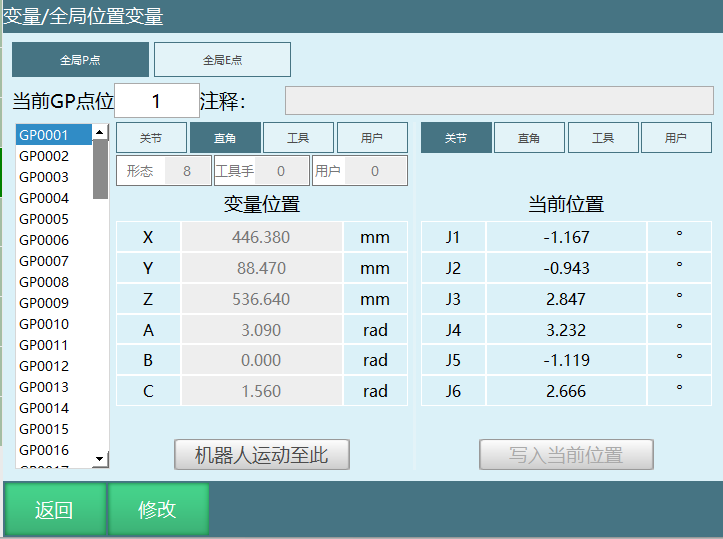
- Then use the calculate target configuration function to calculate how many configurations this point has
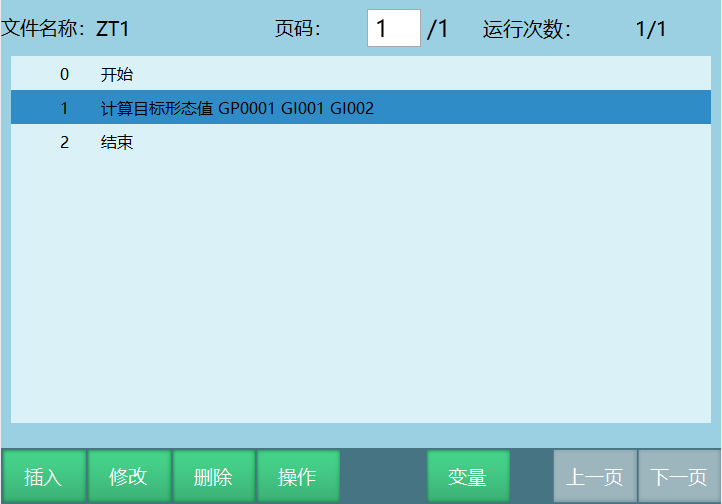
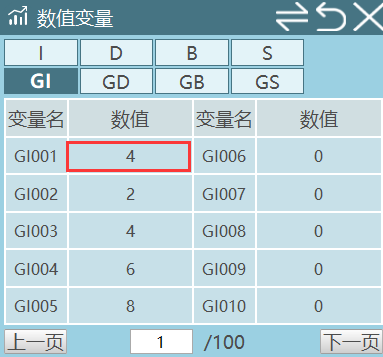
- As can be seen, there are four configurations: Configuration 2, Configuration 4, Configuration 6, Configuration 8;
- Use point-to-point to sequentially move through the calculated configurations, and check each configuration's robot posture to see if the actual axes conform to the configuration value rules

AI Retrieval Q&A (Q&A for Retrieval)
Q: How is the configuration value of a six-axis collaborative robot calculated?
A: The configuration value is determined by three conditions A, B, C. The calculation formula is:
Configuration Value = A*4 + B*2 + C + 1
Where:
- A: J1 axis and J2 axis form a plane. If the end flange center is in front of the plane, A=1, otherwise A=0
- B: If the angle between the upper arm and lower arm is less than 180°, B=1, otherwise B=0
- C: If J4 < 0 (looking down), C=1, otherwise C=0
For example: When A=1, B=1, C=1,
Configuration Value = 1*4 + 1*2 + 1 + 1 = 8
Q: How was the configuration value 8 in the document derived?
A: The example conditions are:
- J1 = 60°
- The angle between upper and lower arms is less than 180°, so B=1
- J4 < 0 (looking down), so C=1
- The end flange center is in front of the plane formed by J1 and J2, so A=1
Substituting into the formula:
Configuration Value = A*4 + B*2 + C + 1
That is:
Configuration Value = 1*4 + 1*2 + 1 + 1 = 8
Therefore the configuration value corresponding to this posture is 8.
Q: After adding configuration parameters to a six-axis collaborative robot, how should I test if it is working?
A: You can test in the following two ways:
Find a point and first calculate the configuration value of this point. After setting different configuration values, execute point-to-point motion and observe whether the actual posture of each robot axis conforms to the configuration value rules.
For multiple configuration values calculated for the same point, you can have the robot switch between these configuration values. Check the actual posture after each motion to confirm it matches the corresponding configuration rules.
For example, the test results in the document show that one point can calculate 4 configurations: Configuration 2, Configuration 4, Configuration 6, Configuration 8. You can run these configurations sequentially to verify.