Multi-Robot Coordination
TASKS — Coordination Task Number
Format: TASKS [Instruction Name] ID [Coordination Task Number] ROBOT1 [Axis Group]
Function: Select the robots that need coordinated synchronization and confirm the task number.
Parameters:
| Parameter | Value | Notes |
|---|---|---|
| Coordination Task Number | 1–999 or bound variable | 1–999 or bound variable |
| Axis Group | 1. Custom: Check the boxes for Robot 1, 2, 3, 4 to select the corresponding robots. 2. More — Variable: • Robot 1 → Variable value 1 • Robot 1, 2 → Variable value 2 • Robot 1, 2, 3 → Variable value 4 • Robot 1, 2, 3, 4 → Variable value 8 • When selecting multiple robots, add the variable values of the corresponding robots together. |
WAIT_SYNC_TASK — Wait for Task Sync Point
Format: WAIT_SYNC_TASK [Instruction Name] Task_ID [Coordination Task Number] ID=1 [Sync Semaphore]
Function: Checks whether multiple robots running their job files have simultaneously reached the wait-for-task-sync-point instruction position. Compares the sync semaphores — if they match, execution continues; if not, the robot stays at the wait-for-task-sync-point position.
| Parameter | Value | Notes |
|---|---|---|
| Coordination Task Number | 1–999 or bound variable | Must match the task number declared in the coordination parameters. |
| Sync Semaphore | Letters, Chinese characters, numbers, or symbols; same input rules as string variables | Must match the sync semaphore in other robots for execution to continue. If mismatched, the robot stays at this instruction. |
Multi-Robot Coordination Example
Environment: Multi-Robot Mode Synchronization
Example 1: Robots 1 and 2 with matching instruction parameters
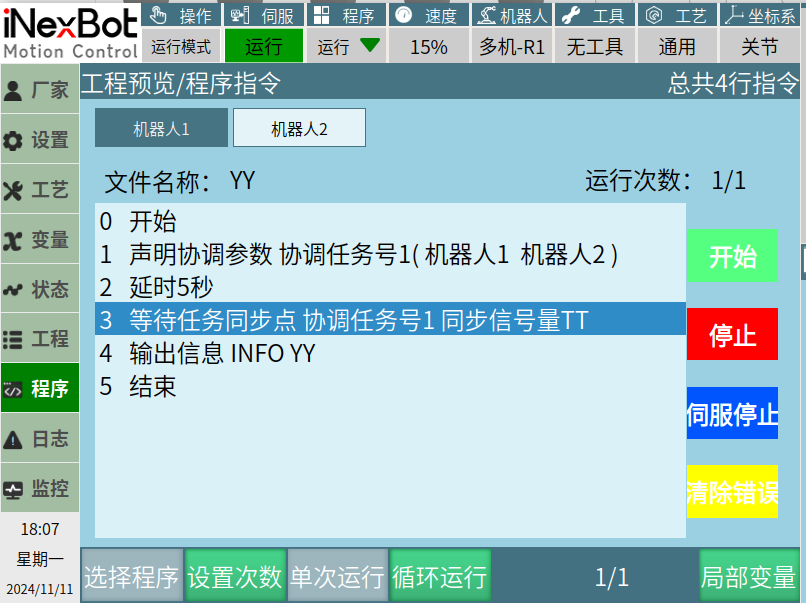
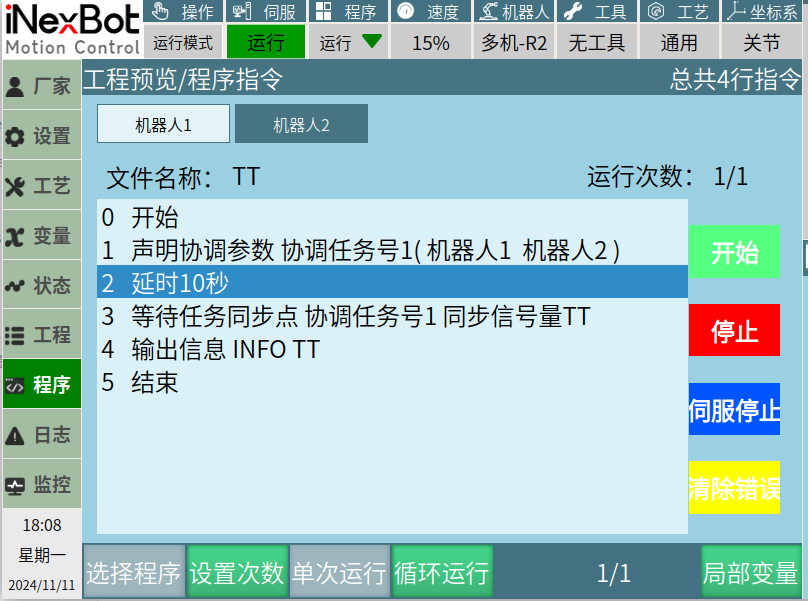
Example description: In multi-robot mode, when running the job files on Robots 1 and 2, when Robot 1 reaches the wait-for-task-sync-point instruction, if Robot 2 has not yet reached its wait-for-task-sync-point, Robot 1 will remain at the wait-for-task-sync-point instruction position until Robot 2 also reaches its wait-for-task-sync-point instruction. Only then will both Robots 1 and 2 continue execution. Otherwise, they will remain at the wait-for-task-sync-point instruction indefinitely.
Example 2: Robots 1 and 2 with mismatched instruction parameters
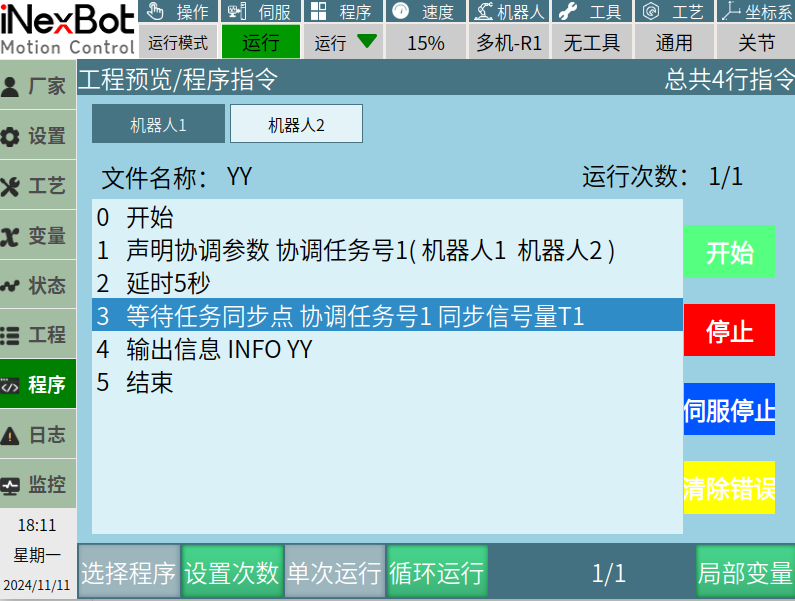
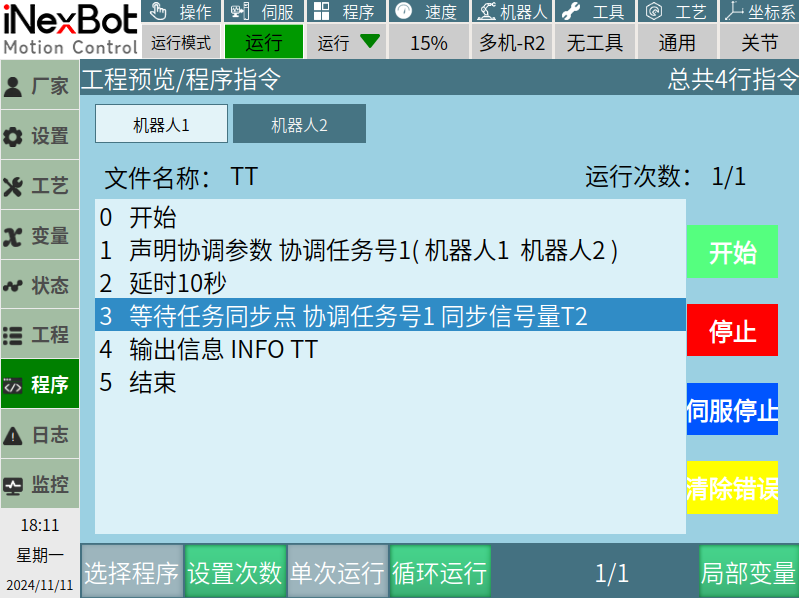
Example description: Robot 1's wait-for-task-sync-point instruction has sync semaphore T1, while Robot 2's has sync semaphore T2. Whether Robots 1 and 2 reach the wait-for-task-sync-point instruction simultaneously or sequentially, because the sync semaphores do not match, both robots will remain at the wait-for-task-sync-point instruction and will not continue.
AI Q&A for Retrieval
Q: What is the purpose of the TASKS instruction?
A: The TASKS instruction is used in multi-robot mode to select the robots that need to participate in coordinated synchronization and to confirm the coordination task number. It is the declaration instruction for multi-robot coordination and must be executed before WAIT_SYNC_TASK.
Q: What is the purpose of the WAIT_SYNC_TASK instruction?
A: This instruction is a synchronization wait point. When multiple robots running their respective job files reach this instruction, they compare whether their sync semaphores match. If they match, all robots continue execution; if not, the arriving robots remain at this instruction and wait until all coordinating robots have matching sync semaphores.
Q: What is the relationship between TASKS and WAIT_SYNC_TASK?
A: TASKS is responsible for declaring "which robots participate in coordination" and "what the coordination task number is," while WAIT_SYNC_TASK sets the actual synchronization wait point during program execution. They must be used together, and the coordination task number in WAIT_SYNC_TASK must match the one declared in TASKS.
Q: What are possible reasons for a robot remaining stationary at WAIT_SYNC_TASK for a long time?
A: Possible reasons include:
- Other coordinating robots have not yet reached the corresponding WAIT_SYNC_TASK instruction;
- The job files of other coordinating robots do not have this sync point configured;
- The sync semaphore settings of participating robots are inconsistent (note case sensitivity and full/half-width character differences);
- The coordination task number declared in TASKS does not match the one in WAIT_SYNC_TASK;
- Not all participating robots were correctly selected in TASKS.
Version History
| Version | Date | Changes | Author |
|---|---|---|---|
| 1.0.0 | 2026-07-06 | Initial version | liweiqi |