Instruction Parameters
This chapter covers instruction parameter details.
Instruction Speed
VJ
VJ controls the motion speed of each robot joint. Range: [1,100].
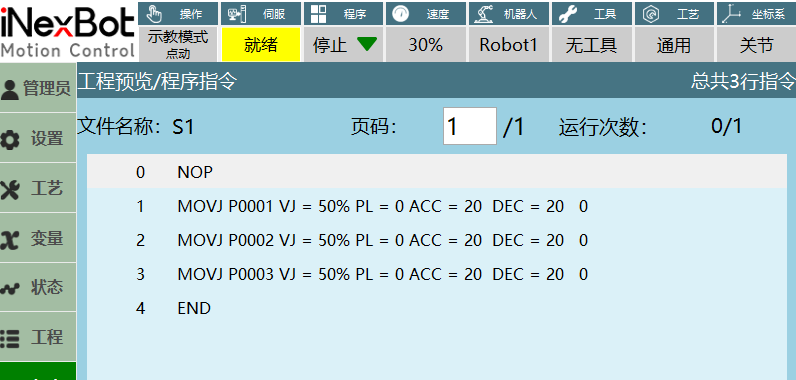
- Step joint: Maximum axis speed = Joint rated forward speed × Instruction speed × Global speed;
- Run mode execution: Maximum axis speed = Joint rated forward speed × Instruction speed × Global speed;
- Example: When executing the MOVJ instruction shown above, maximum axis speed = 235.17 × 50% × 30%. (235.17 represents the rated forward speed of the robot's first axis; this example is for moving only the first axis)
Note: Step joint maximum speed is limited to joint rated speed × 30%.
V
V is the linear motion speed of the robot's end-effector in 3D space.
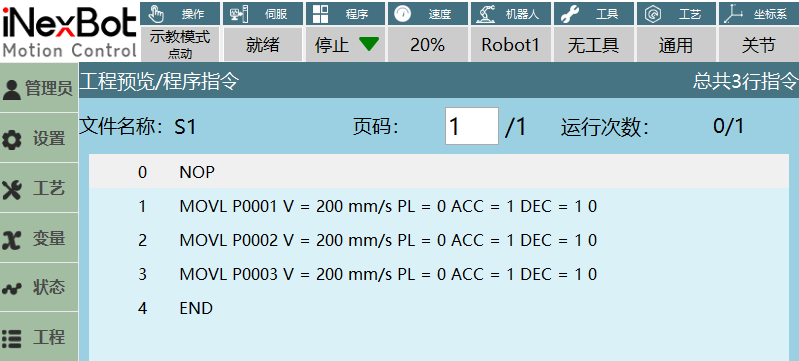
- The maximum acceleration can be modified in the Cartesian parameters interface; the modified value affects the linear speed range. For example: setting maximum acceleration to 1000 changes the linear speed range to [1,1000];
- Step Cartesian: Linear speed = Instruction speed × Global speed;
- Run mode: Linear speed = Instruction speed × Global speed;
- Note: Step Cartesian maximum linear speed is 300mm/s.
EVJ
- EVJ is the external axis speed. Range: [1,100], unit: %;
- When both external axis speed and instruction speed are set, the robot and external axis actually run at the smaller of the two speed values;
- When the set external axis speed is smaller than the instruction speed, the external axis speed is used when the robot and external axis move together;
- When the instruction speed is smaller than the external axis speed, the instruction speed is used when the robot and external axis move together.
PL Smoothing Level
Level range: [0,5].
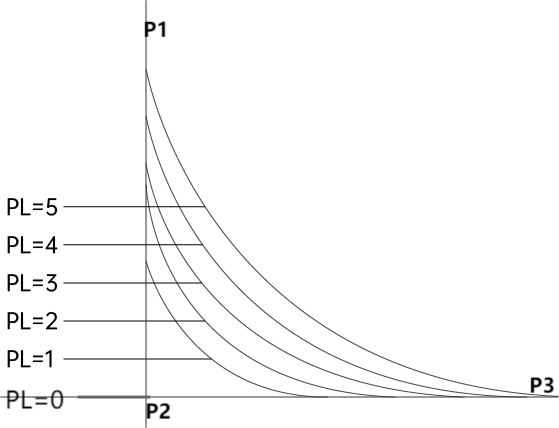
Smoothing level defines the smoothness of robot motion at corners. If set to 0, the robot will briefly pause at corners when running from P1 to P3. If smoothing is enabled, the robot transitions with an arc; higher smoothing levels produce larger arcs.
ACC Acceleration Ratio, DEC Deceleration Ratio
Ratio range: [1,100].
Note: When modifying the robot's instruction speed, the acceleration and deceleration ratios change at a 1:10 ratio relative to the set instruction speed.
Example:
- Insert a MOVJ instruction moving only joint axis 1, then adjust the acceleration and deceleration ratio parameters to obtain the robot's runtime waveform (this example only adjusts acceleration and deceleration ratios for moving a single robot axis);
- Instruction parameter settings: Waveforms captured during program execution with different acceleration/deceleration ratios are shown below:
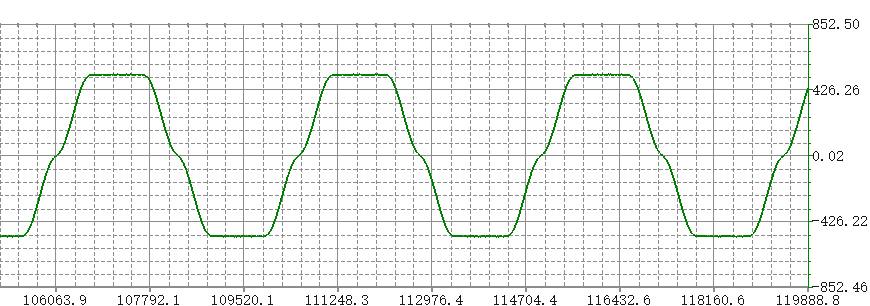
Figure 1. Global speed 50%, instruction speed 30%, acceleration ratio 10%, deceleration ratio 10%
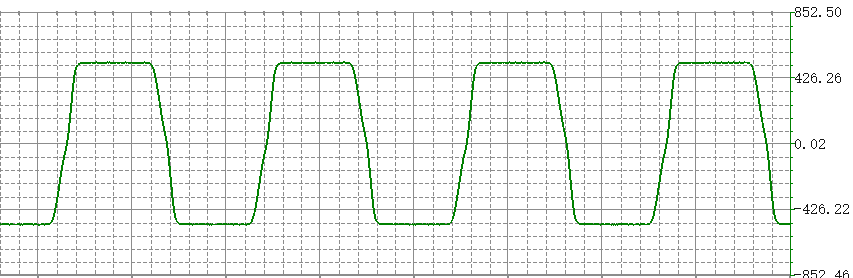
Figure 2. Global speed 50%, instruction speed 30%, acceleration ratio 50%, deceleration ratio 20%
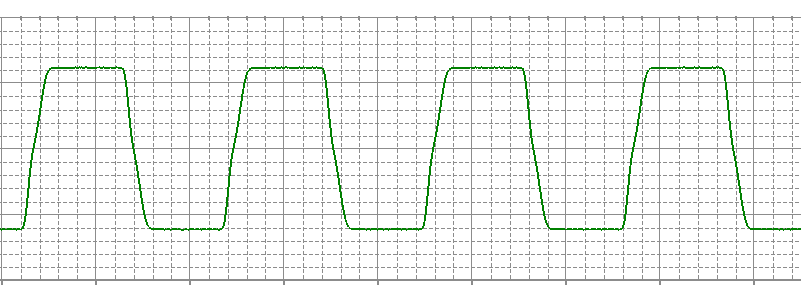
Figure 3. Global speed 50%, instruction speed 30%, acceleration ratio 20%, deceleration ratio 50%
TIME Early Execution
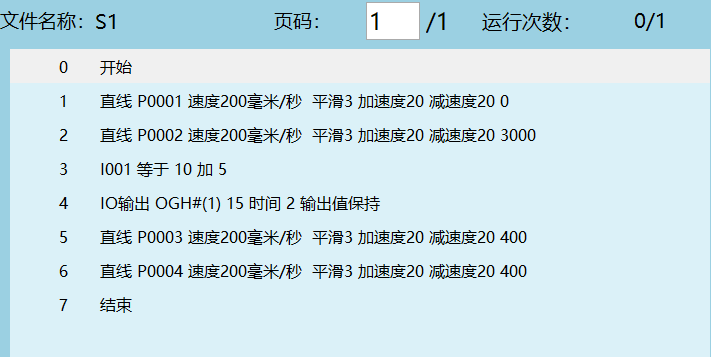
Function: Execute non-motion instructions early by a specified time. Unit: ms.
As shown below, the second motion instruction has an early execution setting of 3 seconds, meaning the next instruction executes 3 seconds early.
Note: Setting the early execution parameter does not interrupt trajectory smoothing.
DISTANCE Early Distance
Function: Execute the next non-motion instruction when the robot reaches the set early distance. Unit: mm.
Supported instructions: MOVL, MOVC, MOVCA, MOVARCH, CONVEYOR_ON
Also supported when IMOV and SAMOV insert non-joint coordinates (i.e., non-joint interpolation).
Example:

Early distance set to 10mm. If the entire trajectory is from P1 to P2 with a total distance of 100mm, when the robot reaches 90mm (point C), it will sequentially execute the following non-motion instructions.
PROPORTION Early Progress
Function: Execute the next non-motion instruction when the robot reaches the set early progress. Unit: %.
Supported instructions: MOVL, MOVC, MOVCA, MOVARCH, CONVEYOR_ON
Also supported when IMOV and SAMOV insert non-joint coordinates (i.e., non-joint interpolation).
Example:
Early progress set to 10%. If the entire trajectory is from P1 to P2 with a total distance of 100mm, with 10% early progress, when the robot reaches [100 - 100×10%] mm (point C), it will sequentially execute the following non-motion instructions.
AI Q&A for Retrieval
Q: What is the VJ parameter?
A: VJ controls the motion speed of each robot joint. Range: [1,100].
Q: What does the V parameter represent?
A: V is the linear motion speed of the robot's end-effector in 3D space.
Q: What is the purpose of the EVJ parameter?
A: EVJ is the external axis speed parameter. Range: [1,100], unit: %.
Q: What is the range of the PL smoothing level?
A: PL smoothing level range: [0,5], used to set the smoothness of robot motion at corners.
Q: What is the range of ACC and DEC parameters?
A: Both ACC acceleration ratio and DEC deceleration ratio have a range of [1,100].
Q: What is the function of the TIME parameter?
A: The TIME parameter is used for early execution of non-motion instructions. Unit: ms.
Q: Which instructions does the DISTANCE parameter support?
A: The DISTANCE parameter supports MOVL, MOVC, MOVCA, MOVARCH, and CONVEYOR_ON instructions, as well as non-joint coordinate insertion in IMOV and SAMOV.
Q: What is the unit of the PROPORTION parameter?
A: The PROPORTION parameter unit is %, representing the early progress percentage.
Q: How is it handled when both external axis speed and instruction speed are set?
A: The robot and external axis actually run at the smaller of the two speed values.
Q: What is the characteristic of robot motion when the smoothing level is 0?
A: When the smoothing level is set to 0, the robot will briefly pause at corners.
Version History
| Version | Date | Changes | Author |
|---|---|---|---|
| 1.0.0 | 2026-06-24 | Initial version | qiuzegai |