User Coordinate System
The default user coordinate system User0 coincides with the Cartesian coordinate system. All new user coordinate systems are derived by transforming the default user coordinate system.
Reflection: We know that the user coordinate system is a reference object in motion, but what role does it actually play during commissioning?
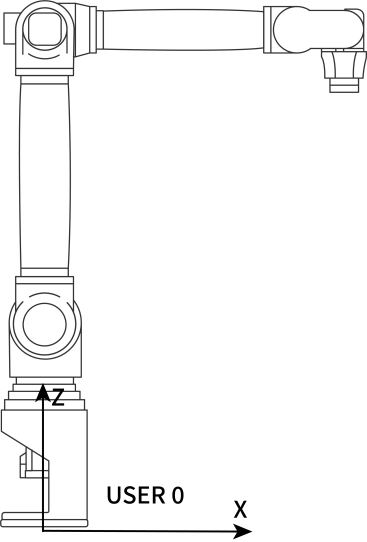
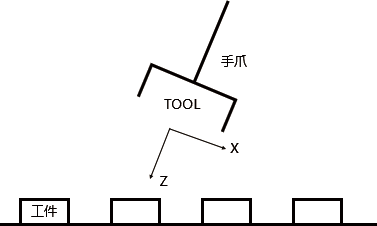
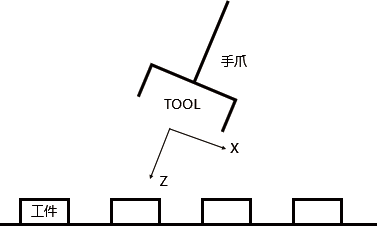
Inference: As shown in the figures, if using the default user coordinate system User 0 or the Cartesian coordinate system, it would be difficult to commission each workpiece position. However, if a coordinate system exists whose two axes are parallel to the worktable surface, it becomes much more convenient.
Purpose of User Coordinate System
Establish a reference coordinate system.
Determine motion directions on the worktable for easier commissioning.
Characteristics of User Coordinate System
The new user coordinate system is derived from the default user coordinate system User 0. The position and orientation of the new user coordinate system are fixed relative to space.
User Coordinate Parameters
Click Settings - User Coordinate Calibration to enter the user coordinate calibration interface, as shown below:
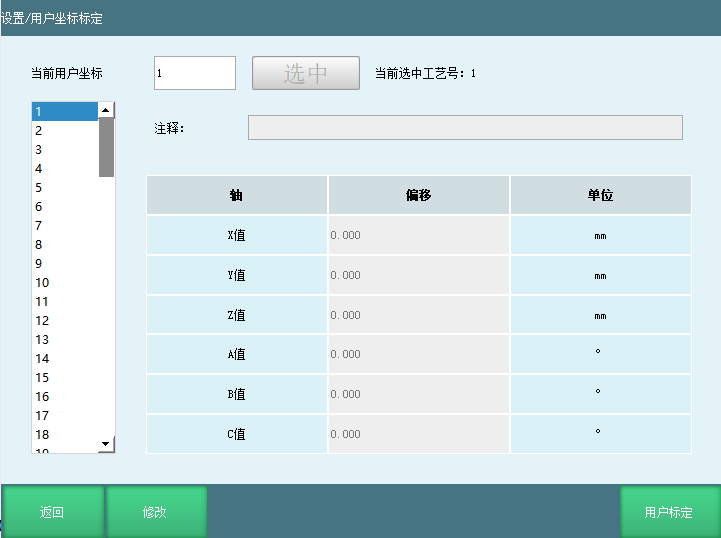
User coordinate parameters:
| Axis | Offset | Unit |
|---|---|---|
| X | Offset of user coordinate origin relative to robot base origin along the X-axis | mm |
| Y | Offset of user coordinate origin relative to robot base origin along the Y-axis | mm |
| Z | Offset of user coordinate origin relative to robot base origin along the Z-axis | mm |
| A | Rotation angle of user coordinate system relative to Cartesian coordinate system around the X-axis | °/rad |
| B | Rotation angle of user coordinate system relative to Cartesian coordinate system around the Y-axis | °/rad |
| C | Rotation angle of user coordinate system relative to Cartesian coordinate system around the Z-axis | °/rad |
User Coordinate System Calibration
Click the [User Calibration] button at the bottom of the "User Coordinate Calibration" interface to enter the "User Calibration" interface, as shown:
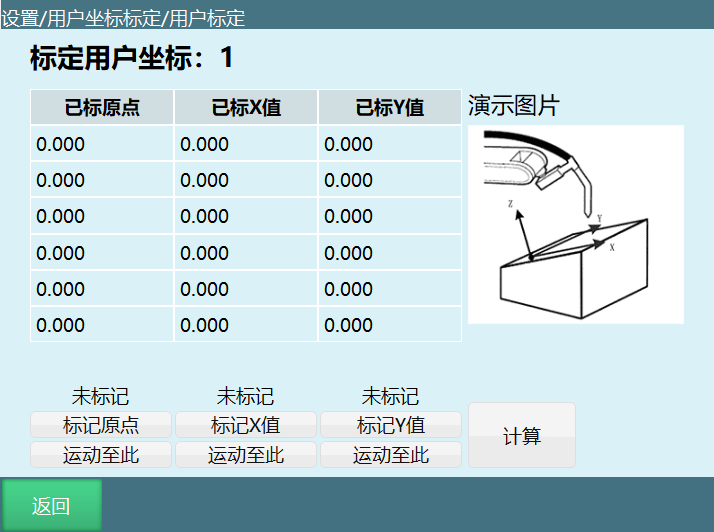
Calibration steps:
Move the robot tip to the desired user coordinate system origin position, then click the "Calibrate Origin" button.
Move the robot from the user coordinate system origin to any distance in the desired positive X-axis direction of the user coordinate system, then click the "Calibrate X-Axis" button.
Move the robot from the user coordinate system origin to any distance in the desired positive Y-axis direction of the user coordinate system, then click the "Calibrate Y-Axis" button.
[Calculate] After calibrating all three points, click Calculate. When the calculation succeeds, user coordinate calibration is complete.
[Return] Return to the previous interface.
[Modify] Modify the calibrated points. After modification, click [Save], then click Calculate to apply the changes.
AI Q&A for Retrieval
Q: What is a user coordinate system?
A: A user coordinate system is derived from the default user coordinate system User0. It is used to establish a reference coordinate system and determine motion directions on the worktable for easier commissioning.
Q: What is the purpose of the user coordinate system?
A: 1. Establish a reference coordinate system; 2. Determine motion directions on the worktable for easier commissioning.
Q: What are the characteristics of the user coordinate system?
A: The new user coordinate system is derived from the default user coordinate system User0. Its position and orientation are fixed relative to space.
Q: What are the steps for user coordinate system calibration?
A: 1. Move the robot tip to the desired user coordinate system origin position and click "Calibrate Origin"; 2. Move the robot to any distance in the desired positive X-axis direction and click "Calibrate X-Axis"; 3. Move the robot to any distance in the desired positive Y-axis direction and click "Calibrate Y-Axis"; finally click Calculate.