Program Control
"√" indicates support for this instruction.
| Instruction Type | Foreground | Global Background | Local Background |
|---|---|---|---|
| Start Thread | √ | √ | |
| Exit Thread | √ | √ | |
| Pause Run | √ | √ | √ |
| Continue Run | √ | √ | √ |
| Stop Run | √ | √ | √ |
| Restart Run | √ | √ | √ |
| Window Instruction | √ | ||
| Thread State | √ | √ | √ |
Program Control Related Content
How to create background tasks?
Click Settings — Function Parameters — Background Tasks to enter the background task interface:
Global Background:
- Click [Global] to enter the global background task interface.
- Click [New] to create a global background job file.
- Click [Operations] to copy, delete, rename, and set auto-start for the currently selected job file.
- Click [Start] to run the selected auto-start program in the background.
- Set Auto-start: Execute the auto-start program at boot. Click [Start] on the global background interface to execute the auto-start program.
- Note: Only global background tasks can set auto-start.
Local Background:
- Click [Local] to enter the local background task interface.
- Click [New] to create a local background job file.
- Click [Operations] to copy, delete, and rename the currently selected job file.
PTHREAD_START - Start Thread
Format: PTHREAD_START [Instruction Name] [$TEST$] [Background Job File to Start] GLOBAL, LOCAL [Global Background, Local Background].
Function: Start a global background or local background task.
Parameters:
| Parameter | Description |
|---|---|
| Type | Global background, local background |
| Background Task | When global background type is selected, the job files created in global background can be selected. When local background type is selected, the job files created in local background can be selected. |
Example:
- NOP
- TIMER T=1
- PTHREAD_START [TEST] GLOBAL
- MOVL P0001 V=10mm/s PL=0 ACC=10 DEC=10 0
- END
Example description: Start the global background job file TEST in the foreground.
PTHREAD_END - Exit Thread
Format: PTHREAD_END [Instruction Name] [$TEST$] [Job File Name to Exit] GLOBAL, LOCAL [Global Background, Local Background].
Function: Close an already started background task.
Parameters:
| Parameter | Description |
|---|---|
| Type | Global background, local background |
| Background Task | Exit the already started local or global background job file |
Note: The exit thread instruction can only exit job files that have been started in the foreground.
For example: If the started global background job task is [TEST], and the exit thread instruction selects global background job task [TEST1], then the global background job task [TEST] cannot be exited when executing the exit thread instruction.
Example:
- NOP
- TIMER T=1
- PTHREAD_START [TEST] GLOBAL
- MOVL P0001 V=10mm/s PL=0 ACC=10 DEC=10 0
- PTHREAD_END [TEST] GLOBAL
- END
Example description:
When the program runs to line 1, it starts the global background job file TEST. When it runs to line 5, it exits the global background job file TEST.
PAUSERUN - Pause Run
Format: PAUSERUN [Instruction Name] ALL, MAIN [Type of Run to Pause].
Function: Pause the main program and local background program execution.
| Parameter | Description |
|---|---|
| Type | All: Pause started local background tasks and the main program. Started global background tasks will not pause. For example: When a global background task is running and the pause instruction is reached, the global background task continues to run normally without pausing. Main program: Pause the running main program. Started background tasks will not pause. Local background: Pause started local background tasks. The running main program will not pause. |
| Program | When All or Main Program is selected, the input box is grayed out. When the type is Local Background, select the background program to pause. |
Example:
- NOP
- TIMER T=1
- PTHREAD_START [TEST] LOCAL
- PTHREAD_START [TEST1] GLOBAL
- MOVL P0001 V=10mm/s PL=0 ACC=10 DEC=10 0
- PAUSERUN ALL
- END
Example description: When the program runs to lines 3 and 4, it starts local and global background tasks. When it runs to line 6 (pause instruction), the started local background task and main program pause execution, while the global background task continues running normally.
CONTINUERUN - Continue Run
Format: CONTINUERUN [Instruction Name] MAIN, LOCAL [Type of Paused Program].
Function: Continue running a paused main program or local background program.
Parameters:
| Parameter | Description |
|---|---|
| Type | Main program: Continue running the paused main program. Already paused background programs will not continue. Local background: Run the paused local background program. |
| Program | When Main Program is selected, the input box is grayed out. When Local Background is selected, you can choose the background program to continue. |
Example:
- NOP
- TIMER T=1
- PTHREAD_START [TEST] LOCAL
- MOVL P0001 V=10mm/s PL=0 ACC=10 DEC=10 0
- PAUSERUN ALL
- TIMER T=1
- CONTINUERUN MAIN
- MOVL P0002 V=10mm/s PL=0 ACC=10 DEC=10 0
- END
Example description: The program starts a local background program during execution. When it runs to line 4, the main program and local background program are paused. When it runs to line 7, the paused main program continues running, while the local background program remains paused.
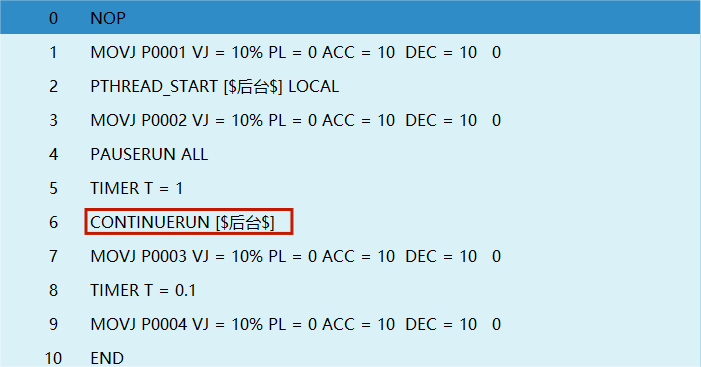
Special note: If the continue run instruction selects the Local Background program type, and a pause instruction has been inserted, when the program reaches the pause instruction the servo status will be paused. Then clicking [Start] on the teach pendant will execute the continue run instruction. The current execution logic is that both the main program and local background program will continue running.
STOPRUN - Stop Run
Format: STOPRUN [Instruction Name].
Function: Stop the running program. When the program reaches the stop run instruction, the servo powers off.
Parameters: Omitted.
- NOP
- PTHREAD_START [TEST] LOCAL
- MOVL P0001 V=10mm/s PL=0 ACC=10 DEC=10 0
- PAUSERUN ALL
- CONTINUERUN MAIN
- STOPRUN
- MOVL P0002 V=10mm/s PL=0 ACC=10 DEC=10 0
- END
Example description: When the program runs to line 6, the servo powers off and the program stops running.
RESTARTRUN - Restart Run
Format: RESTARTRUN [Instruction Name].
Function: Re-run the program above this instruction.
Parameters: Omitted.
Example:
- NOP
- PTHREAD_START [TEST] LOCAL
- MOVL P0001 V=10mm/s PL=0 ACC=10 DEC=10 0
- PAUSERUN ALL
- RESTARTRUN
- TIMER T=1
- MOVL P0002 V=10mm/s PL=0 ACC=10 DEC=10 0
- END
Example description: Each time the program runs to line 5, it re-runs the program above this instruction.
WINDOW - Window Instruction
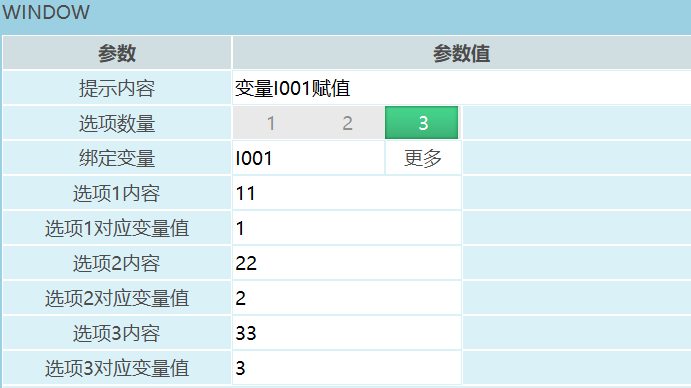
Format: WINDOW [Instruction Name] Variable I001 assignment [Prompt Content] 1,2,3 [Number of Options] INT, GINT [Bound Variable] 11 [Option 1 Content] 1 [Option 1 Variable Value] 22 [Option 2 Content] 2 [Option 2 Variable Value] 33 [Option 3 Content] 3 [Option 3 Variable Value].
Function: When the instruction is executed, a window with the specified prompt content pops up. The number of buttons equals the number of options. Clicking a button stores the corresponding variable value into the bound variable.
Parameters:
| Parameter | Description |
|---|---|
 | |
| Prompt Content | Content displayed in the prompt window when the window instruction is executed. For example: If the prompt content is "Assign value to variable I001", as shown. 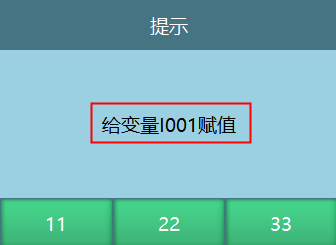 |
| Number of Options | Set the number of options. When the window instruction is executed, the prompt window displays the corresponding number of buttons. For example: If the number of options is 3, as shown. 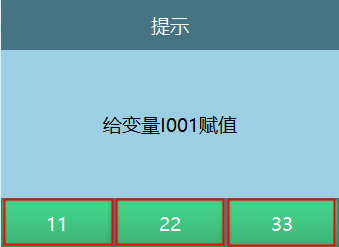 |
| Bound Variable | Supports INT, GINT. When the window instruction is executed, the variable value corresponding to the selected option is stored in this variable. |
| Option Content | Fill in the corresponding content based on the number of options. The window will display these options. For example: Setting 3 options with content 11, 22, 33, as shown. 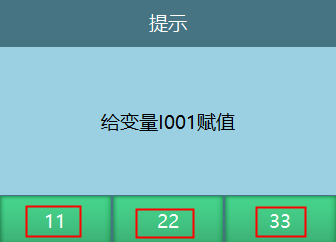 |
| Option Variable Value | Clicking a window option writes the bound value to the bound variable. For example: If the option content is 11 and the corresponding variable value is 1, clicking it assigns 1 to the variable. |
Example:
- NOP
- WINDOW [$Assign value to variable I001$] GI001 3 [$11$] 1 [$22$] 2 [$33$] 3
- END
Example description: Execute the window instruction. Click button 1 — GI001=1; click button 2 — GI001=2; click button 3 — GI001=3.
PTHREAD_STATE - Thread State
Format: PTHREAD_STATE [Instruction Name] MAIN, LOCAL, GLOBAL [Main Program, Local Background, Global Background] I/GI [Variable Type].
Function: View the current state of the executed thread program. Stopped = 1, Paused = 2, Running = 3.
Parameters:
| Parameter | Description |
|---|---|
| Type | View the thread state of main program, local background, or global background |
| Background Task | Main program: When Main Program is selected, the input box is grayed out. Local/Global background: View the state of the selected background task. |
| Variable Type | Store the read state into a variable |
Notes:
The thread state instruction can read the current state of the program. When the main program is stopped or paused, the program cannot reach the thread state instruction, so the foreground cannot read the stopped or paused state of the main program. When the program starts normally, the main program is in running state. Therefore, when you need to read the main program state, you can insert the read thread state instruction in the background and then start this thread from the foreground.
Example:
- NOP
- PTHREAD_START [$TEST$] LOCAL
- TIMER T=1
- PTHREAD_STATE [$TEST$] LOCAL I002
- PAUSERUN [$TEST$]
- TIMER T=1
- PTHREAD_STATE [$TEST$] LOCAL I002
- PTHREAD_END [$TEST$] LOCAL
- TIMER T=1
- PTHREAD_STATE [$TEST$] LOCAL I002
- END
Example description: Line 2 starts the local background thread. When the program runs to line 4, the thread state is read and stored in variable I002=3 (running). When it runs to line 5, the background thread is paused. At line 7, the thread state is read and I002=2 (paused). At line 8, the background thread is exited. At line 10, the thread state is read and I002=1 (stopped).
Q&A for Retrieval
Q: What is the PTHREAD_START instruction?
A: PTHREAD_START is the start thread instruction, used to start a global background or local background task.
Q: What is the PTHREAD_END instruction?
A: PTHREAD_END is the exit thread instruction, used to close an already started background task.
Q: What is the PAUSERUN instruction?
A: PAUSERUN is the pause run instruction, used to pause the main program and local background program execution.
Q: What is the CONTINUERUN instruction?
A: CONTINUERUN is the continue run instruction, used to continue running a paused main program or local background program.
Q: What is the STOPRUN instruction?
A: STOPRUN is the stop run instruction, used to stop the running program. When the program reaches this instruction, the servo powers off.
Q: What is the RESTARTRUN instruction?
A: RESTARTRUN is the restart run instruction, used to re-run the program above this instruction.
Q: What is the WINDOW instruction?
A: WINDOW is the window instruction. When executed, it displays a prompt content window. Clicking a button stores the variable value into the bound variable.
Q: What is the PTHREAD_STATE instruction?
A: PTHREAD_STATE is the thread state instruction, used to view the current state of the executed thread program. Stopped = 1, Paused = 2, Running = 3.
Q: How do I create a background task?
A: Click Settings — Function Parameters — Background Tasks to enter the background task interface. Click [Global] or [Local], then click [New] to create a background job file.
Q: What is the difference between global background and local background?
A: Global background tasks can set auto-start, executing automatically at boot. Local background tasks cannot set auto-start. Global background tasks do not pause when a pause run instruction is executed, while local background tasks do.
Q: What are the limitations of the exit thread instruction?
A: The exit thread instruction can only exit job files that have been started in the foreground.
Q: What do thread state values represent?
A: In thread state, Stopped = 1, Paused = 2, Running = 3.
Version History
| Version | Date | Changes | Author |
|---|---|---|---|
| 1.0.0 | 2026-06-25 | Initial version | FDJAK |