Controller LUA Installation Tutorial
- C1102 script installation tutorial:
(1) This method is only available for RTL-22.07.05 and above versions
(2) Upload the following script and compressed package through the teach pendant version upgrade page using file upload
(3) After successful upload, manually restart the system twice
(4) Open the program, insert lua statement instruction, write any content, step through the instruction. If no error: "This controller has not installed lua environment" appears, it means lua has been installed successfully.
- C1102 manual installation tutorial:
(1) Place the local.tar.gz compressed package in the upgrade path of the USB drive, and upload it through the teach pendant version upgrade page using file upload.
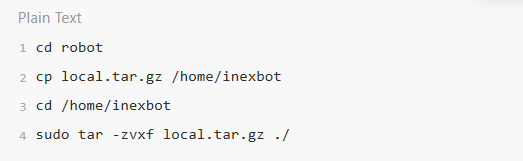
(2) Use putty to enter the controller backend, enter the following commands sequentially: copy the local.tar.gz file to /home/inexbot path and extract it.
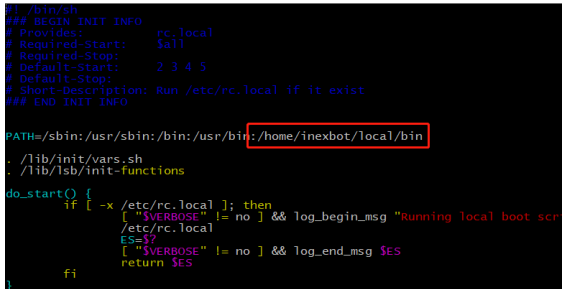
(3) In the /etc/init.d/rc.local file, add the auto-start environment variable: /home/inexbot/local/bin
(4) Restart the controller. Backend print: lua lib open ok
- Integrated drive-controller LUA installation tutorial:
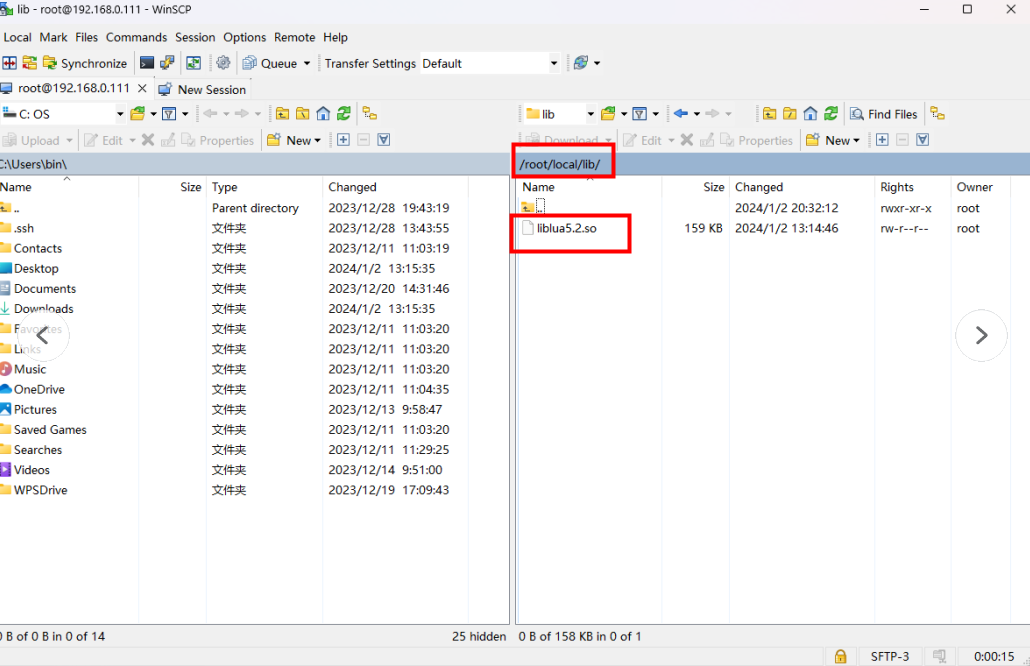
(1) Open the controller backend and create a new folder named lib under /root/local
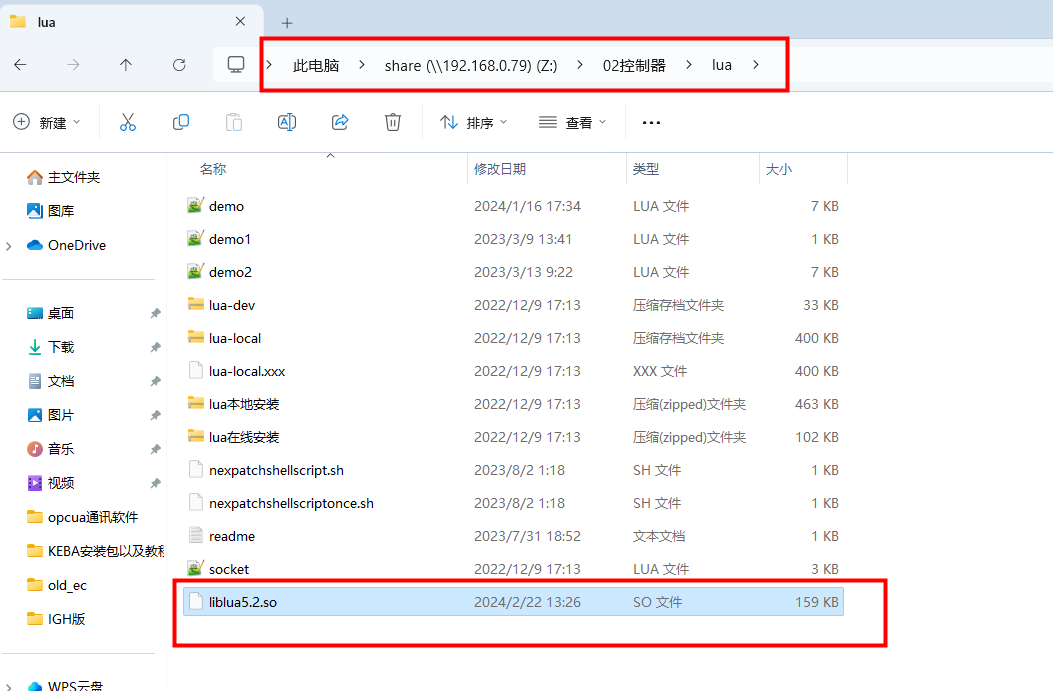
(2) Place lua5.2.so in the lib folder (lua5.2.so is stored in share\192.168.0.79Z:\02 Controller\lua directory)
(3) After placing lua5.2.so, restart the controller to use LUA normally.
- T5 LUA installation tutorial:
Note: For RTL-24.03.16 version and above, "liblua5.2.so" has been changed to "liblua.so" before uploading.
(1) Currently only implemented on the next version after 24.03.07 and dev6.5.9 version.
(2) Place the liblua5.2.so file in the USB drive upgrade directory and upload through the teach pendant.
(3) After successful upload, a message will appear: liblua5.2.so uploaded successfully, please restart the controller.
(4) After restarting the controller, create a new program, insert lua statement instruction, write any content, step through the instruction. If no error: "This controller has not installed lua environment" appears, it means lua has been installed successfully.
Usage Examples
- Controller as Server
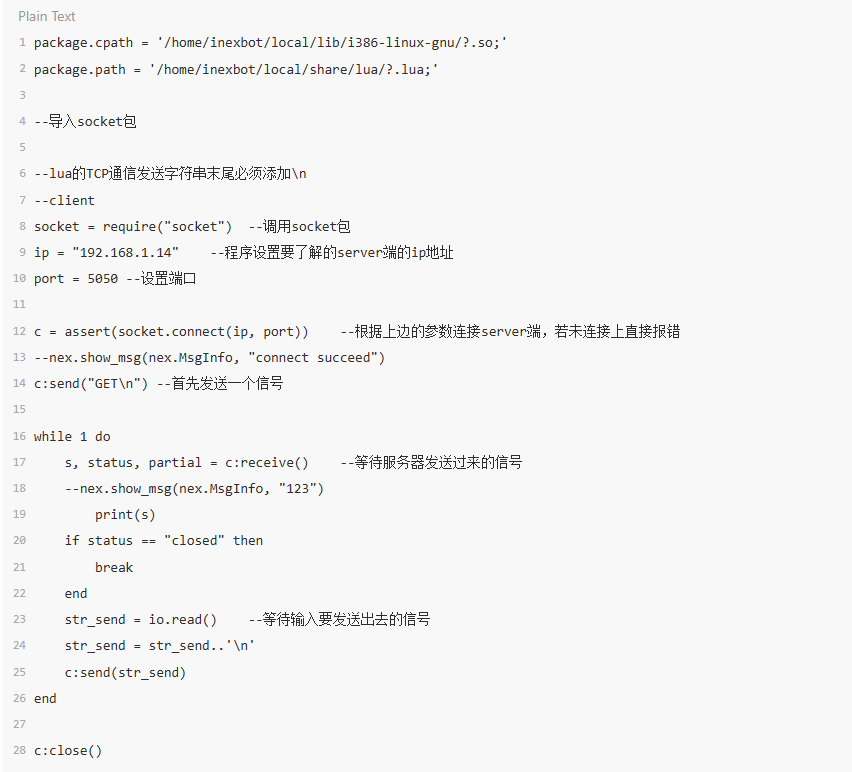
package.cpath = '/home/inexbot/local/lib/i386-linux-gnu/?.so;'
package.path = '/home/inexbot/local/share/lua/?.lua;'

--Import socket package
--Lua TCP communication string must end with \n

--client
socket = require("socket")  --Call socket package
ip = "192.168.1.14"    --Set the server IP address to connect to
port = 5050 --Set port

c = assert(socket.connect(ip, port))    --Connect to server based on the above parameters. If not connected, report error directly.

--nex.show_msg(nex.MsgInfo, "connect succeed")
c:send("GET\n") --First send a signal

while 1 do
    s, status, partial = c:receive()    --Wait for signal from server
    --nex.show_msg(nex.MsgInfo, "123")
    print(s)
    if status == "closed" then
        break
    end
    str_send = io.read()    --Wait for input to send signal
    str_send = str_send..'\n'
    c:send(str_send)
end

c:close()- Controller as Client
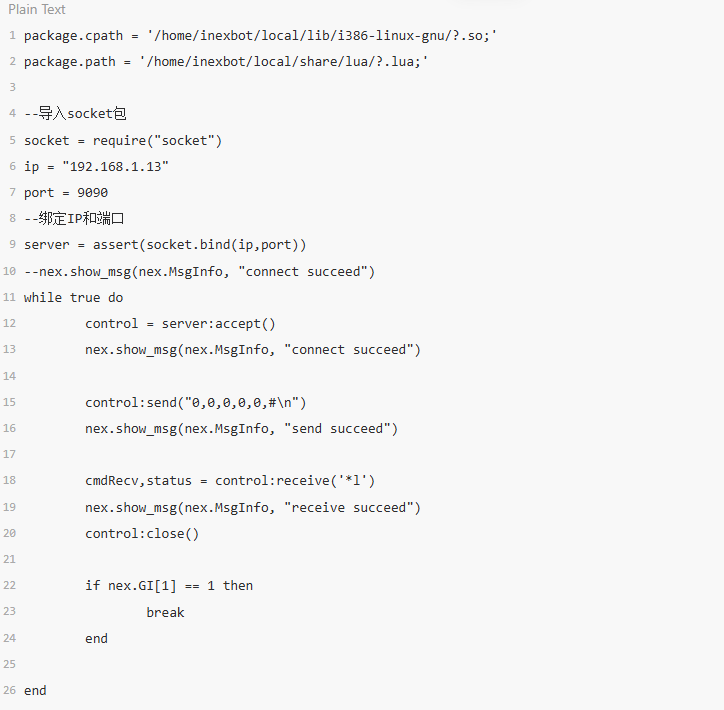
package.cpath = '/home/inexbot/local/lib/i386-linux-gnu/?.so;'
package.path = '/home/inexbot/local/share/lua/?.lua;'

--Import socket package
socket = require("socket")
ip = "192.168.1.13"
port = 9090

--Bind IP and port
server = assert(socket.bind(ip,port))

--nex.show_msg(nex.MsgInfo, "connect succeed")

while true do
    control = server:accept()
    nex.show_msg(nex.MsgInfo, "connect succeed")

    control:send("0,0,0,0,0,#\n")
    nex.show_msg(nex.MsgInfo, "send succeed")

    cmdRecv,status = control:receive('*l')
    nex.show_msg(nex.MsgInfo, "receive succeed")

    control:close()

    if nex.GI[1] == 1 then
        break
    end
end- Assign GP1 X value to GE X value
Basic usage: Assign GP001 x value to GE001 x value.
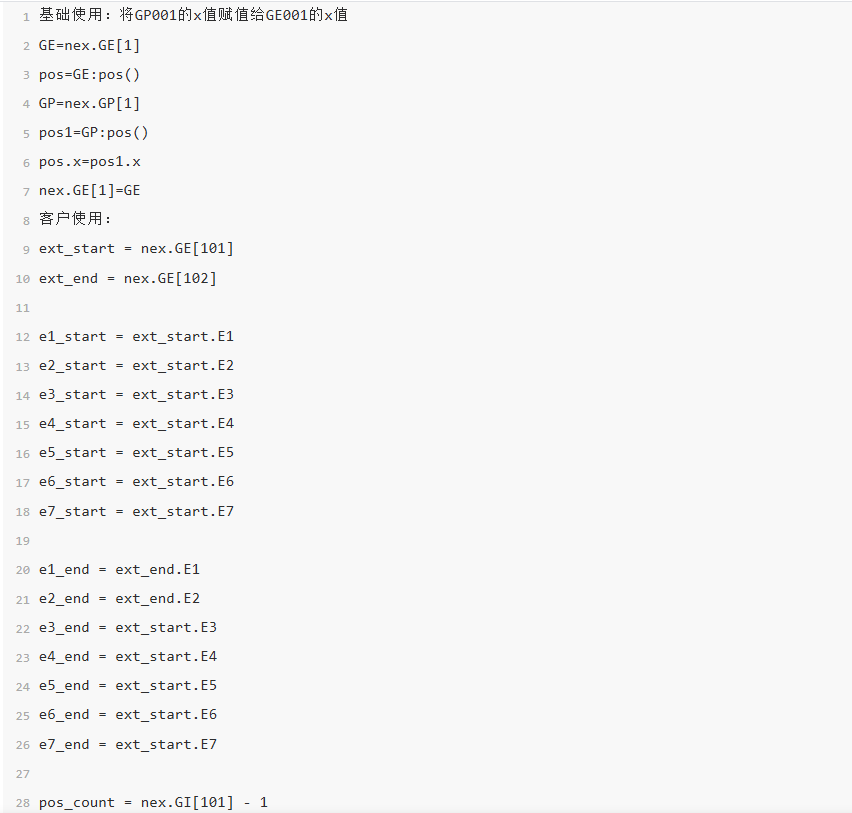
GE=nex.GE[1]
pos=GE:pos()
GP=nex.GP[1]
pos1=GP:pos()
pos.x=pos1.x
nex.GE[1]=GE
Customer usage:
ext_start = nex.GE[101]
ext_end = nex.GE[102]

e1_start = ext_start.E1
e2_start = ext_start.E2
e3_start = ext_start.E3
e4_start = ext_start.E4
e5_start = ext_start.E5
e6_start = ext_start.E6
e7_start = ext_start.E7

e1_end = ext_end.E1
e2_end = ext_end.E2
e3_end = ext_start.E3
e4_end = ext_start.E4
e5_end = ext_start.E5
e6_end = ext_start.E6
e7_end = ext_start.E7

pos_count = nex.GI[101] - 1

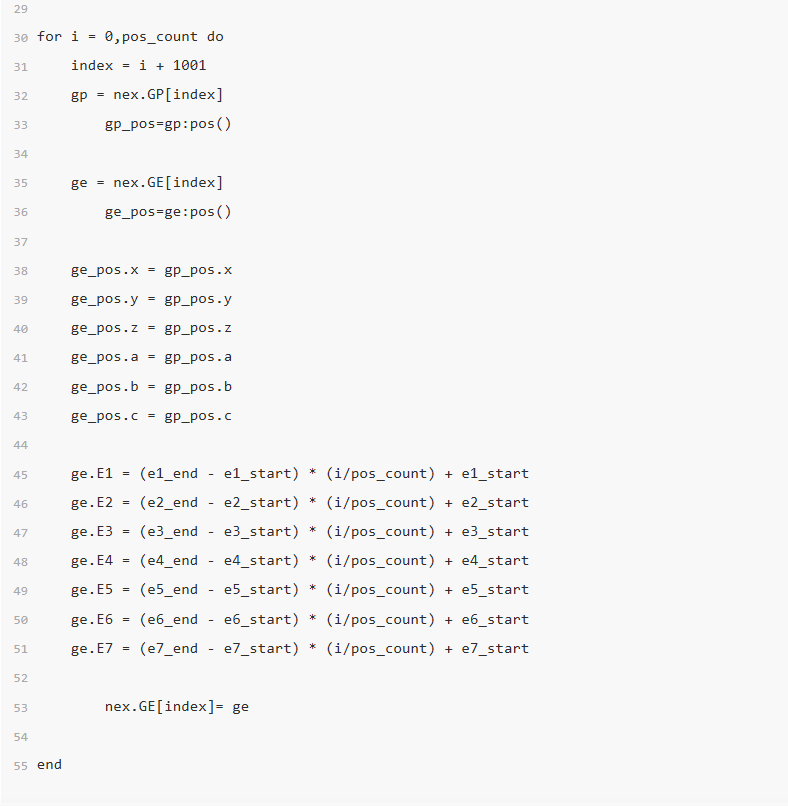
for i = 0,pos_count do
    index = i + 1001
    gp = nex.GP[index]
    gp_pos=gp:pos()

    ge = nex.GE[index]
    ge_pos=ge:pos()

    ge_pos.x = gp_pos.x
    ge_pos.y = gp_pos.y
    ge_pos.z = gp_pos.z
    ge_pos.a = gp_pos.a
    ge_pos.b = gp_pos.b
    ge_pos.c = gp_pos.c

    ge.E1 = (e1_end - e1_start) * (i/pos_count) + e1_start
    ge.E2 = (e2_end - e2_start) * (i/pos_count) + e2_start
    ge.E3 = (e3_end - e3_start) * (i/pos_count) + e3_start
    ge.E4 = (e4_end - e4_start) * (i/pos_count) + e4_start
    ge.E5 = (e5_end - e5_start) * (i/pos_count) + e5_start
    ge.E6 = (e6_end - e6_start) * (i/pos_count) + e6_start
    ge.E7 = (e7_end - e7_start) * (i/pos_count) + e7_start

    nex.GE[index]= ge
end
Instruction Usage
- Call lua file: CALL_LUAFILE:
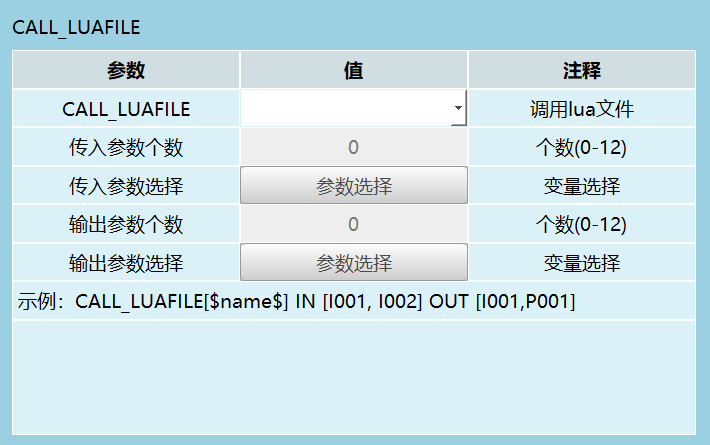
Upload the demo.lua file through the teach pendant version upgrade page using file upload. The uploaded lua script will be placed in the controller backend: home/inexbot/robot/lua folder.
- Call lua statement: CALL_LUASTRING
(1) Modify global numeric variables
Global Integer: GI001=10 Format: nex.GI[1]=true
Global Boolean: GB001=1 Format: nex.GB[1]=1
Global Floating-point: GD001=20 Format: nex.GD[1]=20

(2) Modify local numeric variables
I001=12, B001=1, D001=12.12
nex.I[1]=12 nex.B[1]=1 nex.D[1]=12.12
Note: When calling Lua statements, if the parameter value selects a variable, you first need to assign a value to the string variable, then call the lua statement.

- Teach pendant print message
nex.show_msg(nex.MsgInfo, "message")

- Modify, set delay parameter
Set 500ms delay: nex.delay_ms(500)

- Get global/local position variable parameters
GP1 = nex.GP[1] P2 = nex.P[2]
- Modify global/local position variable coordinate system, unit system, configuration, tool, user coordinate
GP1.coord, GP1.unit, GP1.configuration, GP1.tool, GP1.user = 0,2,4,6,1 P2.coord, P2.unit, P2.configuration, P2.tool, P2.user = 1,1,5,6,7
- Get robot global/local point position
pos1=GP1:pos() pos1=P2:pos()
- Modify robot global/local points
nex.GP[1]=GP1 nex.P[2]=P2


- Get global/local external axis position variable parameters
GE5 = nex.GE[5] E1 = nex.E[1]
- Modify global/local external axis position variable coordinate system, unit system, configuration, tool, user coordinate
GE5.coord, GE5.unit, GE5.configuration, GE5.tool, GE5.user = 2,1,3,4,5 E1.coord, E1.unit, E1.configuration, E1.tool, E1.user = 0,1,2,3,4
- Get robot global/local external axis point position
pos1=GE5:pos() pos1=E1:pos()
- Modify robot GE/E position data
pos1.x,pos1.y,pos1.z,pos1.a,pos1.b,pos1.c, = 1,2,3,4,5,6 pos1.x,pos1.y,pos1.z,pos1.a,pos1.b,pos1.c,E1.E1,E1.E2 = 1,2,3,4,5,6,7,8
- Modify external axis position data E1, E2, E3, E4, E5
GE5.E1,GE5.E2,GE5.E3,GE5.E4,GE5.E5 = 10,20,30,40,50 E1.E1,E1.E2,E1.E3,E1.E4,E1.E5 = 10,20,30,40,50
- Modify global/local external axis position variable
nex.GE[5]=GE5 nex.E[1]=E1


- Get current position in joint coordinates, Cartesian coordinates, tool coordinates, and user coordinate system
Cur=nex.get_robot_current_pos(nex.ACS) Current position in joint coordinate system Cur=nex.get_robot_current_pos(nex.MCS) Current position in Cartesian coordinate system Cur=nex.get_robot_current_pos(nex.PCS) Current position in tool coordinate system Cur=nex.get_robot_current_pos(nex.UCS) Current position in user coordinate system
- Get current robot body position data
pos=Cur:pos()
- Print current position data on screen
print("pos",pos.x,pos.y,pos.z,pos.a,pos.b,pos.c)
- Print external axis current position data on screen E1, E2, E3, E4, E5 (only joint coordinate system has external axis data)
print("Cur ext",Cur.E1,Cur.E2,Cur.E3,Cur.E4,Cur.E5)


- Get tool coordinate value
T=nex.get_tool_frame(1) "1" represents tool number
print("tool",T.x,T.y,T.z,T.a,T.b,T.c)

- Modify tool coordinate value
T.x,T.y,T.z,T.a,T.b,T.c = 60,20,280,10,0,0 nex.set_tool_frame(2, T) --Modify tool coordinate value for tool number 2

- Get user coordinate value
U=nex.get_user_frame(1) "1" represents user coordinate number 1
print("user",U.x,U.y,U.z,U.a,U.b,U.c)

- Modify user coordinate value
U.x,U.y,U.z,U.a,U.b,U.c = 10,20,30,40,50,60 nex.set_user_frame(1, U)

Controller Open Functions
- Controller Status Class
(1) nex.get_controller_id() Function: Get current controller ID
Example: A = nex.get_controller_id() nex.log_info(A)

(2) nex.get_software_uptime_ms() Function: Controller software running time
Example: T=nex.get_software_uptime_ms() nex.show_msg(nex.MsgInfo,T)

(3) nex.get_hardware_uptime_ms() Function: Controller device running time since power-on
Example: T1=nex.get_hardware_uptime_ms() nex.show_msg(nex.MsgInfo,T1)

(4) nex.get_controller_sync_version() Function: Get sync version number
Example: Y=nex.get_controller_sync_version() nex.show_msg(nex.MsgInfo,Y)

(5) nex.get_controller_release_version() Function: Get release version number
Example: Y=nex.get_controller_release_version() nex.show_msg(nex.MsgInfo,Y)

(6) nex.get_system_bits() Function: Get controller Linux system bits
Example: Y=nex.get_system_bits() nex.show_msg(nex.MsgInfo,Y)
(7) nex.get_controller_architecture() Function: Get controller architecture type
Example (C2200-A01): =nex.get_controller_architecture() nex.show_msg(nex.MsgInfo,T)

(8) nex.pulling_out_teach_pendant() Function: Controller actively disconnects from teach pendant. When the teach pendant detects controller disconnection, it will actively connect to the controller.
Example: nex.pulling_out_teach_pendant()--Controller actively disconnects from teach pendant. When the teach pendant detects controller disconnection, it will actively connect to the controller.
(9) nex.get_teach_pendant_connect_state() Function: Get teach pendant current 6000 port connection status
Example: A=nex.get_teach_pendant_connect_state() nex.show_msg(nex.MsgInfo,A)

(10) nex.get_backup_teach_pendant_connect_state() Function: Check socket communication 6001 port connection status
Example: A=nex.get_backup_teach_pendant_connect_state() nex.show_msg(nex.MsgInfo,A)


(11) nex.get_host_computer_service_connect_state() Function: Check socket communication 7000 port connection status
Example: A=nex.get_host_computer_service_connect_state() nex.show_msg(nex.MsgInfo,A)

(12) nex.get_slave_type_list() Function: List of connected slave types
Example: local A = nex.get_slave_type_list()--Get slave list and store in variable A nex.show_msg(nex.MsgInfo,A[1])--Print the name of the first slave in the slave list
(13) nex.get_robot_sum() Function: Get robot count
Example: A=nex.get_robot_sum() nex.show_msg(nex.MsgInfo,A)
(14) nex.get_io_type_list() Function: Get the actual IO list names connected
Example: local A = nex.get_io_type_list() nex.show_msg(nex.MsgInfo,A[1])
(15) nex.get_simu_io_sum() Function: Get the count of configured virtual IOs