T31 Vertical Teach Pendant
Product Introduction
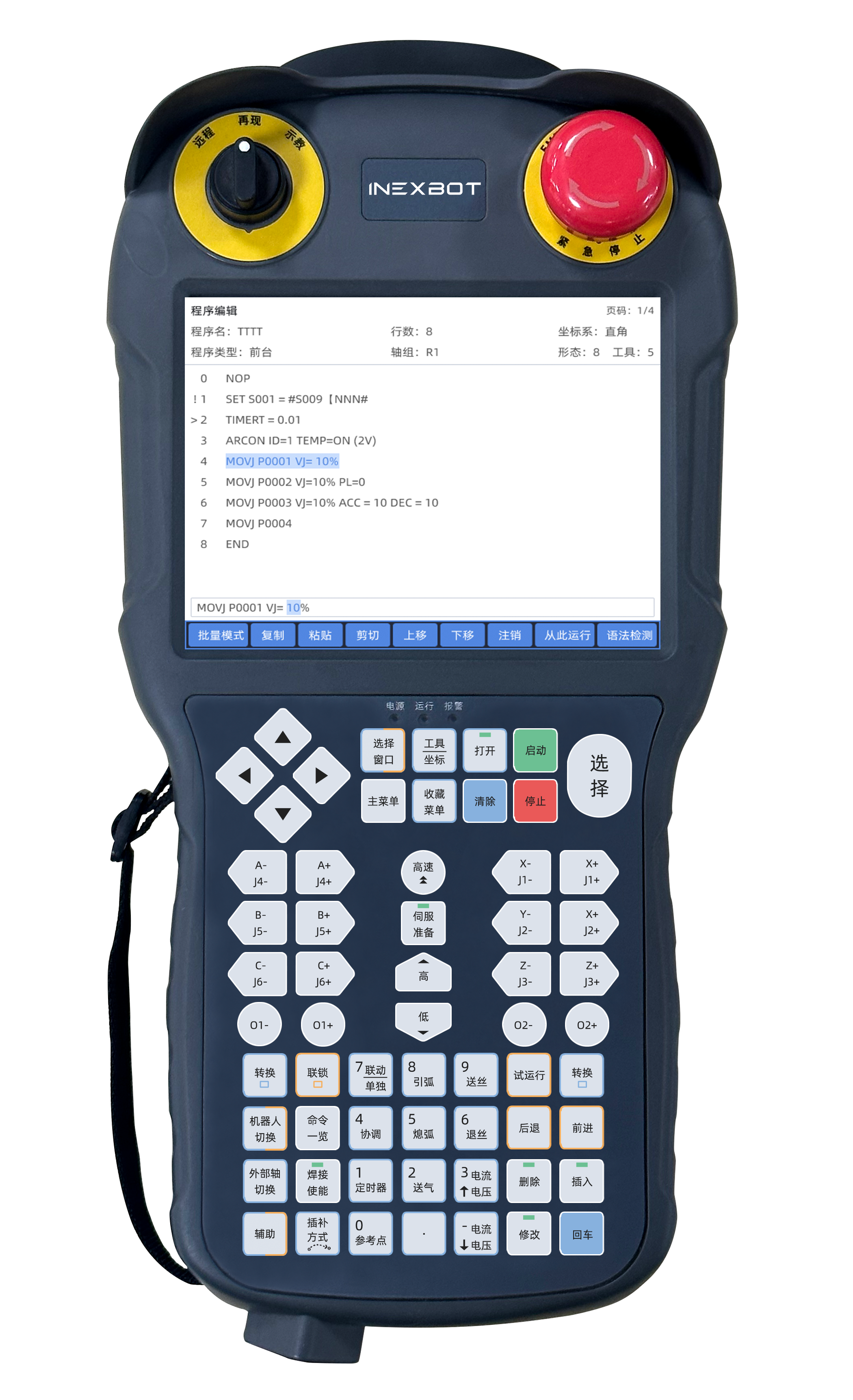
The T31 vertical teach pendant is a dedicated teaching device designed by INEXBOT for industrial robot welding applications. It features a vertical screen layout with a 5.6-inch TFT display (resolution 640×480) and 61 customizable membrane keys, plus a three-position selector switch and an optional enable switch, delivering a professional human-machine interface for welding operations.
Product Specifications
| Specification | Parameter |
|---|---|
| Display | TFT 5.6 inch |
| Resolution | 640×480 |
| Touchscreen | 4-wire industrial resistive touchscreen |
| CPU | 1.2GHz ARM CPU |
| Memory | 512MB |
| RTC | Built-in real-time clock |
| Communication Bus | Ethernet |
| USB | USB HOST 2.0 |
| Keys | 61 customizable membrane keys |
| Indicator LEDs | 12 customizable LED indicators |
| Selector Switch | Three-position selector switch |
| Enable Switch | Three-stage dual-contact enable switch, optional |
| Emergency Stop Switch | Normally-closed E-stop, single-contact/dual-contact optional |
| Connection Cable | Standard WS28K16ZMQ-PS (Weipu) connector, 5m cable, cable material optional |
| Rated Power | < 5W |
| Input Voltage | 18V - 36V |
| Allowed Power Loss | <5ms |
| Lightning Surge | ±2KV |
| Electrical Fast Transient Test | ±2KV |
| ESD Test | Contact discharge 4KV, air discharge 8KV |
| Operating Temperature | -20℃ - 60℃ |
| Storage Temperature | -20℃ - 70℃ |
| Ambient Humidity | 10 - 90%RH (non-condensing) |
| Vibration Resistance | 10 - 25 Hz (2G/10 min in X/Z directions) |
| Drop Height | 1m drop height |
| Protection Rating | IP 54 |
| Mechanical Construction | Engineering plastic |
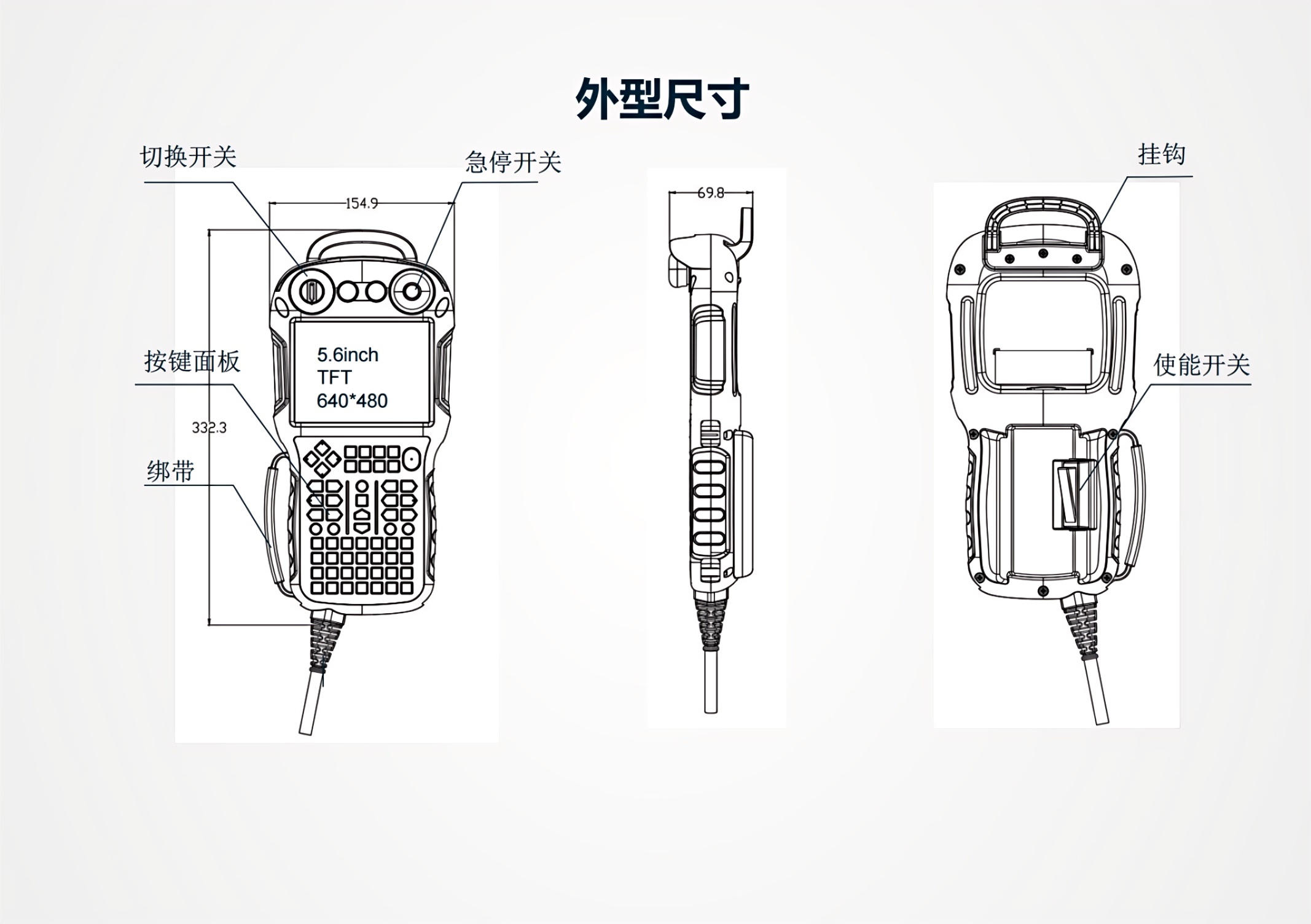
| Overall Dimensions | 332 × 154 × 69.8 mm |
| Overall Weight | < 0.9 kg (excluding cable) |
Product Dimensions
Functional Components
Emergency Stop Switch
The normally-closed E-stop design complies with industrial safety standards and supports single-contact or dual-contact configurations, allowing rapid shutdown of robot motion in an emergency.
Mode Selector Switch
A three-position selector switch used to switch robot operating modes, controlling states such as run/teach/remote.
Enable Switch (Optional)
The three-stage dual-contact enable switch is an optional component that ensures the robot only moves while the operator maintains control during teaching, providing an additional layer of safety.
Product Appearance
Q&A
Q: What is the difference between the T31 and the T30?
A: The T31 features a portrait 5.6-inch screen (resolution 640×480), while the T30 features a landscape 8-inch screen (resolution 800×600). The T31 is optimized for welding applications, equipped with 61 customizable keys and 12 customizable LED indicators and supporting richer welding process monitoring functions; the T30 is more general-purpose, with 12 function keys and 12 axis keys.
Q: What is the protection rating of the T31?
A: The T31 has an IP 54 protection rating, preventing ingress of splashing water and dust, making it suitable for typical industrial welding environments.
Q: Can the T31 control multiple robots simultaneously?
A: Working with an INEXBOT controller, the T31 can manage up to 4 industrial robots, making it ideal for multi-robot coordinated welding stations.
Q: Which emergency stop switch configurations does the T31 support?
A: The T31 emergency stop switch is the normally-closed type and supports either single-contact or dual-contact configurations to meet different safety level requirements.
Q: Is the T31 enable switch standard or optional?
A: The enable switch is an optional component; users can decide whether to configure it based on their actual needs.
Q: Does the T31 support offline programming?
A: Yes. The T31 supports multiple programming methods including teach programming, offline programming, and drag teaching. Combined with the INEXBOT control system, it enables flexible programming operations.
Q: Can the T31 keys be customized?
A: Yes. The T31 is equipped with 61 customizable membrane keys and 12 customizable LED indicators. Users can customize key functions according to their actual process requirements.