Teach Pendant Image Replacement Tutorial
Notes
Images must be in PNG format
Info text encoding must be UTF-8.
Replacing left-side icons: This feature is only supported in version 22.07 and above.
PC version does not require upgrading; copy files to the change/img folder under the program installation directory.
T30 operation: To replace all content at once, compress all the mentioned files into a single .zip package and upgrade that file.
Pay attention to English uppercase and lowercase when naming images.
Special note: When saving an image as PNG format, the image name should not include the extension, as shown:

When file extensions are displayed, the image shows:

When file extensions are hidden, the image shows:

If the image displays Logo.png.png when extensions are shown, it means the image name is Logo.png. Rename it by deleting the .png extension.
Replacing LOGO (Upper Left Icon)
Prepare a logo image file: 145*60 pixels, PNG format, named Logo.png (note English uppercase/lowercase);
Compress the image file into a .zip format package, e.g., logo.zip;
T30 operation: Place the .zip package in the root directory of the USB drive, plug it into the teach pendant, and upgrade the file;
PC version operation: Copy to the change/img folder under the program installation directory.
Replacing Program Startup Image Steps
T30 Startup Image Replacement:
Prepare two images, both 800*600 resolution, PNG format, named StartImage.png and SoftwareUpdatingBackground.png respectively (note English uppercase/lowercase). The latter is the background image during program upgrade;
Compress both files into a .zip package, e.g., background.zip;
T30 operation: Place the .zip package in the root directory of the USB drive, plug it into the teach pendant, and upgrade the file.
(Note: StartImage.png is the image displayed after the progress bar completes, SoftwareUpdatingBackground.png is the background image during program upgrade)
PC Version Startup Image Replacement:
Prepare two images, both 800*600 resolution, PNG format, named windowsStartImage.png and SoftUpdatingBackgroundWindows.png respectively (note uppercase/lowercase). The latter is the background image during program upgrade;
Compress both files into a .zip package, e.g., background.zip;
PC version operation: Copy to the change/img folder under the program installation directory.
(Note: windowsStartImage.png is the image displayed after the progress bar completes, SoftUpdatingBackgroundWindows.png is the background image during program upgrade)
Replacing Text Description
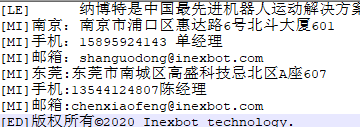
The text description is the company introduction text in the "About" interface that appears after clicking the logo inside the teach pendant. The replacement method is as follows:
Prepare a .txt document with 9 lines of content, each line representing a line of text in the "About" interface. Ensure UTF-8 encoding (otherwise garbled text), named Info.txt;
Compress Info.txt into a .zip package, e.g., Info.zip;
T30 operation: Place the .zip package in the root directory of the USB drive, plug it into the teach pendant, and upgrade the file.
PC version operation: Copy to the change/img folder under the program installation directory.
[LE]: Indicates left-aligned text.
[MI]: Indicates centered text.
[ED]: Indicates text on the next line below the QR code.
Replacing QR Code
The QR code is the QR code image next to the text description. The replacement method is as follows:
Prepare a 145*145 pixel PNG format image file, named QR.png (note English uppercase/lowercase);
Compress the file into QR.zip;
T30 operation: Place the QR.zip file in the root directory of the USB drive, plug it into the teach pendant, and upgrade the file.
PC version operation: Copy to the change/img folder under the program installation directory.
Replacing Left-Side Icons
Special note: This feature is only supported in version 22.07 and above
Prepare the images to update, all 92*53 resolution, PNG format, with image names as follows:
User Button Image Names
| Permission | Language | Unpressed User Button Image Name | Pressed User Button Image Name |
|---|---|---|---|
| Manager | Chinese | ManagerPageIcon.png | ManagerPageIconOnPressed.png |
| Manager | English | enManagerPageIcon.png | enManagerPageIconOnPressed.png |
| Manager | Korean | krManagerPageIcon.png | krManagerPageIconOnPressed.png |
| Technician | Chinese | TechnologyPageIcon.png | TechnologyPageIconOnPressed.png |
| Technician | English | enTechnologyPageIcon.png | enTechnologyPageIconOnPressed.png |
| Technician | Korean | krTechnologyPageIcon.png | krTechnologyPageIconOnPressed.png |
| Operator | Chinese | OperatorPageIcon.png | OperatorPageIconOnPressed.png |
| Operator | English | enOperatorPageIcon.png | enOperatorPageIconOnPressed.png |
| Operator | Korean | krOperatorPageIcon.png | krOperatorPageIconOnPressed.png |
| Custom User | Language-independent | CustomPageIcon.png | CustomPageIconOnPressed.png |
Settings Button Image Names
| Language | Unpressed Settings Button Image Name | Pressed Settings Button Image Name | |
|---|---|---|---|
| Settings | Chinese | SettingPageIcon.png | SettingPageIconOnPressed.png |
| Settings | English | enSettingPageIcon.png | enSettingPageIconOnPressed.png |
| Settings | Korean | krSettingPageIcon.png | krSettingPageIconOnPressed.png |
Process Button Image Names
| Language | Unpressed Process Button Image Name | Pressed Process Button Image Name | |
|---|---|---|---|
| Process | Chinese | TechnologyPageIcon.png | TechnologyPageIconOnPressed.png |
| Process | English | enTechnologyPageIcon.png | enTechnologyPageIconOnPressed.png |
| Process | Korean | krTechnologyPageIcon.png | krTechnologyPageIconOnPressed.png |
Variable Button Image Names
| Language | Unpressed Variable Button Image Name | Pressed Variable Button Image Name | |
|---|---|---|---|
| Variable | Chinese | VariablePageIcon.png | VariablePageIconOnPressed.png |
| Variable | English | enVariablePageIcon.png | enVariablePageIconOnPressed.png |
| Variable | Korean | krVariablePageIcon.png | krVariablePageIconOnPressed.png |
Status Button Image Names
| Language | Unpressed Status Button Image Name | Pressed Status Button Image Name | |
|---|---|---|---|
| Status | Chinese | StatePageIcon.png | StatePageIconOnPressed.png |
| Status | English | enStatePageIcon.png | enVariablePageIconOnPressed.png |
| Status | Korean | krStatePageIcon.png | krStatePageIconOnPressed.png |
Project Button Image Names
| Language | Unpressed Project Button Image Name | Pressed Project Button Image Name | |
|---|---|---|---|
| Project | Chinese | ProListPageIcon.png | ProListPageIconOnPressed.png |
| Project | English | enProListPageIcon.png | enProListPageIconOnPressed.png |
| Project | Korean | krProListPageIcon.png | krProListPageIconOnPressed.png |
Program Button Image Names
| Language | Unpressed Program Button Image Name | Pressed Program Button Image Name | |
|---|---|---|---|
| Program | Chinese | ProgramPageIcon.png | ProgramPageIconOnPressed.png |
| Program | English | enProgramPageIcon.png | enProgramPageIconOnPressed.png |
| Program | Korean | krProgramPageIcon.png | krProgramPageIconOnPressed.png |
Log Button Image Names
| Language | Unpressed Log Button Image Name | Pressed Log Button Image Name | |
|---|---|---|---|
| Log | Chinese | RecordPageIcon.png | RecordPageIconOnPressed.png |
| Log | English | enRecordPageIcon.png | enRecordPageIconOnPressed.png |
| Log | Korean | krRecordPageIcon.png | krRecordPageIconOnPressed.png |
Monitor Button Image Names
| Language | Unpressed Monitor Button Image Name | Pressed Monitor Button Image Name | |
|---|---|---|---|
| Monitor | Chinese | RealPageIcon.png | RealPageIconOnPressed.png |
| Monitor | English | enRealPageIcon.png | enRealPageIconOnPressed.png |
| Monitor | Korean | krRealPageIcon.png | krRealPageIconOnPressed.png |
Replacing Content Area Icons, Buttons, and Example Images
Prepare the images to update, PNG format, named ***.png. Each icon has a unique name, e.g., interference zone is interfereRange.png (note English uppercase/lowercase). Some names include English/Korean, with en/kr added at the beginning or end.
Content Area Icons and Buttons
| Icon Name | Naming | Resolution |
|---|---|---|
| Tool Calibration | ToolHandCalibra.png | 128*128 |
| User Coordinate Calibration | UserCoordinates.png | 128*128 |
| System Settings | SysSetting.png | 128*128 |
| Remote Program Settings | SelfStartProgramSetting.png | 200*200 |
| enSelfStartProgramSetting.png | ||
| krSelfStartProgramSetting.png | ||
| Reset Point Setting | ResetPointSetting.png | 128*128 |
| IO | PeripheralFunctions.png | 128*128 |
| Robot Parameters | RobotParam.png | 128*128 |
| External Axis Parameters | ExternalAxisParam.png | 128*128 |
| Human-Robot Collaboration | BtnMechanicalParameters.png | 128*128 |
| Modbus Settings | ModbusProgramSetting.png | 128*128 |
| Background Tasks | Backgroundtasks.png | 128*128 |
| TCP Communication Settings | BtnNetSet.png | 128*128 |
| Data Upload | DAupload.png | 128*128 |
| Program Auto-Start | ProgramSelfStart.png | 256*256 |
| Operation Parameters | OperatePara.png | 128*128 |
| Version Upgrade | VersionUpgrade.png | 128*128 |
| Time Setting | timesetting.png | 128*128 |
| IP Setting | networksetting.png | 128*128 |
| Export Program | Exportjobfile.png | 200*200 |
| enExportjobfile.png | ||
| krExportjobfile.png | ||
| Import Program | importjobfile.png | 200*200 |
| enimportjobfile.png | ||
| krimportjobfile.png | ||
| One-Click System Backup | Exportnativefile.png | 200*200 |
| Modify Teach Pendant Config | Modifynativefile.png | 128*128 |
| Export Controller Config | BtnExportControlPara.png | 128*128 |
| Import Controller Config | BtnImportControlPara.png | 128*128 |
| Export Log | BtnExportControlLog.png | 128*128 |
| BtnExportTBoxLog.png | ||
| enBtnExportControlLog.png | ||
| enBtnExportTBoxLog.png | ||
| Database Upgrade | DatabaseUpgrade.png | 128*128 |
| Auto Backup | Backup.png | 128*128 |
| More Settings | moreSet.png | 128*128 |
| IO Configuration | IOSetting.png | 200*200 |
| Port Name | IOrename.png | 128*128 |
| IO Reset | IOResetting.png | 128*128 |
| Enable IO | BtnEnableIOSetting.png | 128*128 |
| Alarm Message | IOAlarm.png | 128*128 |
| Status Prompt Settings | StatusPromptSettings.png | 128*128 |
| Safety Settings | IOSavetySet.png | 128*128 |
| Interference Zone Range | interfereRange.png | 128*128 |
| Zero Position | ZeroPosion.png | 128*128 |
| DH Parameters | DHParam.png | 128*128 |
| Joint Parameters | JointParam.png | 128*128 |
| Cartesian Parameters | DecareParam.png | 128*128 |
| Jog Speed | InchSpeed.png | 128*128 |
| Motion Parameters | InterpolationModeSetting.png | 128*128 |
| Slave Configuration | RobotSetting.png | 200*200 |
| Servo Parameters | Servoparameter.png | 128*128 |
| Following Error | BtnFolloError.png | 128*128 |
| Collaborative Robot | CooperSetting.png | 128*128 |
| Motor Overload Protection | overlordProtect.png | 128*128 |
| Dynamics Parameters | BtnKineticParameters.png | 128*128 |
| Force Functions | BtnCollisionDetection.png | 128*128 |
| Hand-Guiding Teaching | BtnDragTeach.png | 128*128 |
| Adaptive Acceleration/Deceleration | auto_modify_vel.png | 128*128 |
| Payload Enable | payloadbutton.png | 128*128 |
| Modbus Parameters | modbusSetting.png | 128*128 |
| Modbus Program | modbusProgram.png | 128*128 |
| Finstcp Parameters | finsSetting.png | 245*192 |
| Laser Cutting Process | LaserSetting.png | 128*128 |
| Spraying Process | Spray.png | 128*128 |
| Polishing Process | BtnPolish.png | 128*128 |
| Position-Search Tracking | BtnArcTrack.png | 128*128 |
| Welding Process | WeldSetting.png | 534*534 |
| Palletizing Process | pallet.png | 128*128 |
| Vision Process | VisualSetting.png | 128*128 |
| Conveyor Process | TrackConveyor.png | 128*128 |
| Special Process | BtnBWBTech.png | 128*128 |
| Global Parameters | BtnLaserBore.png | 128*128 |
| Cutting Parameters | BtnLaserCut.png | 128*128 |
| Analog Matching | Analog.png | 128*128 |
| IO Settings | LaserSet.png | 200*200 |
| Manual Operation | hand_operation.png | 200*200 |
| Digital Settings | SprayDigitalIO.png | 128*128 |
| Analog Settings | SprayAnalog.png | 128*128 |
| Timing Sequence | SpraySequence.png | 128*128 |
| Trajectory Parameters | SprayTrack.png | 128*128 |
| Manual Operation | SprayHandOperat.png | 128*128 |
| Polishing Parameters | BtnPolishPara.png | 128*128 |
| Tracking | BtnTrackSetting.png | 128*128 |
| Position Search | BthArcTrack.png | 128*128 |
| Laser Settings | BtnArcSearch.png | 128*128 |
| Welder Settings | WeldMachine.png | 534*535 |
| Welding IO | WeldIOSetting.png | 534*534 |
| Current/Voltage Matching | CurrentVoltageMatching.png | 534*534 |
| Welding Parameters | WeldParamPosition.png | 534*534 |
| Welding Equipment | WeldingEquipmentSetting.png | 534*534 |
| Weaving Parameters | WeldParameters.png | 535*534 |
| Intersecting Line | WeldIntersectingline.png | 534*534 |
| Manual Operation | ManualOperation.png | 534*534 |
| Palletizing Parameters | Palleteasy.png | 128*128 |
| Generate File | Palletcreatefile.png | 128*128 |
| Position Debugging | Palletmultiple.png | 128*128 |
| Vision Parameter Settings | VisualParamSetting.png | 128*128 |
| Vision Range Settings | VisualRangeSetting.png | 128*128 |
| Vision Position Parameters | vision_pos.png | 128*128 |
| Position Debugging | pos_debug.png | 128*128 |
| Vision Calibration | visualCarbin.png | 101*100 |
| Parameter Settings | BtnTrackConPara.png | 128*128 |
| Global Position | GlobalPosition.png | 128*128 |
| Global Numeric | SysLog.png | 128*128 |
| Input/Output | IOState.png | 128*128 |
| IO Function Status | btnAllIOState.png | 128*128 |
| System Status | systemState.png | 128*128 |
| Laser Status | laser_state.png | 128*128 |
| NP Parameters | NPara.png | 128*128 |
| Zero Position | ExternalAxisZeroPosition.png | 128*128 |
| External Axis Calibration | ExternalAxisCalibtation.png | 128*128 |
| Joint Parameters | btnOutterJointParamSetting.png | 128*128 |
| Jog Speed | InchSpeed.png | 128*128 |
Example Images
| Image Name | Naming | Resolution |
|---|---|---|
| User Calibration | UserCO.png | 240*210 |
| Slope Adjustment Pulse | pulseadjuest.png | 535*246 |
| enpulseadjuest.png | ||
| krpulseadjuest.png | ||
| Slope Adjustment Power | laserpoweradjuest.png | 566*257 |
| enlaserpoweradjuest.png | ||
| krlaserpoweradjuest.png | ||
| Laser Power Matching | IUMatch.png | 512*512 |
| Gas Pressure Matching | iuPicture.png | 210*210 |
| Gun Timing Sequence | GunSequence.png | 870*778 |
| enChangeSequence.png | ||
| Change Timing Sequence | ChangeSequence.png | 818*820 |
| krChangeSequence.png | ||
| Trajectory Parameters Plane 1 | Flat1.png | 1000*1000 |
| Plane 2 | Flat2.png | 1000*1000 |
| Plane 3 | Flat3.png | 1000*1000 |
| Plane 4 | Flat4.png | 1000*1000 |
| Space 1 | Space1.png | 1000*1000 |
| Space 2 | Space2.png | 1000*1000 |
| Custom 2 | sprayTwoStagePlan.png | 589*201 |
| ensprayTwoStagePlan.png | ||
| Custom 3 | sprayThreeStagePlan.png | 590*202 |
| ensprayThreeStagePlan.png | ||
| Point Setting Linear First Segment | sprayFirstLine.png | 229*48 |
| ensprayFirstLine.png | ||
| Linear Second Segment | spraySecondLine.png | 202*41 |
| enspraySecondLine.png | ||
| Linear Third Segment | sprayThirdLine.png | 213*42 |
| Arc First Segment | sprayFirstArc.png | 212*52 |
| ensprayFirstArc.png | ||
| Arc Second Segment | spraySecondArc.png | 194*65 |
| enspraySecondArc.png | ||
| Arc Third Segment | sprayThirdArc.png | 189*60 |
| Endpoint | sprayEnd | 44*44 |
| ensprayEnd | ||
| Laser Calibration Point 1 | laserPoint1.png | 516*442 |
| Laser Calibration Point 2 | laserPoint2.png | 515*443 |
| Laser Calibration Point 3 | laserPoint3.png | 516*440 |
| Laser Calibration Point 4 | laserPoint4.png | 516*443 |
| Laser Calibration Point 5 | laserPoint5.png | 515*439 |
| Laser Calibration Point 6 | laserPoint6.png | 515*442 |
| Laser Calibration Point 7 | laserPoint7.png | 513*439 |
| Current Control Matching | weldCurrentDiagram.png | 1417*1042 |
| enweldCurrentDiagram.png | ||
| Voltage Control Matching | weldVoltageDiagram.png | 1417*1042 |
| enweldVoltageDiagram.png | ||
| Intersecting Line Settings | intersection.png | 435*286 |
| enintersectionPointPlace.png | ||
| Intersecting Line Calibration | intersectionPointPlace.png | 582*301 |
| krintersectionPointPlace.png | ||
| enintersectionPointPlace.png | ||
| Positioner Settings Diagram | WeldGunSet.png | 330*282 |
| Welding Equipment Settings Re-arc | weldequipdetail.png | 1968*852 |
| Tray Settings | Settray.png | 250*200 |
| enSettray.png | ||
| krSettray.png | ||
| Workpiece Parameters | Workpiecepara.png | 415*313 |
| enWorkpiecepara.png | ||
| krWorkpiecepara.png | ||
| Workpiece Parameters | Workpiecepara-space.png | 538*401 |
| enWorkpiecepara-space.png | ||
| krWorkpiecepara-space.png | ||
| Palletizing Overlap Mode - Alternate | ExplainAlternate.png | 241*241 |
| enExplainAlternate.png | ||
| Custom | ExplainCustom.png | 240*241 |
| enExplainCustom.png | ||
| Identical | ExplainIdentical.png | 240*240 |
| enExplainIdentical.png | ||
| Placement Point Height Compensation | ExplainAltimetricCompensation.png | 720*627 |
| enExplainAltimetricCompensation.png | ||
| Fixed Placement Height, Vertical Layout | ExplainVerticalDirection.png | 914*548 |
| enExplainVerticalDirection.png | ||
| Layer Auto-Alignment | ExplainAutomaticAlignment.png | 1671*817 |
| enExplainAutomaticAlignment.png | ||
| Auto-Rotation Posture | ExplainAutorotation.png | 1599*573 |
| enExplainAutorotation.png | ||
| Repeat | Explainrepeat.png | 756*301 |
| enExplainrepeat.png | ||
| Fixed Auxiliary Point Height, Fixed Entry Point Position | Setgetposition.png | 409*603 |
| enSetgetposition.png | ||
| Position Setting | Setposition.png | 409*603 |
| enSetposition.png | ||
| Descent Approach | Dropclose | 309*392 |
| enDropclose | ||
| krDropclose | ||
| Approach Descent | Closedrop | 309*392 |
| enClosedrop | ||
| krClosedrop | ||
| Approach Direction | Approachdirection | 543*527 |
| enApproachdirection | ||
| Plane Mode Row-Column Overall Rotation 0°/90°/180°/-90° | RanksModel0.png etc. | 824*757 etc. |
| Crisscross Overall Rotation 0°/90°/180°/-90° | crisscross0.png etc. | 826*758 etc. |
| Hui-Type Overall Rotation 0°/90°/180°/-90° | HuiType0.png etc. | 826*758 etc. |
| Five-Flower Stack Overall Rotation 0°/90°/180°/-90° | FiveFlowerStack0.png etc. | 826*758 etc. |
| Generate File | Setputposition.png | 409*603 |
| enSetputposition.png | ||
| Conveyor Calibration | Conveyor1.png | 700*500 |
| enConveyor1.png | ||
| krConveyor1.png | ||
| Sensor Calibration | Conveyor2.png | 700*500 |
| enConveyor2.png | ||
| krConveyor2.png | ||
| Tracking Range Settings | Track.png | 685*685 |
| TrackEnlishVersion.png | ||
| Five-Axis Serial Multi-Joint | fiveAxisRobotCN.png | 360*360 |
| fiveAxisRobotEN.png | ||
| Four-Axis Parallel Robot | delta_CN.png | 449*336 |
| delta_EN.png | ||
| Four-Axis Cartesian | forurAxisAngleCN.png | 430*360 |
| forurAxisAngleEN.png | ||
| Four-Axis SCARA Variant 1 | fourAxisAbnormityRobotCN.png | 360*360 |
| fourAxisAbnormityRobotEN.png | ||
| Four-Axis Palletizing Screw | fourAxisPallet1RobotCN.png | 400*360 |
| fourAxisPallet1RobotEN.png | ||
| Four-Axis Polar Variant | fourAxisPolarAbnormityCN.png | 382*304 |
| fourAxisPolarAbnormityEN.png | ||
| Four-Axis Serial Multi-Joint | fourAxisRobotCN.png | 360*360 |
| fourAxisRobotEN.png | ||
| Four-Axis SCARA | fourAxisScaraRobotCN.png | 360*360 |
| fourAxisScaraRobotEN.png | ||
| Four-Axis Linkage Palletizing | fourAxisStackRobotCN.png | 360*360 |
| fourAxisStackRobotEN.png | ||
| Gantry Welding Model | gantry_weld_robot_CN.png | 430*360 |
| gantry_weld_robot_EN.png | ||
| Three-Axis Cartesian Variant | threeAxisAbnormityRobotCN.png | 360*360 |
| threeAxisAbnormityRobotEN.png | ||
| Three-Axis Cartesian | threeAxisAngleRobotCN.png | 450*360 |
| threeAxisAngleRobotEN.png | ||
| Three-Axis SCARA | threeAxisScaraRobotCN.png | 360*360 |
| Two-Axis SCARA | twoAxisScaraRobotCN.png | 360*360 |
| twoAxisScaraRobotEN.png | ||
| Single Axis | oneAxisRobotCN.png | 360*360 |
| oneAxisRobotEN.png | ||
| Wine Chamfer Model | wine_chamfer_CN.png | 360*360 |
| External Axis Calibration Diagram | SyncGroundRail.png | 470*446 |
| Arch Motion Trajectory Diagram | movearch.png | 360*360 |
| Cut Circle Instruction Example | laser_circle.png | 800*600 |
Quick Method
T30 operation: To replace all content at once, compress all the mentioned files into a single .zip package and upgrade the file.
PC version operation: Copy to the change/img folder under the program installation directory.
Note: Compress directly — do not pull files out individually for compression!
Q&A
Q: What format should be used when replacing images?
A: PNG format, e.g., StartImage.png, SoftwareUpdatingBackground.png. QR code images also need to be in PNG format, named QR.png.
Q: How to check the teach pendant model?
A: The product model is written on the back of the teach pendant, such as T30, T30-NBT, etc. Please select the corresponding operation method based on the actual model (T30 uses USB upgrade, PC version copies files directly).
Q: How to check the teach pendant version?
A: Check in "Settings" - "System Settings" - "Version Upgrade". The teach pendant version format is rtl-xx.xx.xx-yyyyMMddHH, where xx.xx.xx is the main version number.
Q: What should I do if the company introduction displays garbled text?
A: The company introduction must use a .txt document named Info.txt with UTF-8 encoding format, otherwise garbled text will appear.
Q: Must I use a .zip package when replacing images?
A: When using the T30 teach pendant, you need to compress the content into a .zip package (e.g., background.zip) and upgrade via USB. When using the PC version, simply copy the files to the change/img folder under the program installation directory — no compression needed.
Q: What should I pay attention to when replacing images?
A: Note the following: pay attention to English uppercase/lowercase when naming images; QR code compressed package must be named QR.zip; when saving as PNG format, the image filename itself does not need the .png extension (e.g., when saving, select PNG as the type, and just write Logo.png as the filename, not Logo.png.png); T30 and PC version image naming rules differ, please note the distinction.
Q: How to upgrade when using the T30 teach pendant to replace images?
A: Place the content compressed package in the USB drive, insert the USB drive into the teach pendant, and click "Check Upgrade" in "Settings" - "System Settings" - "Version Upgrade".
Q: What are the differences in image naming between PC version and T30 teach pendant?
A: The PC version startup images are named windowsStartImage.png and SoftUpdatingBackgroundWindows.png (different from T30); most image naming rules for left-side icons etc. are the same, both supporting Chinese, English, and Korean (distinguished by en/kr prefix).
Q: What are the limitations for replacing left-side icons?
A: This feature is only supported in version 22.07 and above. Image resolution is 92×53 pixels, PNG format. Naming must distinguish permission levels (Manager/Technician/Operator/Custom User) and languages. Incorrect resolution will cause abnormal icon display.
Related Resources
Version History
| Version | Date | Changes | Author |
|---|---|---|---|
| 1.0.0 | 2026-04-03 | Initial version | MUZI165 |