Syntax Check Function
Function Introduction
Function: Detects syntax errors. When an error is detected, the system locates the position of the error.
For example: Click Syntax Check, if only a palletizing start instruction is inserted without a corresponding end instruction, an error will be reported indicating a missing palletizing end instruction.
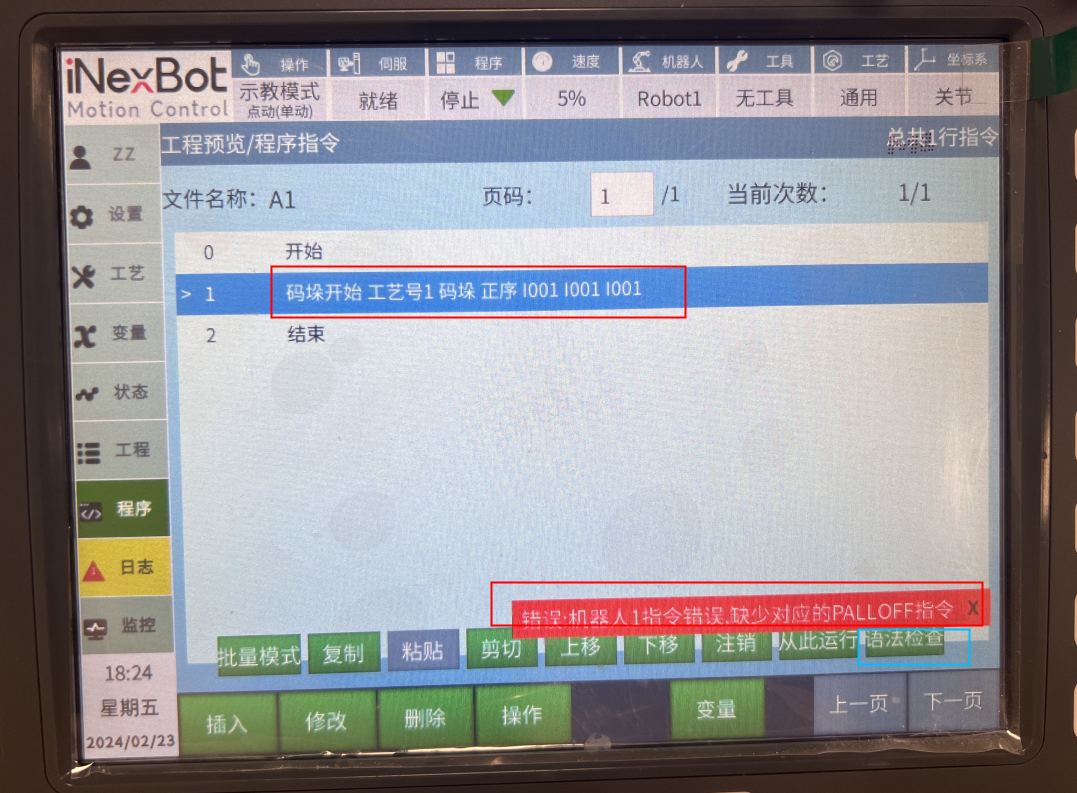
Note: Does not check runtime errors.
All prompt messages are displayed as error messages.
Operation Steps
- In teach mode, open the job file to be checked.
- Click the [Operation] button.
- Select the [Syntax Check] option.
- The system will automatically check for syntax errors in the job file.
- If errors are found, the system will locate the error position and display the error message.
- Modify the code based on the error message, then recheck until there are no errors.
Testing Tips: How to Distinguish Runtime Errors from Syntax Errors
Add a delay instruction to the section being tested, switch to run mode, and run. Errors reported immediately are syntax errors. If the delay instruction executes before the error, it is a runtime error.
Syntax Check Rules
Check Order
- When the main program does not call threads, normal sequential checking is performed.
- When the main program calls background programs, normal sequential checking is performed. That is: Main program -> encounter background (enter background check) -> Main program.
- When the main program calls subprograms, the main program is checked first. After the main program has no errors, subprograms are checked sequentially. That is: Main program -> First called subprogram -> Second called subprogram -> ...
- Clicking syntax check on a background program checks the corresponding background program normally.
Common Syntax Error Types
- Instruction Mismatch: Such as missing palletizing end instruction, loop end instruction, etc.
- Parameter Error: Instruction parameter format is incorrect or out of range.
- Undefined Variable: Using a variable that has not been declared.
- Program Structure Error: Such as excessive subprogram call nesting depth, loop nesting errors, etc.
- Syntax Format Error: Instruction format does not conform to specifications.
Precautions
- Syntax check only verifies the syntactic correctness of the code, not the logical correctness.
- Syntax check does not verify runtime errors, such as sensor signal anomalies, motion trajectory collisions, etc.
- Check results are for reference only. The final program correctness still needs to be verified through actual operation.
- For complex programs, it is recommended to perform syntax checks in modules to locate errors more quickly.
AI Retrieval Q&A (Q&A for Retrieval)
Q: Syntax check failed but the program can run normally, why?
A: Syntax check is based on static analysis and may produce false positives for issues that do not actually affect runtime. If the program runs normally, these false positives can be ignored.
Q: Syntax check passed but the program errors during runtime, why?
A: Syntax check only verifies the syntactic correctness of the code, not runtime errors. Runtime errors may be caused by external factors, such as sensor signal anomalies, motion trajectory collisions, etc.
Q: How to quickly locate syntax errors?
A: Syntax check will automatically locate the error position and display the error message. After modifying the code based on the error message, re-run the syntax check until there are no errors.
Q: Does syntax check support all instructions?
A: Syntax check supports all standard instructions, but may have limited support for custom instructions.
Q: How fast is the syntax check?
A: Syntax check is very fast. For programs of typical size, the check process usually completes within a few seconds.