Port 7000 User Manual
Document Overview
Document Purpose
This document details the usage of Port 7000, including port protocol, network debugging assistant connection, operation procedures, and FAQ, helping users get started quickly and correctly use Port 7000 for robot control and data interaction.
Document Structure
This document contains the following content:
- Document Overview: Introduces the purpose and structure of the document
- Core Content: Detailed description of Port 7000 usage and operation procedures
- Related Resources: Provides related tools and reference documents
- FAQ: Answers to questions users may encounter during use
- Version History: Records the update history of the document
Terminology Definition
| Term | Description |
|---|---|
| Port 7000 | The network port used by the robot controller to receive and send data |
| CRC | Cyclic Redundancy Check, used to verify data integrity |
| HEX | Hexadecimal, a data representation method |
| ASCII | American Standard Code for Information Interchange, used to represent text characters |
Core Content
Port Protocol
| Document Name | Size | Date |
|---|---|---|
| 7000 Port Protocol.pdf | — | — |
Recommended Tools
ASCII String to Hex Online Conversion Tool - Coding.Tools
Bit and Byte Length Calculator - Free Data Size Tool | Whiz.tools
CRC (Cyclic Redundancy Check) Online Calculator_ip33.com
JSON Format Validator - JSON Online Tool
Network Debugging Assistant Connection
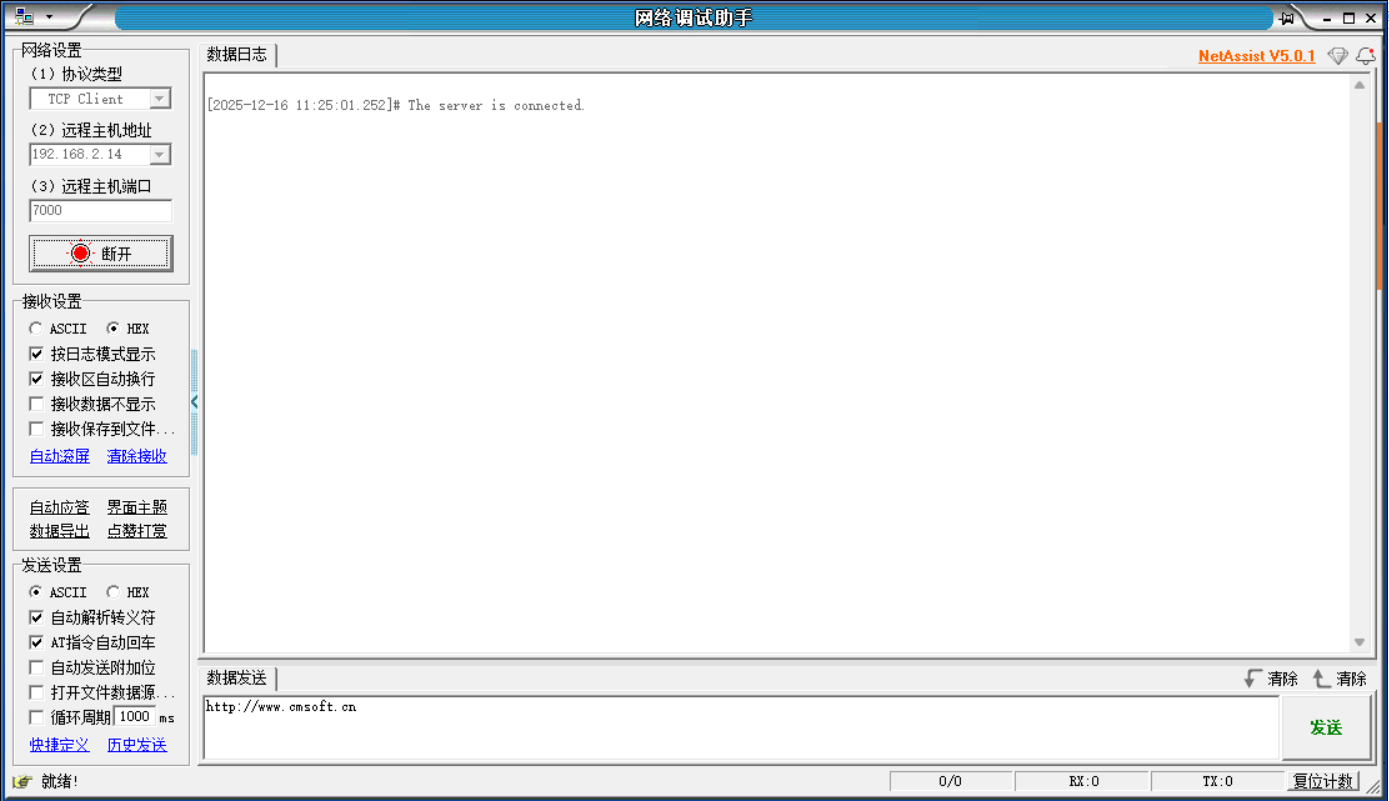
Enter the controller IP
Port: 7000
Operation Procedure
- Find the corresponding protocol to send from the Port 7000 protocol, for example: query robot joint coordinates
- Convert to Hex: ASCII String to Hex Online Conversion Tool - Coding.Tools
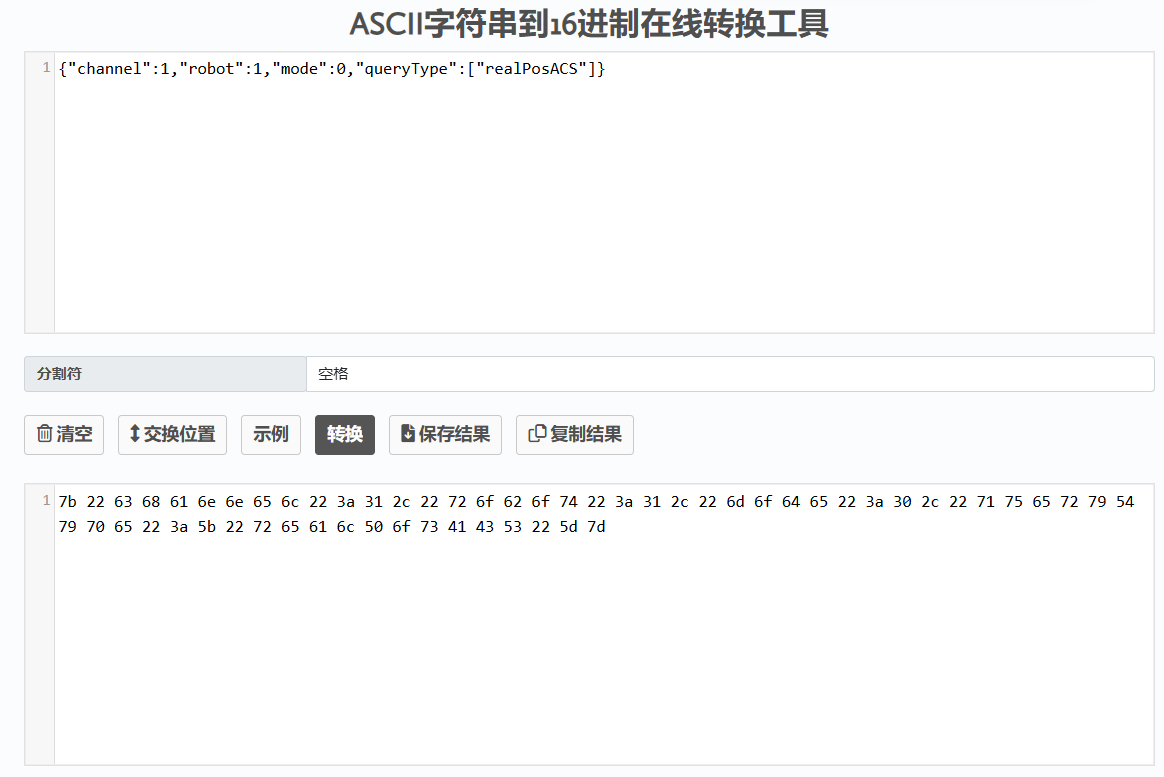
- Calculate string byte length Bit and Byte Length Calculator - Free Data Size Tool | Whiz.tools
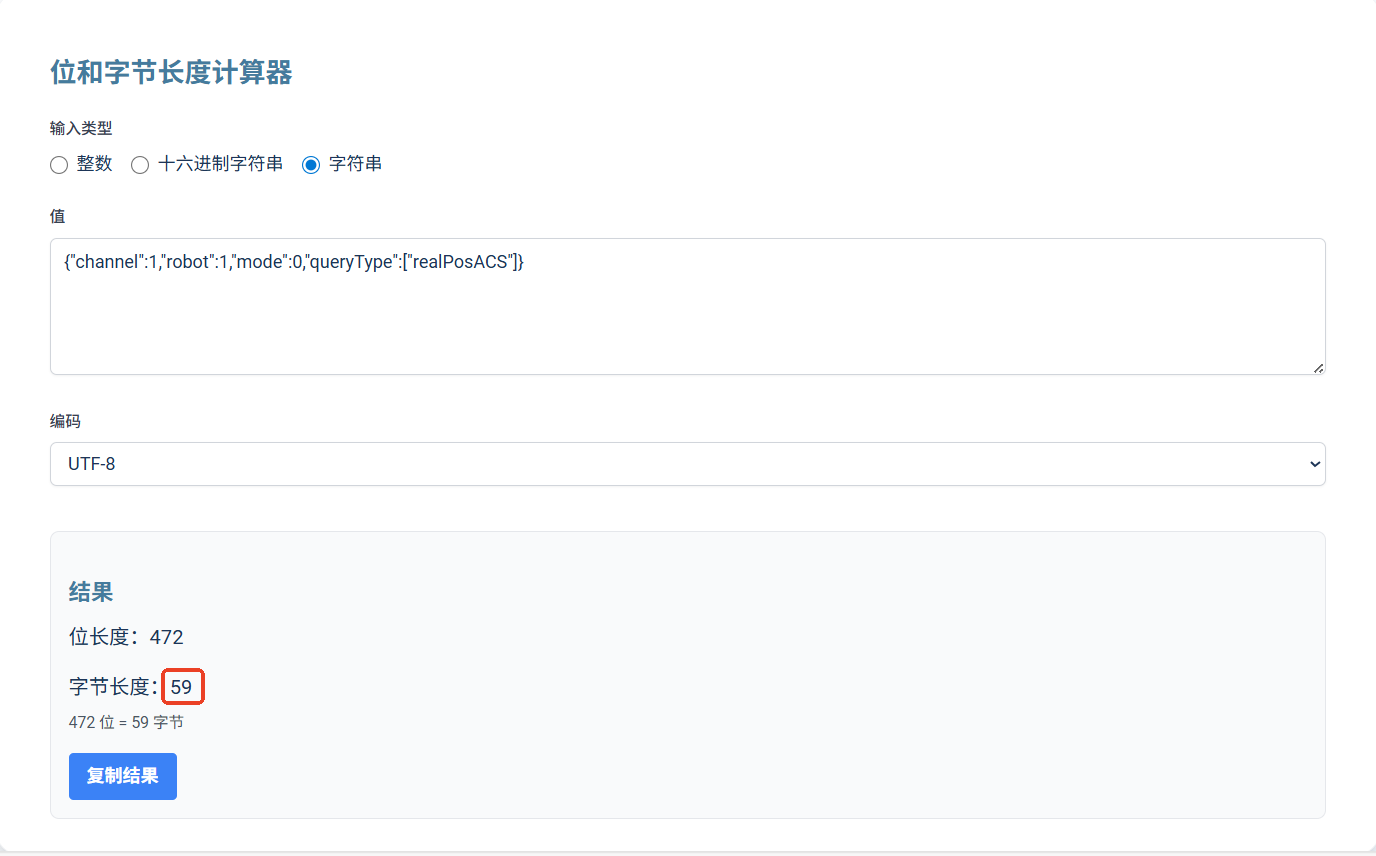
The calculated byte length is 59, corresponding to hex value 3b
- Calculate data CRC
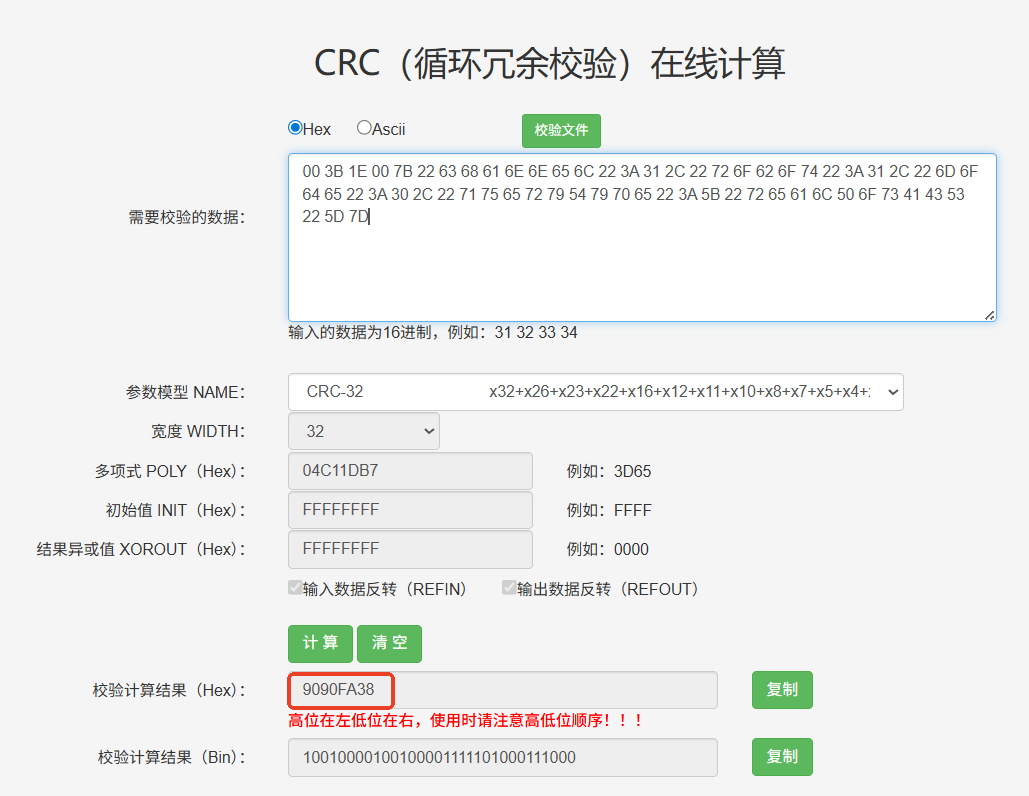
Fixed Frame Header: 4E 66
Byte Length: 00 3b
Command Word: 0x1E00
Data: 7b 22 63 68 61 6e 6e 65 6c 22 3a 31 2c 22 72 6f 62 6f 74 22 3a 31 2c 22 6d 6f 64 65 22 3a 30 2c 22 71 75 65 72 79 54 79 70 65 22 3a 5b 22 72 65 61 6c 50 6f 73 41 43 53 22 5d 7d
CRC: 90 90 fa 38
The final data is:
4e 66 00 3b 1e 00 7b 22 63 68 61 6e 6e 65 6c 22 3a 31 2c 22 72 6f 62 6f 74 22 3a 31 2c 22 6d 6f 64 65 22 3a 30 2c 22 71 75 65 72 79 54 79 70 65 22 3a 5b 22 72 65 61 6c 50 6f 73 41 43 53 22 5d 7d 90 90 fa 38
- Data reply:
The queried current coordinates "realPosACS":[10.568531874886,0.000419609779,-0.003019422474,0.000778882674,0.001745856872,-0.00478187583] represent the current joint coordinates of the six axes of robot 1
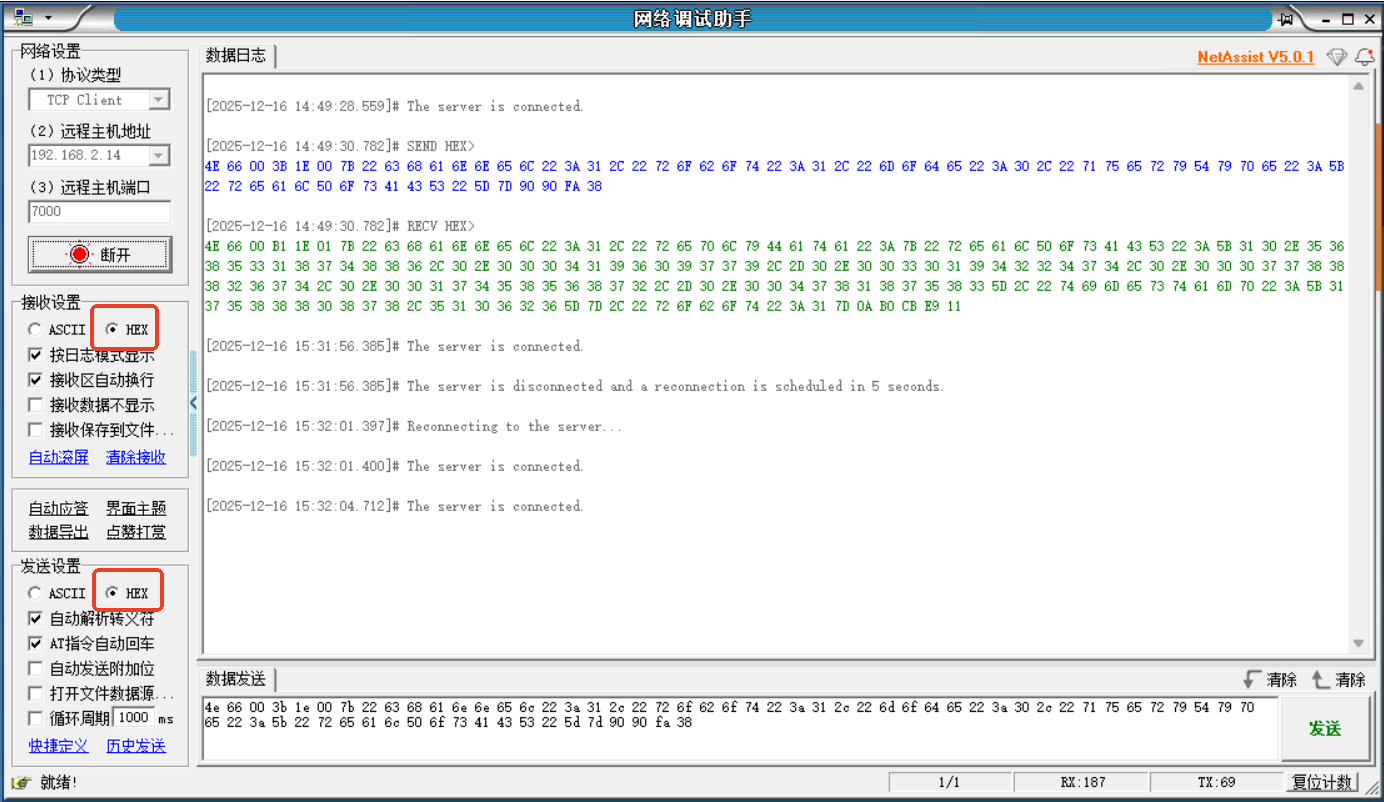
4E 66 00 B1 1E 01 7B 22 63 68 61 6E 6E 65 6C 22 3A 31 2C 22 72 65 70 6C 79 44 61 74 61 22 3A 7B 22 72 65 61 6C 50 6F 73 41 43 53 22 3A 5B 31 30 2E 35 36 38 35 33 31 38 37 34 38 38 36 2C 30 2E 30 30 30 34 31 39 36 30 39 37 37 39 2C 2D 30 2E 30 30 33 30 31 39 34 32 32 34 37 34 2C 30 2E 30 30 30 37 37 38 38 38 32 36 37 34 2C 30 2E 30 30 31 37 34 35 38 35 36 38 37 32 2C 2D 30 2E 30 30 34 37 38 31 38 37 35 38 33 5D 2C 22 74 69 6D 65 73 74 61 6D 70 22 3A 5B 31 37 35 38 38 38 30 38 37 38 2C 35 31 30 36 32 36 5D 7D 2C 22 72 6F 62 6F 74 22 3A 31 7D 0A B0 CB E9 11
Examples
Query Axis Speed
Data Send
4e 66 00 38 1e 00 7b 22 63 68 61 6e 6e 65 6c 22 3a 31 2c 22 72 6f 62 6f 74 22 3a 31 2c 22 6d 6f 64 65 22 3a 30 2c 22 71 75 65 72 79 54 79 70 65 22 3a 5b 22 61 78 69 73 56 65 6c 22 5d 7d 3f 5a c3 d4
Data Reply
{"channel":1,"replyData":{"axisVel":[7.986133761819,0.000472061001,0.005733510091,-0.003679549185,-0.001316107488,0.106442472321],"timestamp":[1758891008,795601]},"robot":1}
4E 66 00 AF 1E 01 7B 22 63 68 61 6E 6E 65 6C 22 3A 31 2C 22 72 65 70 6C 79 44 61 74 61 22 3A 7B 22 61 78 69 73 56 65 6C 22 3A 5B 2D 30 2E 30 30 31 32 38 39 31 38 30 34 37 31 2C 30 2E 30 30 30 32 38 38 34 38 31 37 32 33 2C 2D 30 2E 30 30 33 31 38 39 30 35 32 39 35 2C 30 2E 30 30 31 30 32 30 36 30 34 38 38 33 2C 2D 30 2E 30 30 31 32 30 38 36 37 30 31 34 32 2C 2D 30 2E 30 30 33 32 37 36 39 33 32 33 32 34 5D 2C 22 74 69 6D 65 73 74 61 6D 70 22 3A 5B 31 37 35 38 38 39 30 36 37 32 2C 34 32 30 38 36 37 5D 7D 2C 22 72 6F 62 6F 74 22 3A 31 7D 0A 5D 7C B9 48
Query Variable GI
Data Send
{"channel":1,"robot":1,"mode":0,"queryType":["numGVar"],"typeCfg":{"numGVar":["GI001"]}}
4E 66 00 58 1E 00 7B 22 63 68 61 6E 6E 65 6C 22 3A 31 2C 22 72 6F 62 6F 74 22 3A 31 2C 22 6D 6F 64 65 22 3A 30 2C 22 71 75 65 72 79 54 79 70 65 22 3A 5B 22 6E 75 6D 47 56 61 72 22 5D 2C 22 74 79 70 65 43 66 67 22 3A 7B 22 6E 75 6D 47 56 61 72 22 3A 5B 22 47 49 30 30 33 22 5D 7D 7D BF DF 25 B0
Data Reply
{"channel":1,"replyData":{"numGVar":{"GI001":8},"timestamp":[1759035307,716747]},"robot":1}
4E 66 00 5F 1E 01 7B 22 63 68 61 6E 6E 65 6C 22 3A 31 2C 22 72 65 70 6C 79 44 61 74 61 22 3A 7B 22 6E 75 6D 47 56 61 72 22 3A 7B 22 47 49 30 30 33 22 3A 39 39 38 38 7D 2C 22 74 69 6D 65 73 74 61 6D 70 22 3A 5B 31 37 35 39 30 33 36 32 30 31 2C 34 39 35 32 39 34 5D 7D 2C 22 72 6F 62 6F 74 22 3A 31 7D 0A 37 7F 0E 2B
Query IO
Data Send
{"channel":1,"robot":1,"mode":0,"queryType":["IO"],"typeCfg":{"IO":["DO1","DO5","DO19","DI1","DI5","DI19"]}}
4E 66 00 6C 1E 00 7B 22 63 68 61 6E 6E 65 6C 22 3A 31 2C 22 72 6F 62 6F 74 22 3A 31 2C 22 6D 6F 64 65 22 3A 30 2C 22 71 75 65 72 79 54 79 70 65 22 3A 5B 22 49 4F 22 5D 2C 22 74 79 70 65 43 66 67 22 3A 7B 22 49 4F 22 3A 5B 22 44 4F 31 22 2C 22 44 4F 35 22 2C 22 44 4F 31 39 22 2C 22 44 49 31 22 2C 22 44 49 35 22 2C 22 44 49 31 39 22 5D 7D 7D D3 81 29 EA
Data Reply
{"channel":1,"replyData":{"IO":{"DI1":1.0,"DI19":-1.0,"DI5":0.0,"DO1":0.0,"DO19":-1.0,"DO5":1.0},"timestamp":[1759036974,479771]},"robot":1}
4E 66 00 8D 1E 01 7B 22 63 68 61 6E 6E 65 6C 22 3A 31 2C 22 72 65 70 6C 79 44 61 74 61 22 3A 7B 22 49 4F 22 3A 7B 22 44 49 31 22 3A 31 2E 30 2C 22 44 49 31 39 22 3A 2D 31 2E 30 2C 22 44 49 35 22 3A 30 2E 30 2C 22 44 4F 31 22 3A 30 2E 30 2C 22 44 4F 31 39 22 3A 2D 31 2E 30 2C 22 44 4F 35 22 3A 31 2E 30 7D 2C 22 74 69 6D 65 73 74 61 6D 70 22 3A 5B 31 37 35 39 30 33 37 31 39 33 2C 35 33 36 33 30 34 5D 7D 2C 22 72 6F 62 6F 74 22 3A 31 7D 0A 1F 13 C1 4A
Query Running Parameters (Queryable During Motion)
Data Send
{"channel":1,"robot":1,"mode":0,"queryType":["detailedMotionPos"],"typeCfg":{"detailedMotionPos":{"num":10,"optional":["ACS","MCS","time"]}}}
4E 66 00 8D 1E 00 7B 22 63 68 61 6E 6E 65 6C 22 3A 31 2C 22 72 6F 62 6F 74 22 3A 31 2C 22 6D 6F 64 65 22 3A 30 2C 22 71 75 65 72 79 54 79 70 65 22 3A 5B 22 64 65 74 61 69 6C 65 64 4D 6F 74 69 6F 6E 50 6F 73 22 5D 2C 22 74 79 70 65 43 66 67 22 3A 7B 22 64 65 74 61 69 6C 65 64 4D 6F 74 69 6F 6E 50 6F 73 22 3A 7B 22 6E 75 6D 22 3A 31 30 2C 22 6F 70 74 69 6F 6E 61 6C 22 3A 5B 22 41 43 53 22 2C 22 4D 43 53 22 2C 22 74 69 6D 65 22 5D 7D 7D 7D CD 70 08 39
Data Reply
{"channel":1,"replyData":{"detailedMotionPos":{"data":[{"ACS":[-3.737246137402,0.0,-0.0,0.0,-0.0,0.0],"MCS":[863.715856927365,-56.417844557178,922.9601,3.14159265359,0.0,0.065227250055],"time":[1759052356,264138361]}],"num":10},"timestamp":[1759052356,804742]},"robot":1}
4E 66 06 C9 1E 01 ... (truncated for brevity)
Send Independent Point (Joint)
Data Send
{"robot":1,"targetMode":0,"cfg":{"coord":"ACS","extMove":0,"sync":0,"speed":50,"acc":50},"targetPos":[10,0,0,0,0,0]}
4E 66 00 74 1E 02 7B 22 72 6F 62 6F 74 22 3A 31 2C 22 74 61 72 67 65 74 4D 6F 64 65 22 3A 30 2C 22 63 66 67 22 3A 7B 22 63 6F 6F 72 64 22 3A 22 41 43 53 22 2C 22 65 78 74 4D 6F 76 65 22 3A 30 2C 22 73 79 6E 63 22 3A 30 2C 22 73 70 65 65 64 22 3A 35 30 2C 22 61 63 63 22 3A 35 30 7D 2C 22 74 61 72 67 65 74 50 6F 73 22 3A 5B 31 30 2C 30 2C 30 2C 30 2C 30 2C 30 5D 7D B9 D9 C7 09
Data Reply
4E 66 00 2F 1E 03 7B 22 63 61 75 73 65 22 3A 22 22 2C 22 72 6F 62 6F 74 22 3A 31 2C 22 73 69 7A 65 22 3A 31 2C 22 73 75 63 63 65 73 73 22 3A 74 72 75 65 7D 0A 5F F6 80 3
Send Continuous Points (Joint)
Data Send
{"robot":1,"targetMode":1,"sendMode":0,"cfg":{"coord":"ACS","extMove":0,"sync":0,"speed":50,"acc":50},"targetVec":[{"pos":[1,2,3,4,5,6],"timeStamp":1000},{"pos":[11,12,13,14,15,16],"timeStamp":2000},{"pos":[21,22,23,24,25,26],"timeStamp":4000}]}
4E 66 00 F5 1E 02 ... (truncated for brevity)
Data Reply
4E 66 00 2F 1E 03 ... (truncated for brevity)
Variable/IO Control
Data Send
{"numGVar":{"GA001":true,"GI033":88,"GD666":9.99},"IO":{"DO6":1,"DO13":0}}
4E 66 00 4A 1E 04 ... (truncated for brevity)
Servo Control
Data Send
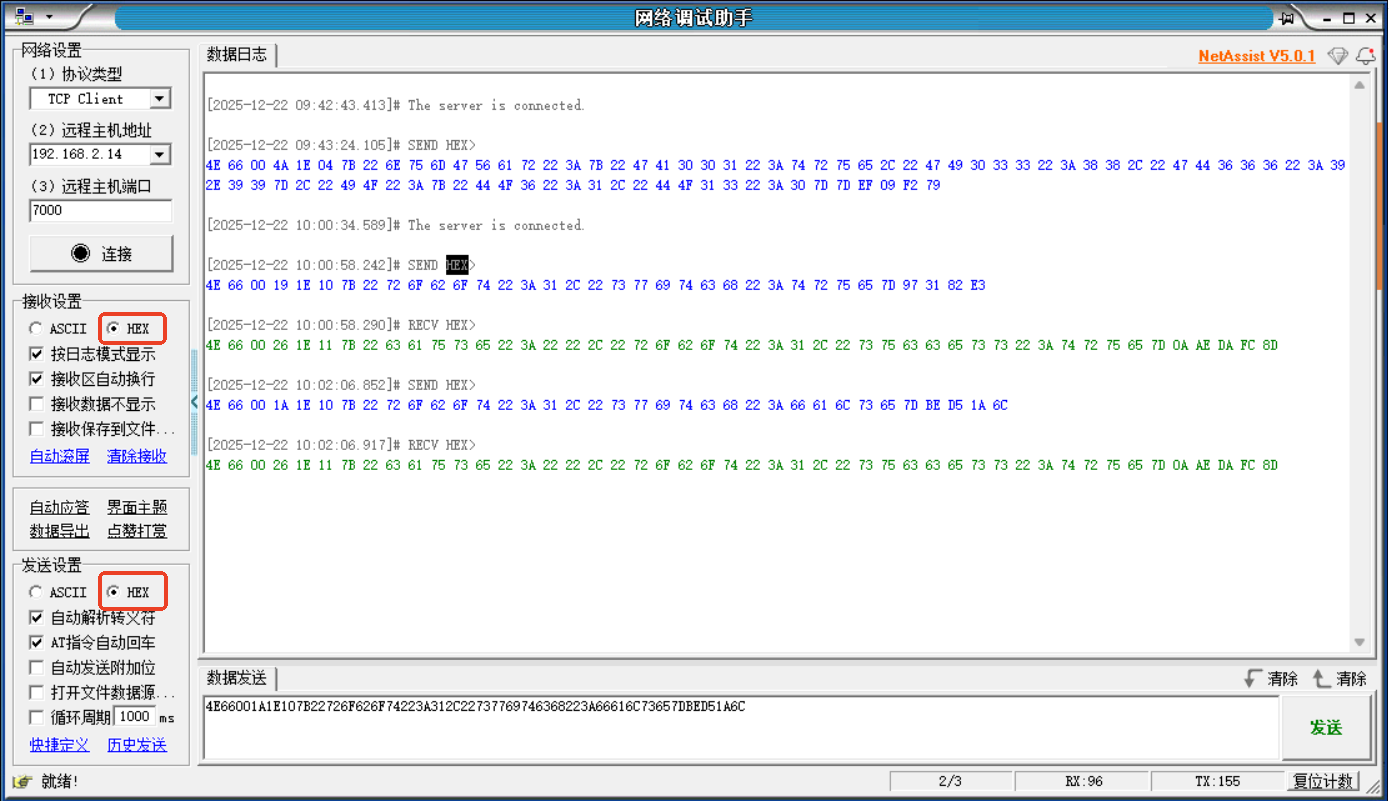
4E 66 00 19 1E 10 ... (truncated for brevity)
Data Reply
4E 66 00 26 1E 11 ... (truncated for brevity)
FAQ
Format Issues
Question: After sending data, no reply is received. How to troubleshoot format issues?
Answer:
- Check if the fixed frame header is 4E 66
- Verify the byte length is accurate and converted to hex, use tools to check
- Verify the command word for the corresponding function is accurate, refer to the port protocol
- Check if the data content symbols and data are in English when using ASCII, use JSON validation tool to check
- Verify the data CRC is accurate, use tools to check
Network Debugging Assistant Issues
Question: After sending data using the network debugging assistant, no reply is received. How to resolve?
Answer:
- Ensure both sending and receiving are in HEX format
- Check if the network connection is normal
- Confirm the controller IP address and port number (7000) are correct
- Check if the network debugging assistant format settings are accurate
Related Resources
Reference Documents
Related Tools
- ASCII String to Hex Online Conversion Tool - Coding.Tools
- Bit and Byte Length Calculator - Free Data Size Tool | Whiz.tools
- CRC (Cyclic Redundancy Check) Online Calculator_ip33.com
- JSON Format Validator - JSON Online Tool
Version History
| Version | Date | Changes | Author |
|---|---|---|---|
| 1.0.0 | 2026-04-13 | Initial version | iNexBot |