Axis Control User Guide
| Instruction Type | Foreground | Global Background | Local Background |
|---|---|---|---|
| Axis Point-to-Point | Supported | Supported | Supported |
| Axis Constant Speed | Supported | Supported | Supported |
| Axis Constant Torque | Supported | Supported | Supported |
| Axis Stop | Supported | Supported | Supported |
| Cancel Independent Control | Supported | Supported | Supported |
Precautions:
Before using the axis control function, please note the following:
Before use, check if the servo supports PP, CSP, PV, CSV, PT, and other modes. Although some servo manuals indicate support for these modes, actual support may not exist. For example, most servos from Qingeng Dechuang and Jiutong drive-control integrated products.
If the control words for these modes used on-site are non-standard, re-adaptation is required. Please refer to the corresponding servo manual for details.
If some servos have true control words but use inconsistent units, re-adaptation is required. Please refer to the corresponding servo manual for details.
Configure eni parameters according to different servo PP, CSP, PV, CSV, PT mode descriptions. Please refer to the corresponding servo manual for details.
After confirming the above configuration precautions, if normal motion is still not possible, please confirm whether the servo parameters are correct.
Axis control motion cannot be test-run.
Precautions:
When the main program continuously calls global or local programs, a delay needs to be added in between. When multi-threading is enabled, without adding a delay, the axis motion in that thread may not be enabled, causing failure to run (the phenomenon of external axes on first run after canceling independent control).
When the main program calls a local program, if the local program does not set the axis stop instruction, it cannot stop with the end of the local program. It is recommended to use according to the normal axis instruction usage flow.
Some operations in pop-up windows and calibration interfaces, such as jogging and homing, as well as some continuous running operations, will not be stopped by the corresponding axis stop. They can only be stopped through the stop method in the corresponding interface.
Independent Axis Parameters
Independent Axis Parameter Settings
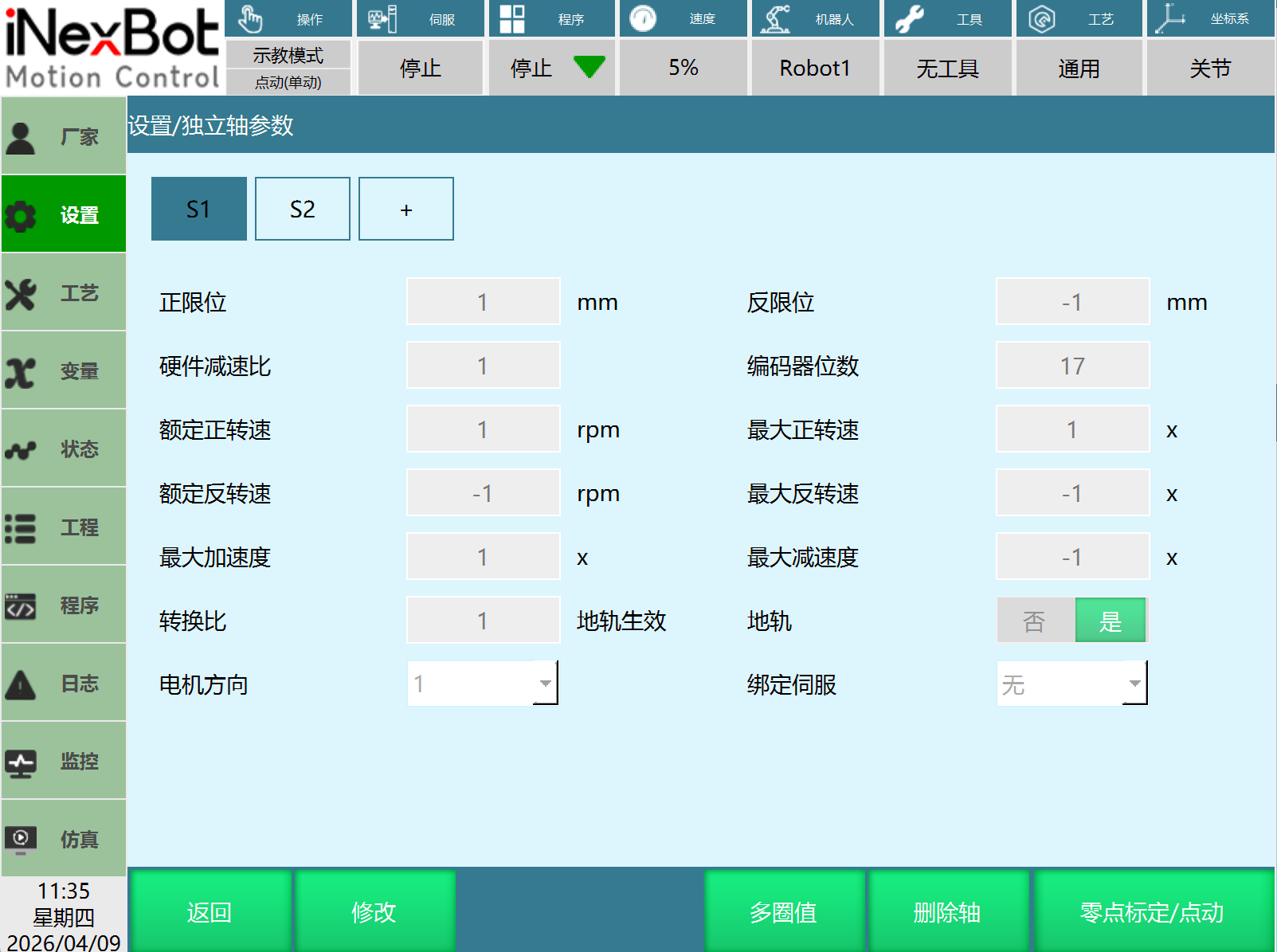
Open Settings - Independent Axis Parameters page, set independent axis joint parameters:
Click the "+" button to create a new independent axis page and configure joint parameters (up to 10 independent axes can be created).
Click the "Modify" button to modify independent axis joint parameters.
Click "Delete Axis" to delete the currently selected independent axis.
Modify the motor direction to change the independent axis motion direction.
Select ground rail based on actual usage. You need to fill in the angle-distance conversion ratio, and the position unit in instructions changes from ° to mm.
Homing/Jogging
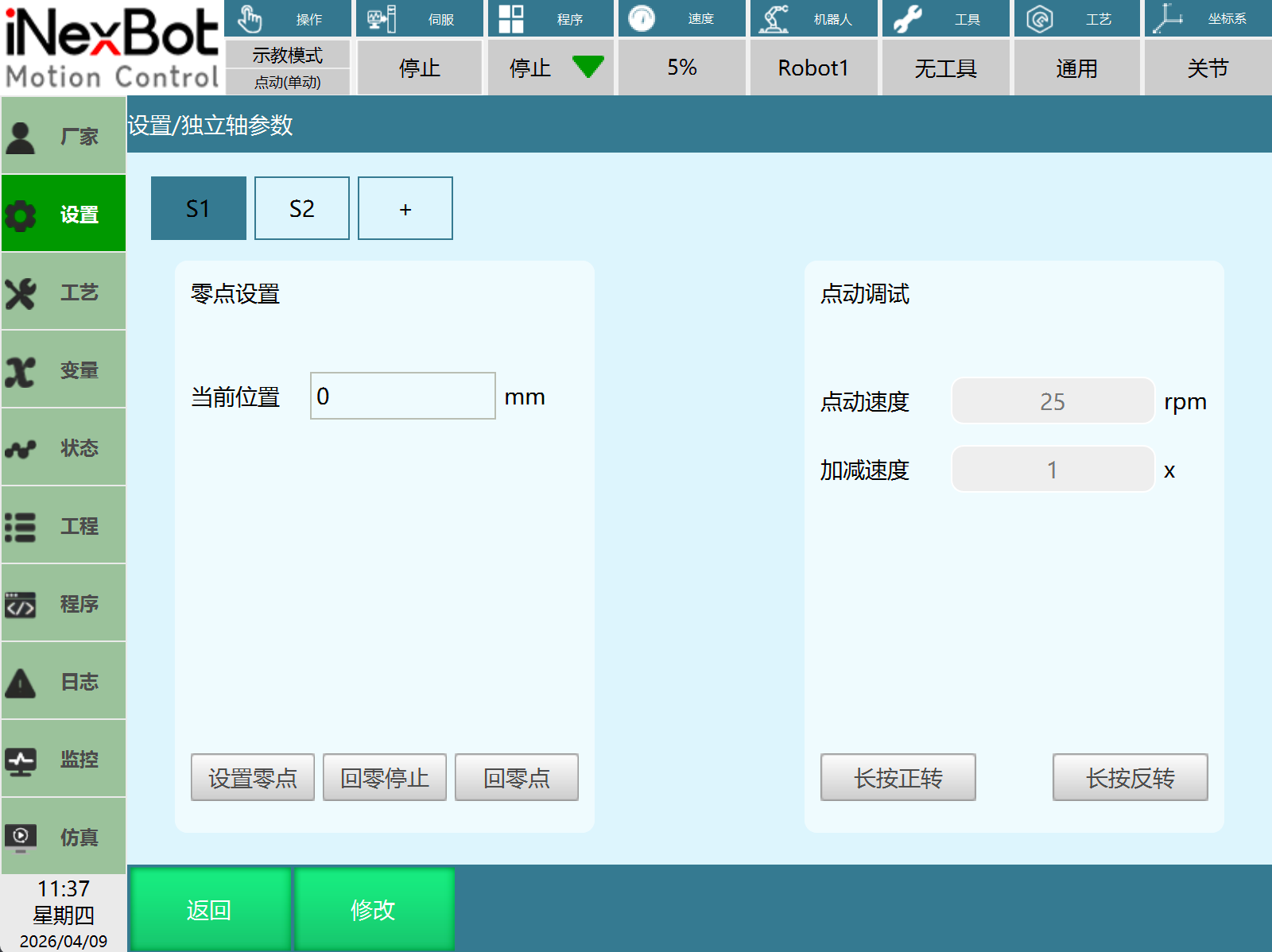
Open Settings - Independent Axis Parameters - Homing/Jogging:
Current Position: Displays the current position of the independent axis. The unit is displayed based on the actual state. If ground rail is selected in the independent axis parameters, the current position unit changes from ° to mm.
Home: Click Home to move the current independent axis to the home position. Requires PDO configuration for normal use.
Home Stop: Click Home Stop to stop the currently moving axis. Requires PDO configuration for normal use.
Set Home: Click Set Home to set the current independent axis position as the home position.
Jog Speed: Enter the speed used during jogging, range [0.001,10000].
Acceleration/Deceleration: Enter the acceleration/deceleration multiplier used during jogging, range [1,5].
Long Press Forward: After clicking Long Press Forward, the current independent axis's mapped axis moves in the positive direction.
Long Press Reverse: After clicking Long Press Reverse, the current independent axis's mapped axis moves in the negative direction.
Modify: After clicking Modify, jog speed and acceleration/deceleration can be filled in normally. These two parameters are not saved and need to be reset after restart.
Home: Uses CSP mode, CSP: 607A.
Jog Debug: Uses CSV mode, CSV: 60FF.
Multi-turn Value
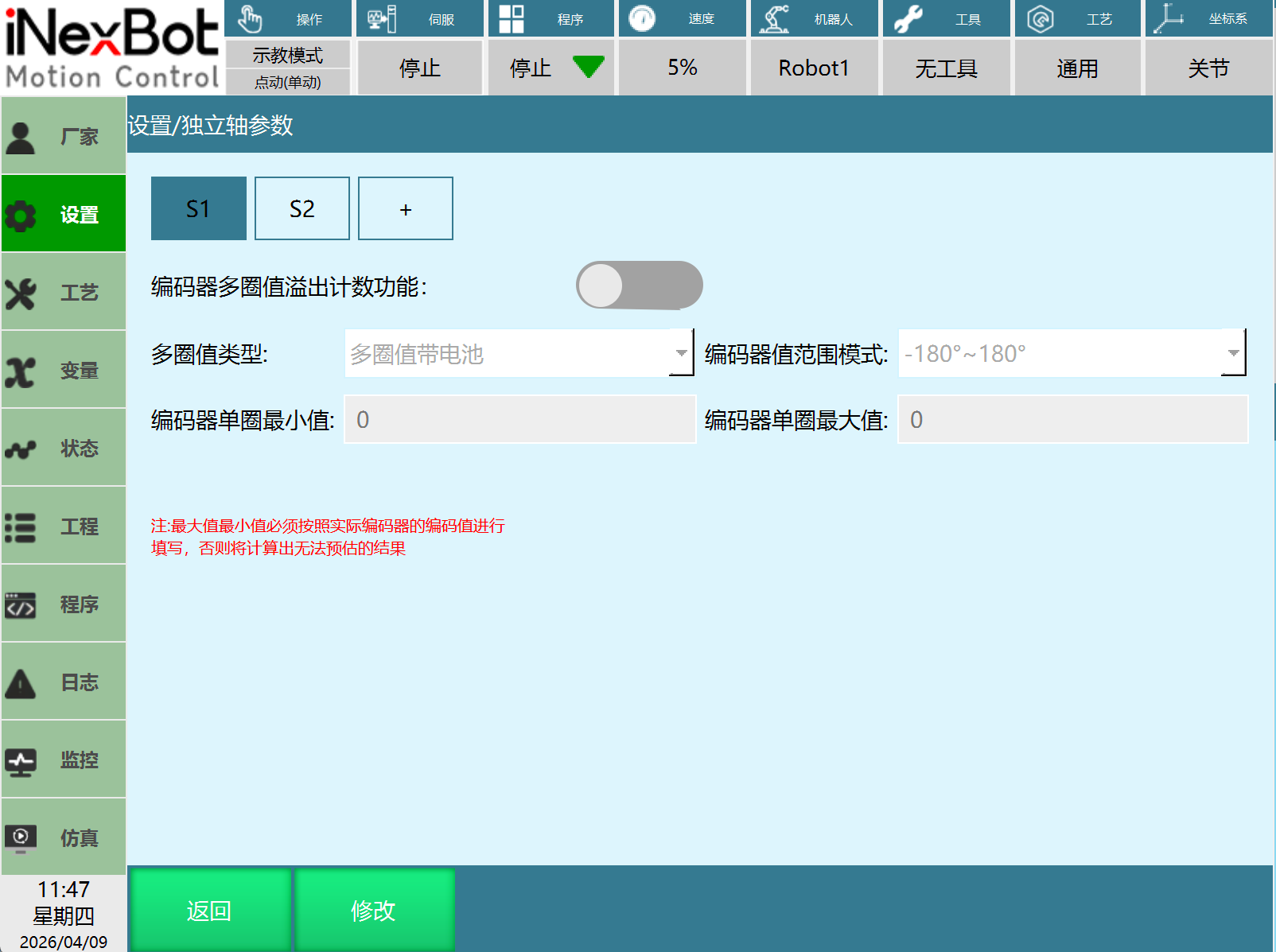
Open Settings - Independent Axis Parameters - Multi-turn Value:
Function Introduction: Encoder multi-turn value overflow counting function: This function is used to eliminate the impact caused by jumps between encoder maximum/minimum values.
For example: The encoder multi-turn value range is [-2147483648,2147483647], and the current encoder multi-turn value position is 2147483647. Rotating one more unit in the positive direction will result in -2147483648. If the system does not know the encoder multi-turn value range, it will think the robot suddenly jumped and will not know that only one unit was actually rotated. At this point, a runaway phenomenon is likely to occur.
 This parameter must be filled in. Not filling it may cause the following problems: This parameter must be filled in. Not filling it may cause the following problems:1. Significant point jumps, e.g., suddenly changing from 4 degrees to 40 degrees. 2. Runaway. |
|---|
Encoder Multi-turn Value Overflow Counting Function: When enabled, it can eliminate the impact caused by jumps between encoder maximum and minimum values.
Multi-turn Value Type: Select the encoder type. Need to confirm normal selection.
- Multi-turn with battery
- Multi-turn without battery
- Single-turn
Encoder Value Range Mode: Select the encoder range type. Need to confirm normal selection.
- -180° to 180°
- 0° to 360°
Encoder Single-turn Minimum Value: Displays the corresponding encoder single-turn minimum value based on multi-turn value type and encoder value range mode.
Encoder Single-turn Maximum Value: Displays the corresponding encoder single-turn maximum value based on multi-turn value type and encoder value range mode.
Axis Control Instruction Details
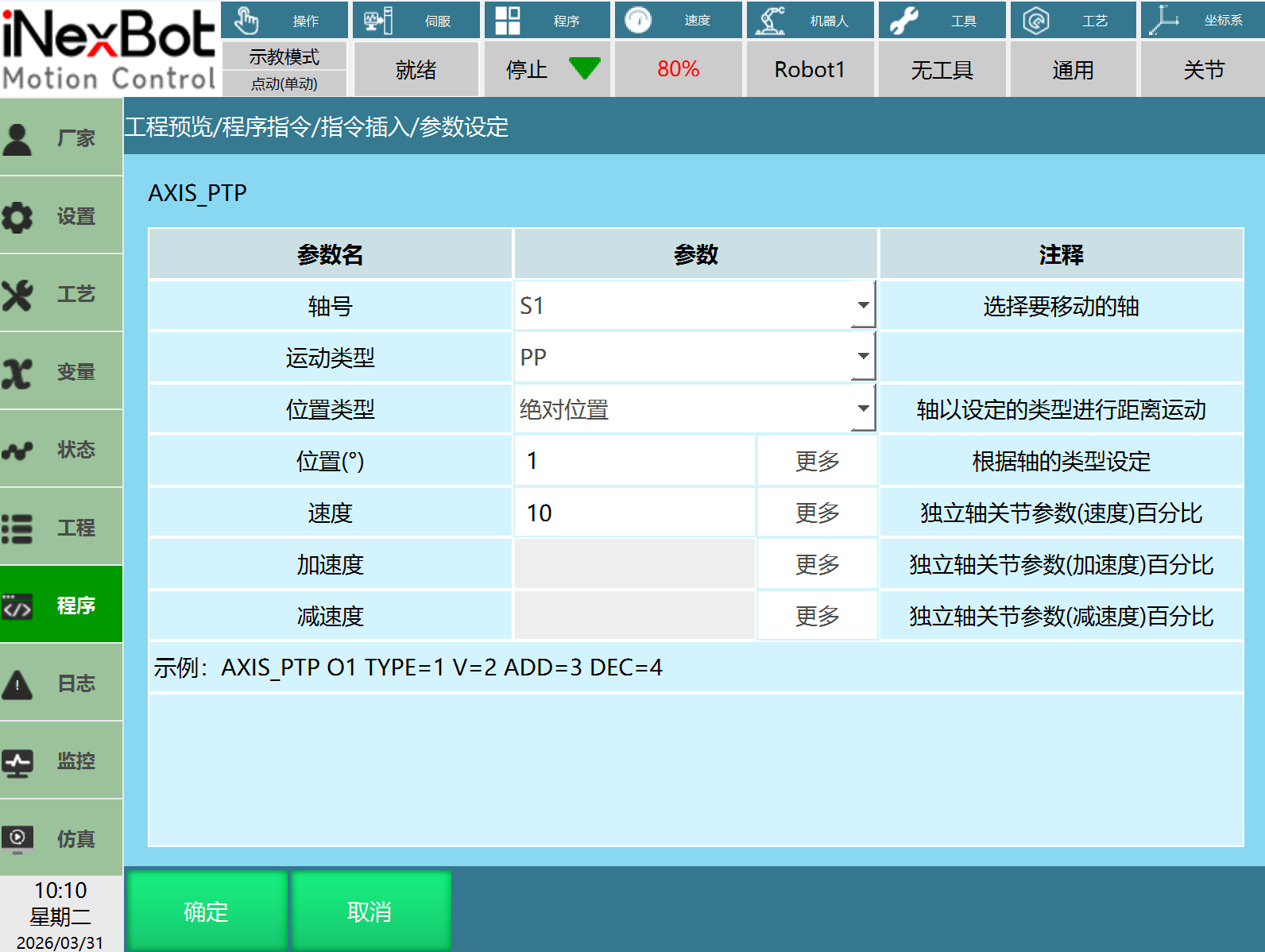
Axis Point-to-Point (AXIS_PTP)
Supported Types: External axis (O1, O2), Independent axis (S1, S2)
Motion Type: PP, CSP
Profile Position Mode (PP): The controller sends target position, speed, and acceleration/deceleration to the driver. The driver internally completes position control, speed control, and torque control.
Cyclic Synchronous Position Mode (CSP): The controller completes position planning and periodically sends the planned target position to the driver. The driver internally completes position control, speed control, and torque control.
Position Type: Absolute position, Increment
- Absolute position: Move to the set position.
- Increment: Move by a certain increment from the current position.
Position: Position is set as distance or angle. Positive/negative represents the motion direction, determined by the axis type, in mm or °.
Speed: Speed and acceleration/deceleration set the axis's movement speed. The input value range is 1-100% of the value set in joint parameters (speed, acceleration/deceleration). Acceleration/deceleration defaults to not used and can be selected as manual input with 8 numeric types including integer and floating-point.
Blocking Characteristics: This instruction is blocking motion. The next instruction will only run after the motion is complete.
PDO Required for Corresponding Mode (using Anchi as example):
- PP: 6081 6083 6084
- CSP: 607A
Usage Example:
NOP
AXIS_PTP AxisNum = 1 RunType = 1 PositionType = 1 PositionValue = 1000 V = 30 AccSpeed = [-] DecSpeed = [-]
AXIS_STOP 1
AXIS_PTP AxisNum = 1 RunType = 1 PositionType = 1 PositionValue = -1200 V = 30 AccSpeed = 50 DecSpeed = 30
AXIS_STOP 1
END
Axis Constant Speed (CONSTANTAXIS_VELOCITY)
Supported Types: External axis (O1, O2), Independent axis (S1, S2)
Motion Type: PV, CSV
Profile Velocity Mode (PV): The controller sends target speed and acceleration/deceleration to the driver. Speed and torque adjustment are performed internally by the driver.
Cyclic Synchronous Velocity Mode (CSV): The controller completes target speed planning and periodically sends it to the driver. Speed and torque adjustment are performed internally by the driver.
Speed: Speed is the axis moving at the set speed (motor rotation speed). Positive/negative represents the motion direction, in rpm or mm/min.
Acceleration/Deceleration: Acceleration/deceleration is calculated based on speed, with units of speed×multiplier/min². The numeric type defaults to not used. When manual input is selected, 8 numeric types including integer and floating-point are available.
Blocking Characteristics: This instruction is non-blocking motion. During motion, the next instruction can be executed until the next instruction runs.
PDO Required for Corresponding Mode (using Anchi as example):
- PV: 60FF 6083 6084
- CSV: 60FF
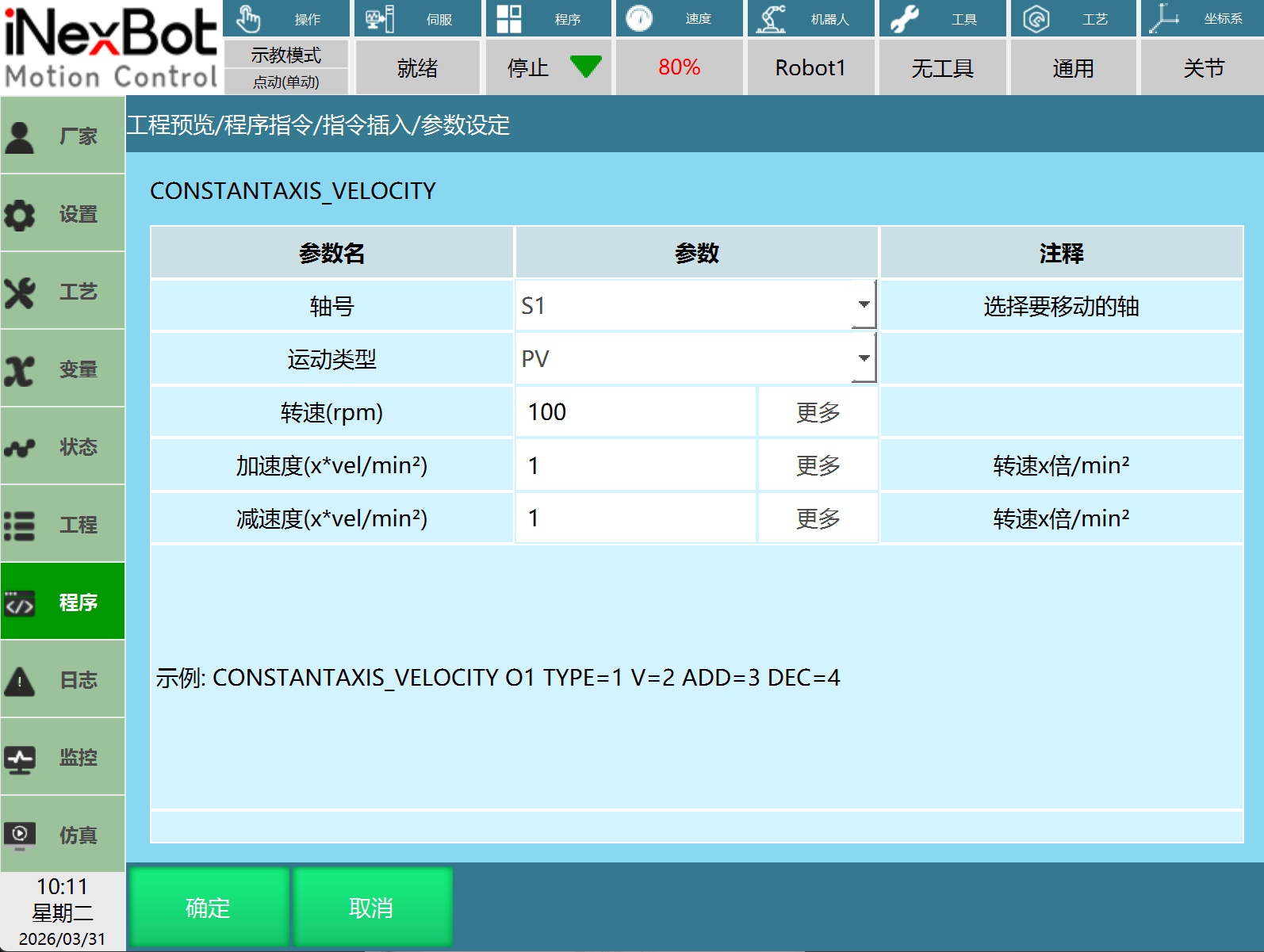
Usage Example:
NOP
CONSTANTAXIS_VELOCITY AxisNum = 1 RunType = 2 V = -2900 AccSpeed = 10 DecSpeed = 10
TIMER T = 3
AXIS_STOP 1
CONSTANTAXIS_VELOCITY AxisNum = 1 RunType = 2 V = 1000 AccSpeed = 10 DecSpeed = 10
TIMER T = 3
AXIS_STOP 1
END
Axis Constant Torque (CONSTANTAXIS_TORQUE)
Supported Types: External axis (O1, O2), Independent axis (S1, S2)
Motion Type: PT
Profile Torque Mode (PT): The controller sends target torque and torque ramp value to the driver. Torque adjustment is executed internally by the driver.
Torque: The torque value is set as a percentage of the axis's rated torque. Positive/negative represents the motion direction.
Torque Ramp: Torque ramp is the acceleration/deceleration of torque, with units of %0.1/s. When the torque ramp is small, startup will be slower.
Blocking Characteristics: This instruction is non-blocking motion. During motion, the next instruction can be executed until the next instruction runs.
PDO Required for Corresponding Mode (using Anchi as example):
- PT: 6071
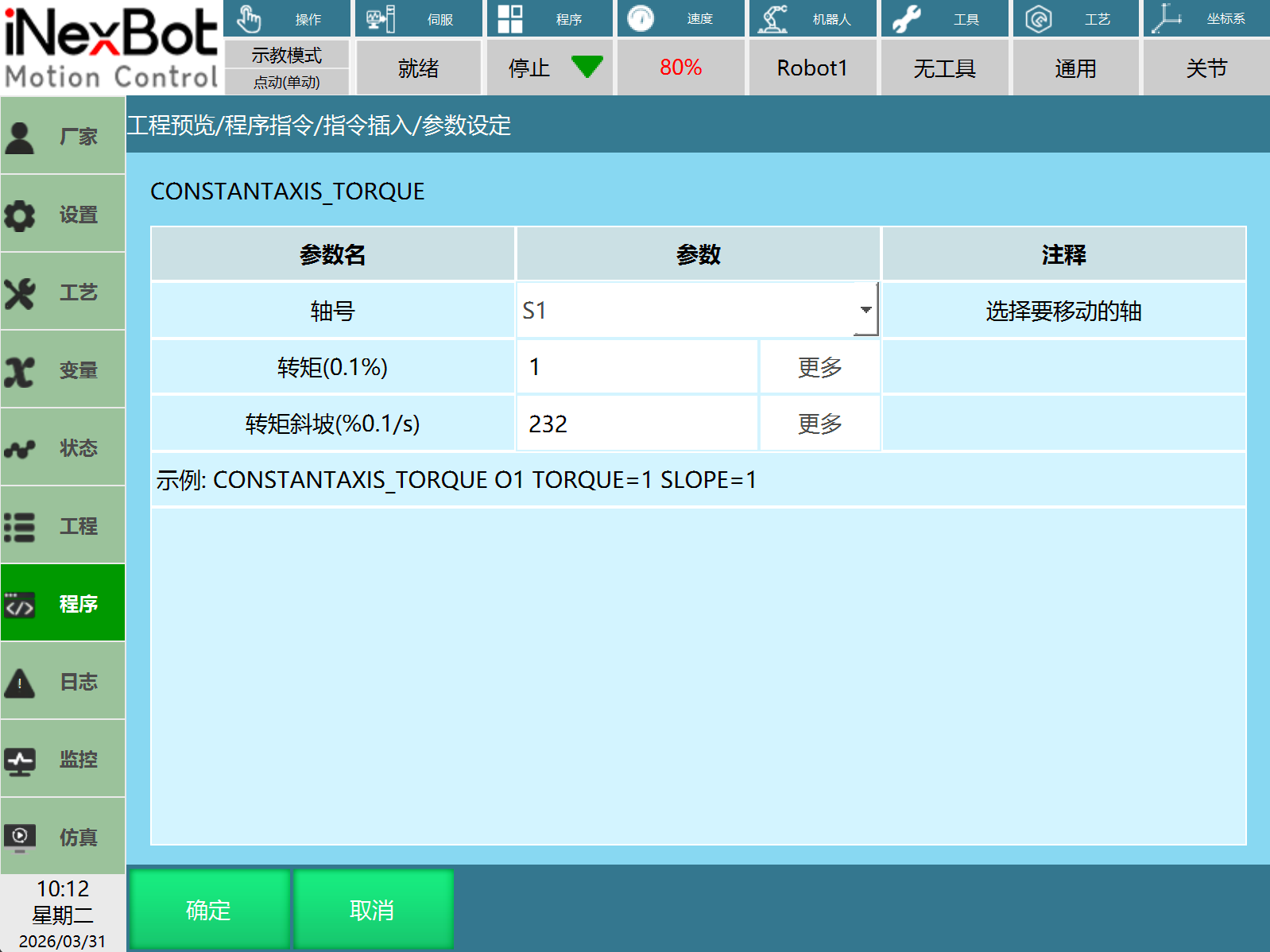
Usage Example:
NOP
CONSTANTAXIS_TORQUE 2 1000 232
TIMER T = 3
AXIS_STOP 2
CONSTANTAXIS_TORQUE 2 -1000 232
TIMER T = 3
AXIS_STOP 2
END
Axis Stop (AXIS_STOP)
Supported Types: External axis (O1, O2), Independent axis (S1, S2)
Axis Number: Select the corresponding axis number to stop. Can stop a running axis.
Precautions:
- After running an axis control motion instruction, an axis stop instruction needs to be added. After running the axis stop instruction, other axis control instructions can be run.
Possible Issues:
- Not adding an axis stop instruction after an axis control motion instruction may cause the next axis control instruction to have incorrect motion direction or speed.
- Not adding an axis stop instruction after an axis control motion instruction may prevent the independent axis from stopping normally.
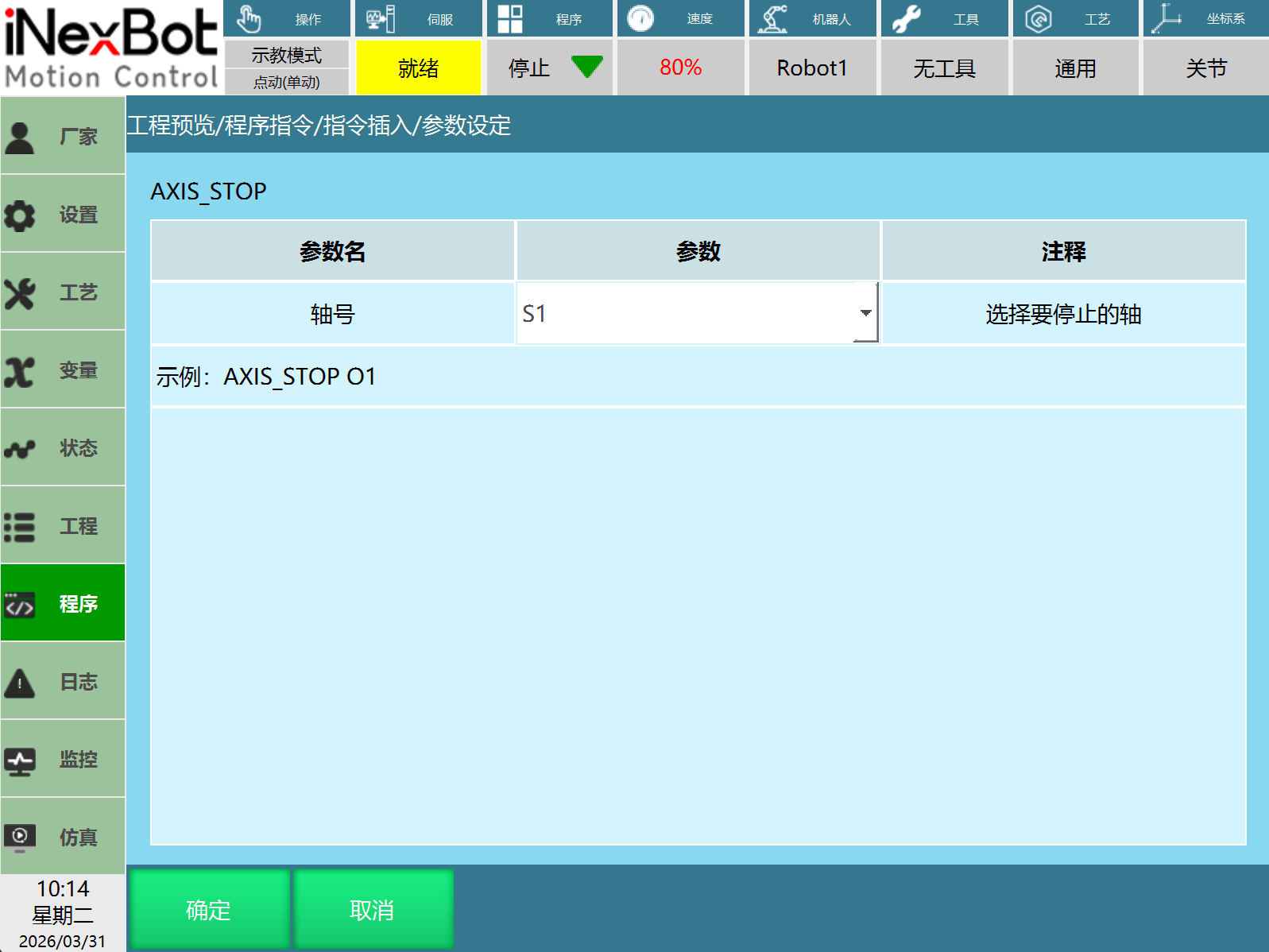
Usage Example:
NOP
CONSTANTAXIS_TORQUE 2 1000 232
TIMER T = 3
AXIS_STOP 2
END
NOP
AXIS_PTP AxisNum = 1 RunType = 1 PositionType = 1 PositionValue = 1000 V = 30 AccSpeed = [-] DecSpeed = [-]
AXIS_STOP 1
ENDCancel Independent Control (CancelIndependentControl)
Supported Types: External axis (O1, O2)
Axis Number: Select the axis number to cancel. Can rebind an already unbound axis. External axes can be used.
Precautions:
- To rebind an unbound axis, run the Cancel Independent Control instruction.
- During axis motion, executing Cancel Independent Control cannot rebind the unbound axis. Need to ensure the unbound axis is not moving.
Possible Issues:
- An unbound external axis cannot be jogged. It needs to be rebound before jogging operations can be performed.
- Without running the Cancel Independent Control instruction to rebind the unbound axis, joint parameters and servo mapping cannot be modified.
- The Cancel Independent Control instruction can rebind an unbound axis. If there are still motion control instructions below the Cancel Independent Control instruction, it will prompt a servo state inconsistency error and job file startup failure. During job file runtime, motion control basic instructions will perform servo state detection, while axis control motion instructions do not detect servo state.
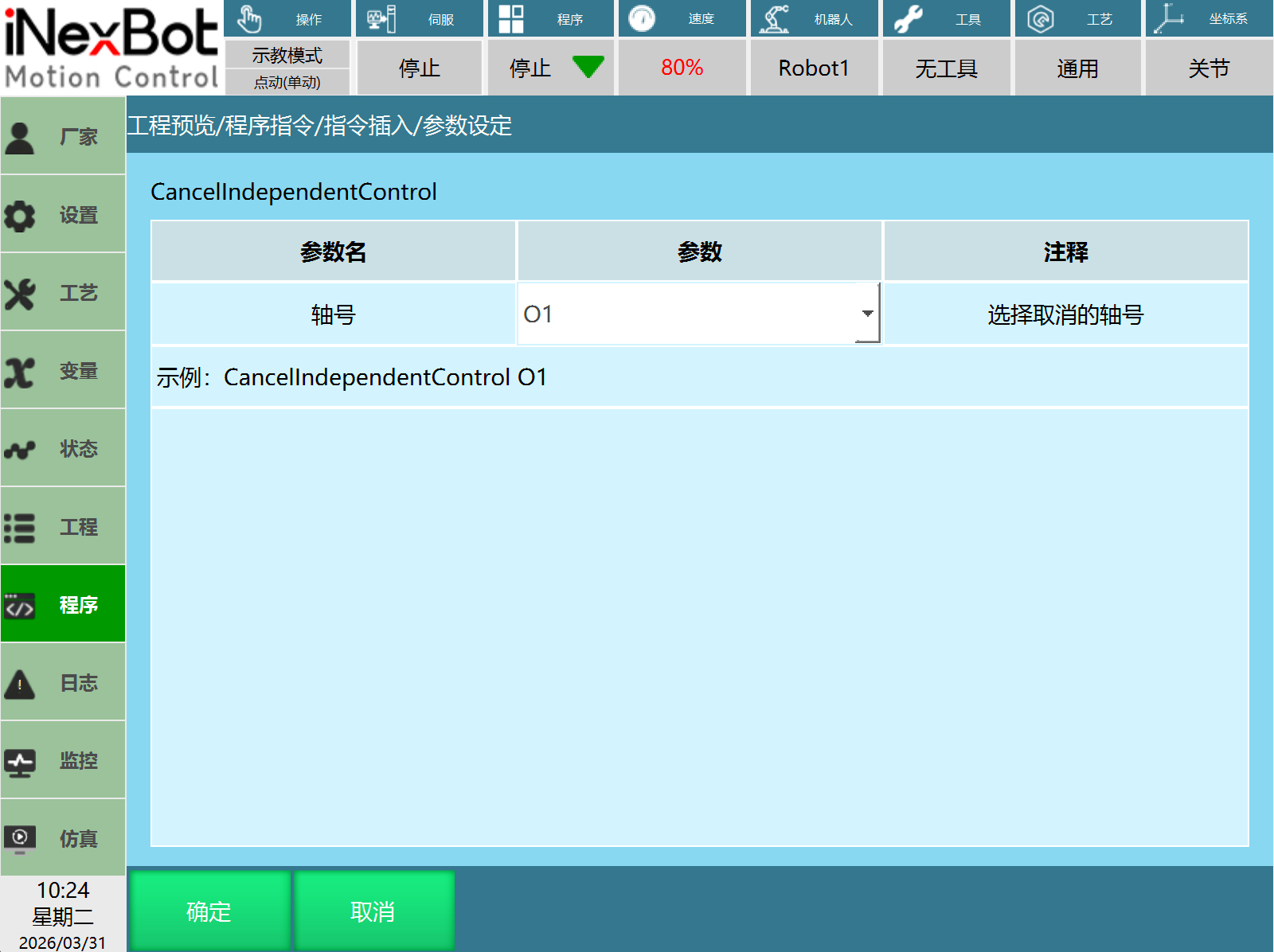
Usage Example:
NOP
CONSTANTAXIS_VELOCITY AxisNum = 1 RunType = 3 V = -50 AccSpeed = 10 DecSpeed = 10
TIMER T = 3
AXIS_STOP 1
CANCEL_INDEPENDENT_CONTROL 1
END
Axis Independent Control Window
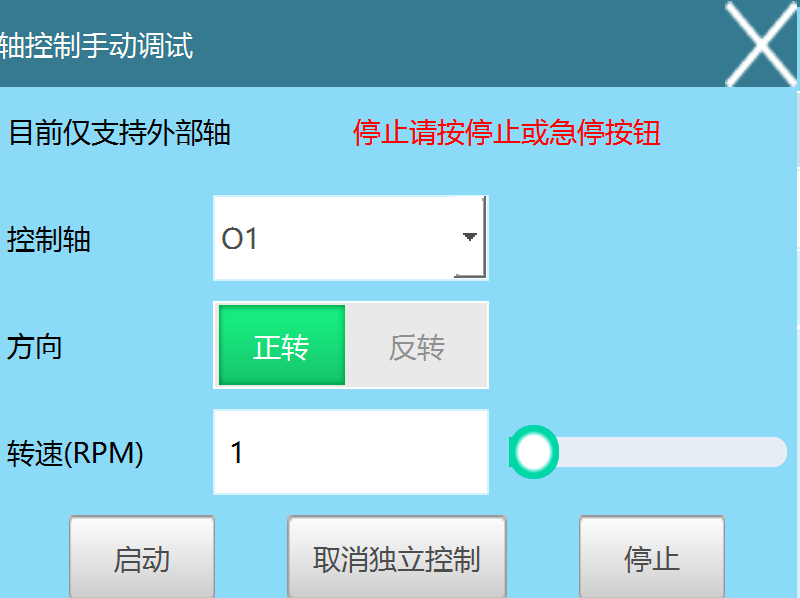
Open Settings - Operation Parameters, turn on Show Axis Control Interface. The "Axis Independent Control" will appear in the process pop-up.
The axis independent control window supports mode: PV.
Control Axis: Select the axis to move/stop. Currently supports external axes.
Direction: Direction during motion.
Speed: Set the speed during motion.
Start: Click Start to run axis motion (axis constant speed PV).
Stop: Click Stop to stop the running axis (axis stop).
Cancel Independent Control: Rebind the selected control axis (cancel independent control).
AI Retrieval Q&A (Q&A for Retrieval)
Q: How to use an independent axis? What preparation is needed before use?
A: Based on how many axes are needed, create that many independent axes. Fill in the mapped drive encoder bit count, reduction ratio, rated forward speed, and other parameters based on configuration. Confirm whether the driver supports the desired mode. Configure PDO based on the driver manual.
Q: After configuring PDO, using/jogging has no response?
A: Confirm the configured PDO is correct. Confirm the set reduction ratio, encoder bit count, rated speed, and other key parameters are normal. Confirm if it's because the axis motion is too slow and not visibly obvious.
Q: Axis constant speed motion is too slow?
A: Export the configuration via USB drive. Open the IndependentControlAxisConfig.json file and modify the pvAndPpModeMaxVel field. The specific value should be filled based on the encoder bit count, with a maximum of 2^32-1.
Q: What types of axes does axis control support?
A: Supports external axes (O1, O2) and independent axes (S1, S2).
Q: What motion modes does axis control support?
A: Supports PP (Profile Position Mode), CSP (Cyclic Synchronous Position Mode), PV (Profile Velocity Mode), CSV (Cyclic Synchronous Velocity Mode), PT (Profile Torque Mode).
Q: What is the difference between PP mode and CSP mode?
A: PP mode is where the controller sends target position, speed, and acceleration/deceleration to the driver, and the driver internally completes position control, speed control, and torque control. CSP mode is where the controller completes position planning and periodically sends the planned target position to the driver, and the driver internally completes position control, speed control, and torque control.
Q: What position types does axis point-to-point motion have?
A: There are two types: absolute position and increment. Absolute position is moving to the set position. Increment is moving by a certain increment from the current position.
Q: What is the blocking characteristic of the axis constant speed instruction?
A: The axis constant speed instruction is non-blocking motion. During motion, the next instruction can be executed until the axis stop instruction runs.
Q: An unbound external axis cannot be jogged. What should be done?
A: An unbound external axis cannot be jogged. It needs to be rebound before jogging operations can be performed. Run the Cancel Independent Control instruction.
Q: What problems will occur if the Cancel Independent Control instruction is not run to rebind the unbound axis?
A: Without running the Cancel Independent Control instruction to rebind the unbound axis, joint parameters and servo mapping cannot be modified.
Q: Sudden point jump during motion. What is the cause?
A: During independent axis motion, the encoder value is at the critical point of maximum/minimum values, and the multi-turn value function is not enabled, causing point jumps.