System Maintenance Function Tutorial
The system maintenance function performs maintenance and servicing on the robot and controller when they reach the set time.
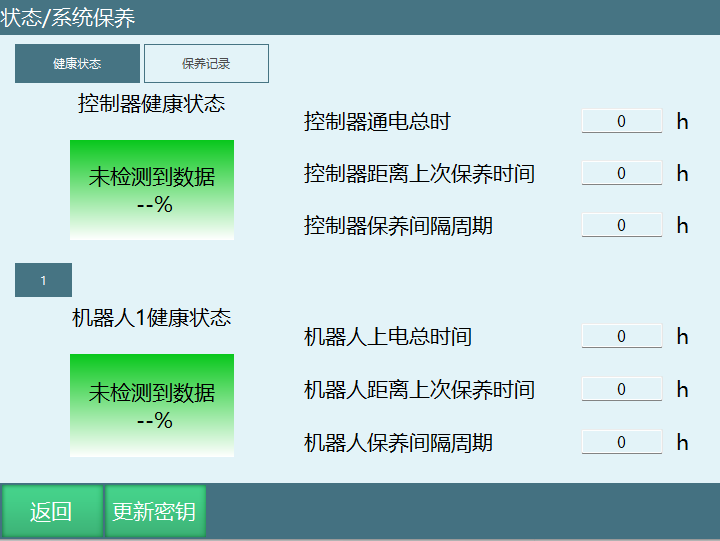
System Maintenance Parameter Description
Controller Power-on Time: This time starts recording from the first maintenance key update. This is the total duration and will not be reset after updating the maintenance key.
Controller Time Since Last Maintenance: This time starts recording from the maintenance key update. This is the interval time between key updates. It will be reset after updating the controller maintenance key.
Controller Maintenance Interval: The interval period of the maintenance key generator. When the default checkbox is selected, it is 8760 hours. Unchecking and entering a value allows a custom time.
Robot Total Power-on Time: This time starts recording from the first maintenance key update. This is the total duration and will not be reset after updating the maintenance key.
Robot Time Since Last Maintenance: This time starts recording from the maintenance key update. This is the interval time between key updates. It will be reset after updating the robot maintenance key.
Robot Maintenance Interval: The interval period of the maintenance key generator. When the default checkbox is selected, it is 8760 hours. Unchecking and entering a value allows a custom time!
System Maintenance Usage Instructions
For first-time use, you need to use the Windows key generator software to generate the maintenance key.
Enter the Controller ID and select the key type and period to generate. *Controller ID: Click the Update Key button to display the Controller ID.
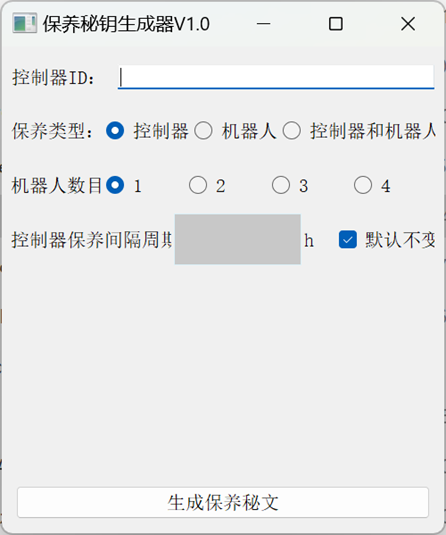
Click Generate Maintenance Ciphertext, and the software will generate a key file named maintenance.
Copy the file to the root directory of the USB drive.
Insert the USB drive, click the Update Key button, and upload the key file.
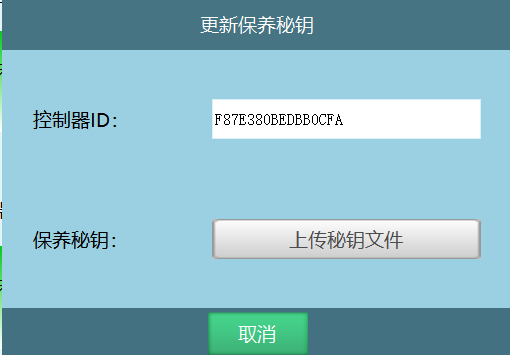
- The teach pendant and controller will automatically restart, and the changes will take effect after boot-up.
Notes
After successful import, the maintenance key file is stored in the controller directory /home/inexbot/robot/ and renamed to maintenanceLicense. If you need to reset the total power-on time, simply delete this file and restart.